Acctual – Accounting Firm Elementor Template Kit

100% Original fileUnmodified copy of the developer's release
DeveloperElementor Template Kits
Up to dateOriginal released Apr 9, 2024 · File last updated Oct 23, 2026
About this product
Acctual Elementor Template Kit 1.1.0 is a set of ready-made Elementor templates for accounting firms. The developer made it for accountants, tax reporting services and finance consultants who want a clean, modern business site and would rather start from finished pages than a blank canvas. Because it runs on free plugins only, a small practice can build a full site, from the home page to the contact form, without buying Elementor Pro.
What's in the Acctual Elementor Template Kit download
Our download is the original Acctual template kit ZIP for version 1.1.0, with the license key already activated. It holds 16 templates: Home, About Us, Services, Pricing, FAQ and Our Team pages, Cases with a Case Details layout, Blog and Single Blog, two contact pages (one built on MetForm), a 404 page, a header, a footer and the Global Kit Styles. The stock photos in the demo are not licensed with the kit, so plan to use your own images.
Good to know
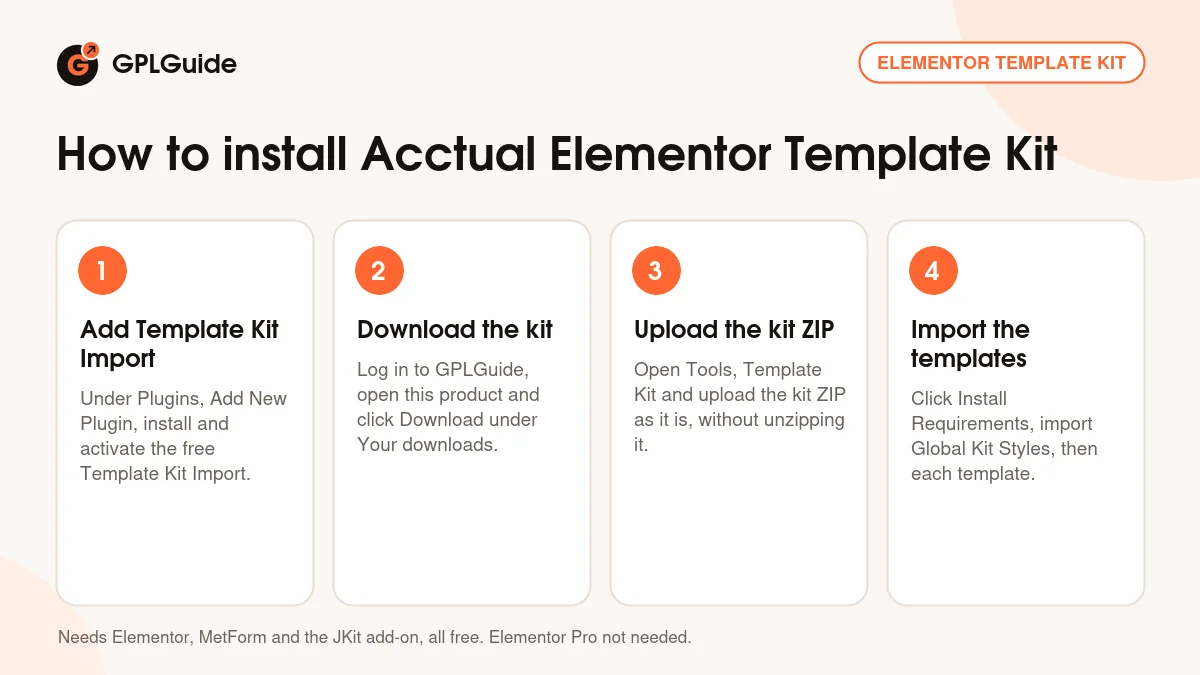
You need three free plugins from the WordPress plugin screen: Elementor, MetForm and the free JKit add-on for Elementor. Install them before you import, or use the Install Requirements button in the import screen, then import Global Kit Styles first so the colours and fonts carry over. Upload the kit ZIP as it is, not unzipped. The contact form takes an extra step: import the MetForm form template, create a new form under MetForm, insert it from My Templates, then pick it in the page's MetForm widget.
How to install Acctual Elementor Template Kit
Features & capabilities
- Runs on free plugins only, so you can skip Elementor Pro
- Services, Pricing and FAQ pages set up for an accounting or tax practice
- Cases page with a Case Details layout for client success stories
- Our Team page to introduce your accountants and advisers
- Blog and single post layouts for tax tips and firm news
- Contact page with a MetForm form, plus a simpler contact layout
- Header, footer and 404 templates to round off the site
- Global Kit Styles that set colours and fonts across every page
Frequently asked questions
Is this the original file?
Yes. Every product on GPLGuide is the developer’s own release, unchanged. The license key comes already activated. If a product does ask for a key, the activation steps appear on its page once you have it.
Is it legal to use a GPL plugin or theme from GPLGuide?
Yes. WordPress plugins and themes are released under the GPL, which lets anyone use, share and change the code. The developer’s support desk and the developer’s own update service are not part of the file; those stay with the developer.
How do I install it?
Log in, open the product page and click Download under Your downloads. For a plugin go to Plugins, Add New Plugin, Upload Plugin, choose the ZIP, then Install Now and Activate. For a theme go to Appearance, Themes, Add New Theme, Upload Theme.
How do updates work?
When a newer version is listed on GPLGuide, download it from the product page and upload it over the installed copy; WordPress offers to replace the old version. Updates are manual.
Can I use it on more than one site?
Yes. The GPL lets you use it on as many of your own sites as you like.
What if the file does not work or a newer version is out?
Tell us on the Request Item page or through Support. We check the file and add the newer version when we have it.