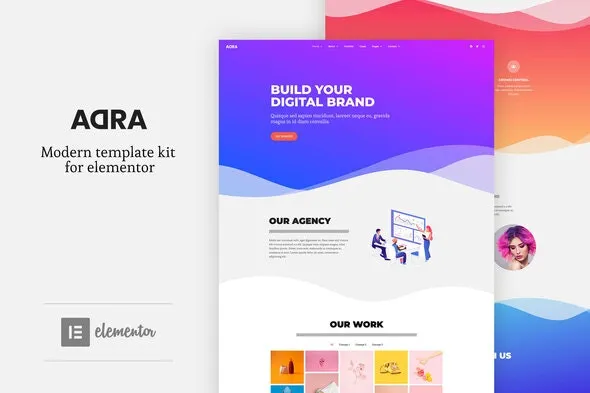
Adra – Modern & Creative Elementor Template Kit
100% Original fileUnmodified copy of the developer's release
DeveloperElementor Template Kits
Up to dateFile last updated Oct 23, 2026
About this product
Adra Elementor Template Kit 3.0.10 is a modern, creative set of Elementor templates with bold typography and vivid colours. The developer made it for professionals, creatives, artisans and agencies who need a business website or a one page portfolio in WordPress. It suits a studio or solo creative who wants past work and services to make a strong first impression, and you can start with the free Elementor pages and add the Pro ones later.
What's in the Adra Elementor Template Kit download
Our download is the original Adra template kit ZIP for version 3.0.10, with the license key already activated. It holds 18 templates: Home, About, Services, Portfolio, Cases, Careers, Pricing and Contact pages, Pro versions of Home, About, Pricing and Contact, a Team page, a 404 page, header and footer blocks, a popup block and the Global Kit Styles. The demo photos are not licensed with the kit, so replace them with your own.
Good to know
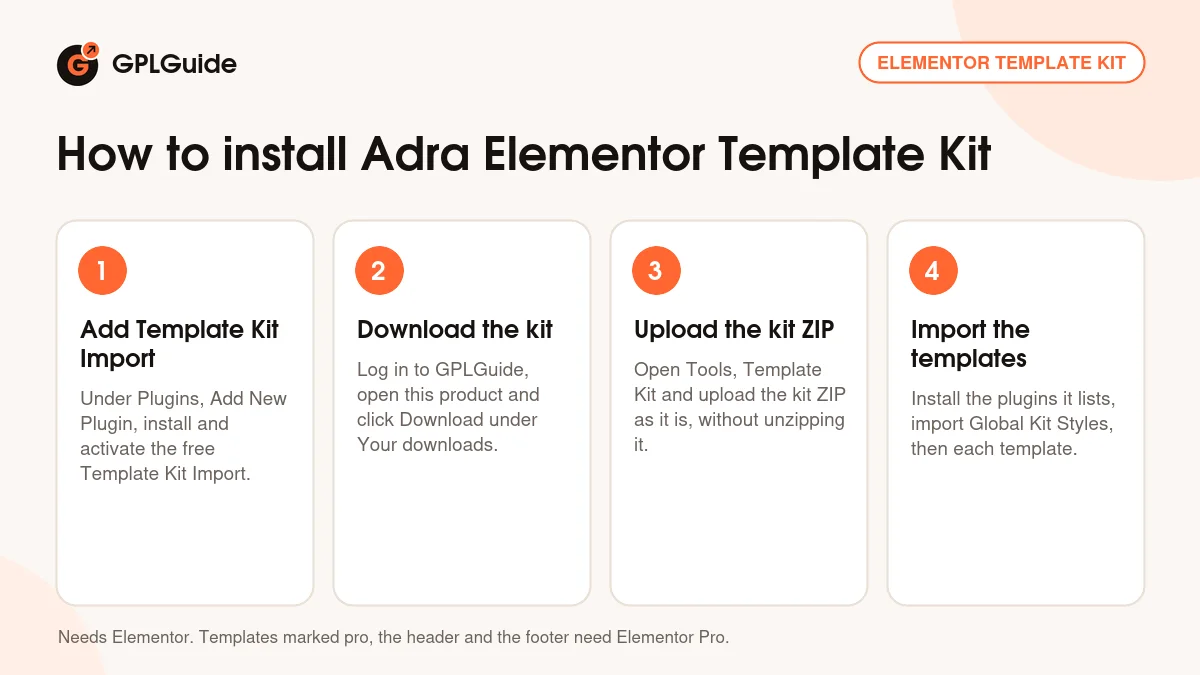
The kit lists Elementor and Elementor Pro. Elementor is free from the WordPress plugin screen, while Elementor Pro is paid. Templates marked pro need Elementor Pro, and that includes Team, 404 and the header, footer and popup blocks; the other pages work in free Elementor. Install the plugins before you import, then import Global Kit Styles first so the colours and fonts carry over. Upload the kit ZIP as it is, not unzipped.
How to install Adra Elementor Template Kit
Features & capabilities
- Bold type and bright colours for creative businesses
- Portfolio and Cases pages to show finished projects
- Services and Pricing pages that explain what you offer and what it costs
- Careers page for studios that are hiring
- Free and Pro versions of the Home, About, Pricing and Contact pages
- Header, footer and popup blocks for Elementor Pro sites
- Global Kit Styles to change colours and fonts on every page at once
- Responsive layouts that adapt to phones, tablets and desktops
Frequently asked questions
Is this the original file?
Yes. Every product on GPLGuide is the developer’s own release, unchanged. The license key comes already activated. If a product does ask for a key, the activation steps appear on its page once you have it.
Is it legal to use a GPL plugin or theme from GPLGuide?
Yes. WordPress plugins and themes are released under the GPL, which lets anyone use, share and change the code. The developer’s support desk and the developer’s own update service are not part of the file; those stay with the developer.
How do I install it?
Log in, open the product page and click Download under Your downloads. For a plugin go to Plugins, Add New Plugin, Upload Plugin, choose the ZIP, then Install Now and Activate. For a theme go to Appearance, Themes, Add New Theme, Upload Theme.
How do updates work?
When a newer version is listed on GPLGuide, download it from the product page and upload it over the installed copy; WordPress offers to replace the old version. Updates are manual.
Can I use it on more than one site?
Yes. The GPL lets you use it on as many of your own sites as you like.
What if the file does not work or a newer version is out?
Tell us on the Request Item page or through Support. We check the file and add the newer version when we have it.