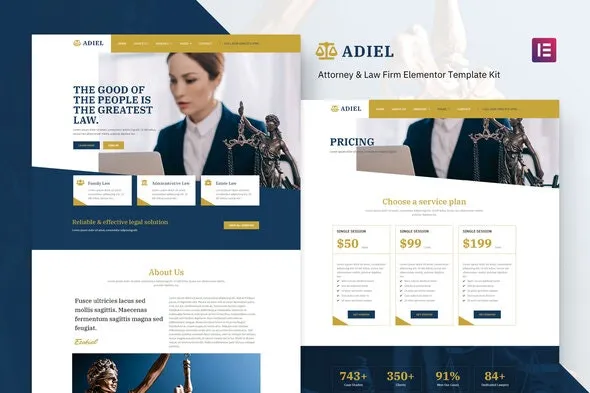
Adiel – Attorney & Law Firm Elementor Template Kit
100% Original fileUnmodified copy of the developer's release
DeveloperElementor Template Kits
Up to dateFile last updated Oct 23, 2026
About this product
Adiel Elementor Template Kit 1.0.0 is a set of Elementor templates for attorneys and law firms. It fits a solo lawyer or a small practice that needs a site with practice areas, attorney profiles, fees and client feedback, and wants to build it in the free Elementor editor instead of starting every page from nothing. All the plugins it relies on are free, so you can put a complete law firm site together without paying for page builder add-ons.
What's in the Adiel Elementor Template Kit download
Our download is the original Adiel template kit ZIP for version 1.0.0, with the license key already activated. It holds 13 templates: Home and About pages, Services with a Single Services layout, Our Team, Pricing, Testimonial, Gallery, FAQ and Contact pages, plus a header, a footer and the Global Kit Styles.
Good to know
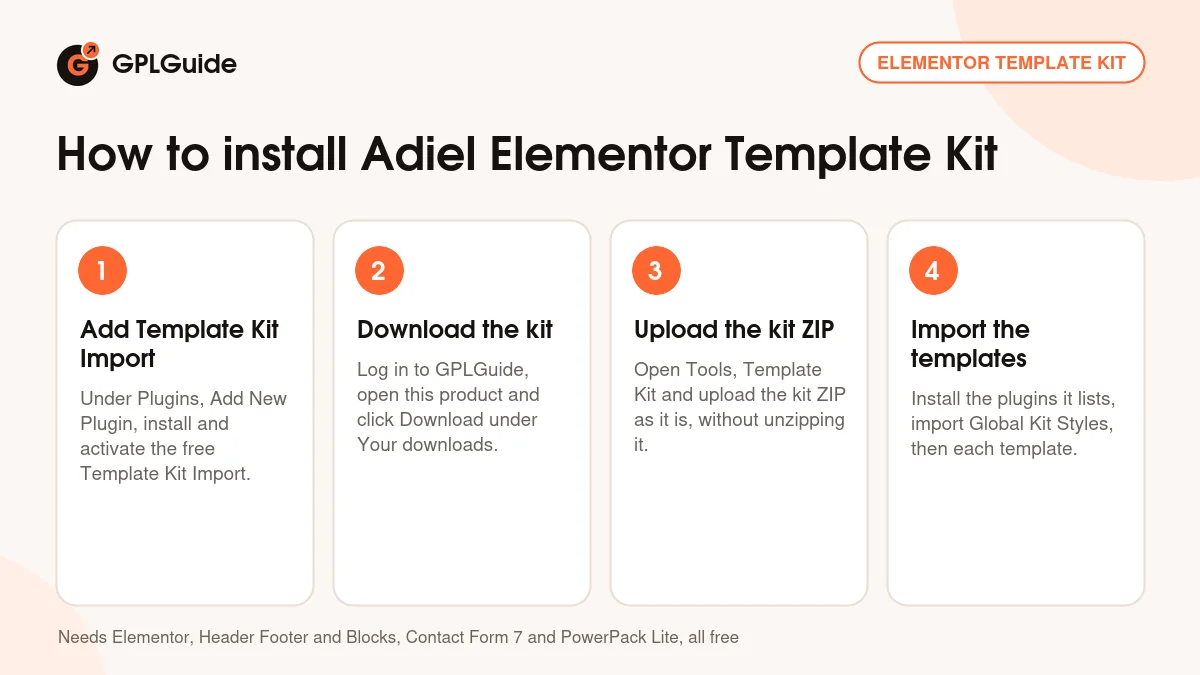
The kit needs four free plugins, all from the WordPress plugin screen: Elementor, Elementor Header, Footer & Blocks, Contact Form 7 and PowerPack Lite for Elementor. Elementor Pro is not on the list. Install them before you import, then import Global Kit Styles first so the colours and fonts carry over. The header and footer are shown through Elementor Header, Footer & Blocks, so assign them there after the import. Upload the kit ZIP as it is, not unzipped.
How to install Adiel Elementor Template Kit
Features & capabilities
- Home and About pages laid out for a law firm
- Services overview plus a Single Services layout for each practice area
- Our Team page for attorney profiles
- Pricing page for consultation fees or retainers
- Testimonial and Gallery pages for client feedback and office photos
- FAQ and Contact pages, with the form handled by Contact Form 7
- Header and footer templates for the free Elementor Header, Footer & Blocks plugin
- Global Kit Styles that set colours and fonts across every page
Frequently asked questions
Is this the original file?
Yes. Every product on GPLGuide is the developer’s own release, unchanged. The license key comes already activated. If a product does ask for a key, the activation steps appear on its page once you have it.
Is it legal to use a GPL plugin or theme from GPLGuide?
Yes. WordPress plugins and themes are released under the GPL, which lets anyone use, share and change the code. The developer’s support desk and the developer’s own update service are not part of the file; those stay with the developer.
How do I install it?
Log in, open the product page and click Download under Your downloads. For a plugin go to Plugins, Add New Plugin, Upload Plugin, choose the ZIP, then Install Now and Activate. For a theme go to Appearance, Themes, Add New Theme, Upload Theme.
How do updates work?
When a newer version is listed on GPLGuide, download it from the product page and upload it over the installed copy; WordPress offers to replace the old version. Updates are manual.
Can I use it on more than one site?
Yes. The GPL lets you use it on as many of your own sites as you like.
What if the file does not work or a newer version is out?
Tell us on the Request Item page or through Support. We check the file and add the newer version when we have it.