AutomateWoo – Marketing Automation for WooCommerce

100% Original fileUnmodified copy of the developer's release
DeveloperAutomateWoo
Up to dateOriginal released Oct 12, 2026 · File last updated Oct 23, 2026
About this product
AutomateWoo is a marketing automation plugin for WooCommerce that sends follow-up emails, abandoned cart reminders, win-back offers and SMS messages based on what your customers actually do in your store. It's for store owners who want those messages to go out on their own once the rules are set, with no cap on how many emails you send. This page is for AutomateWoo 6.9.4, released on October 12, 2026. On GPLGuide you download the original plugin file to install on your own WooCommerce stores.
Good for: WooCommerce store owners, subscription shops and agencies that run stores for clients, who want cart reminders, review requests, loyalty coupons and renewal notices running from inside WordPress.
Requirements: WordPress 7.0 or newer, WooCommerce 11.1 or newer and PHP 7.4 or newer. The developer lists it as tested with WordPress 7.1 and WooCommerce 11.2, and compatible with the cart and checkout blocks and HPOS. No other plugin is required. Subscription, membership, booking, points and wishlist triggers only show up when those plugins are active.
What AutomateWoo does
Everything in AutomateWoo is a workflow: one trigger (the event that starts it), optional rules (conditions that must be true), one or more actions and a timing option. You build them under AutomateWoo, Workflows, Add Workflow. A welcome email for first-time buyers, for example, is the Order Completed trigger, the Order Is Customer's First rule, a Send Email action and a one-hour delay.
The developer lists 65 triggers, 96 rules and more than 80 variables for emails and texts, such as customer.first_name, order.cross_sells and cart.link. Emails go out through the same mail system WordPress and WooCommerce already use. Opens, clicks and conversions are tracked, so you can see which follow-up emails bring in orders.
Don't want a blank screen? Workflows, Browse presets has ready workflows for Abandoned Cart, Credit Card, Cross-sells, Loyalty, New Customer, Reviews and Winback. Create workflow saves a preset as a disabled draft, so nothing is sent until you've edited it and switched it on.
Triggers, rules and timing in AutomateWoo
Triggers. Order triggers cover Order Status Changes, Order Created, Order Paid, Order Completed, Order Refunded and more, several with an Each Line Item version that runs once per product. Customer triggers include Customer Win Back, Customer Total Spend Reaches, Customer Order Count Reaches and Customer Before Saved Card Expiry. There are three Cart Abandoned triggers, plus New Review Posted and New Guest Captured. With WooCommerce Subscriptions active you get 13 more, among them Subscription Before Renewal and Subscription Renewal Payment Failed.
Rules. Rules narrow down who gets a message, with comparisons such as is, is greater than or matches any of. The most useful ones are Customer Order Count, Customer Total Spent, Order Total, Cart Total, Review Rating and Workflow Run Count for Customer. That last one stops the same person getting the same message twice. Version 6.8.2 added billing and shipping address rules.
Timing. Run Immediately sends as soon as the trigger fires. Delayed waits a set number of minutes, hours, days, weeks or months. Scheduled runs at a chosen time on chosen days of the week, with a Minimum Wait. Fixed runs on one date, and Scheduled with a Variable counts from a stored date, such as three days before a subscription's next payment.

Abandoned cart emails and personal coupons
The plugin tracks carts for logged-in customers, for registered customers who return while logged out (session tracking spots them) and for guests. A cart counts as abandoned after 15 minutes without activity by default, which you can change under AutomateWoo, Settings, Carts. Carts are cleared when the customer buys, empties the cart or the cart expires, after 60 days by default. AutomateWoo, Carts lists every tracked cart.
Guests are the tricky part, because you need an email address before you can remind anyone. Pre-submit capture, switched on in AutomateWoo, Settings, saves billing details as the customer types them at checkout and lists them under AutomateWoo, Guests. On the classic checkout that's the full billing form. On the block checkout it's only the billing email and name.
Each abandoned cart workflow runs once per cart. If the cart becomes active again, queued reminders for it are removed, so nobody is chased for something they already bought. The cart.link variable restores the cart, and since 6.9.0 the customer confirms before that link changes their current cart.
Personal coupons. Create a template coupon under Marketing, Coupons, Add Coupon, set its visibility to Private, give it the discount and leave the expiry date empty. In a Send Email action, the customer.generate_coupon variable then makes a unique code for each recipient, with an optional expiry such as seven days. Codes start with aw- by default, and Send Test creates a real one you can try at checkout.
SMS, tracking and consent
SMS runs through Twilio. Under AutomateWoo, Settings, Twilio you enter the number you bought in Twilio and your Twilio API credentials, then send a test message. After that, Send SMS (Twilio) works in any workflow. A free Twilio account can only message verified numbers, so plan on a paid one before you text real customers.
Tracking is set per workflow. Enable tracking adds open and click tracking, and Enable conversion tracking links orders back to the workflow that likely caused them. An order counts when it's placed within the conversion window (14 days by default), its billing email matches the recipient, and the email was opened or an SMS link clicked. As of 6.9.4, each workflow run records up to 100 clicks by default.
For consent you choose opt-in or opt-out mode. In opt-in mode nobody gets marketing email or SMS until they agree, at checkout, at registration, in their account or on the AutomateWoo signup page. Non-transactional emails carry an unsubscribe link. Tick Is transactional on a workflow for receipts and similar messages, and it skips that link.
AutomateWoo workflows you can copy
These use only the triggers, rules and actions above. Change the numbers to fit your store.
- Two-step cart reminder: Cart Abandoned, a Cart Total rule of greater than 30, Send Email with the cart.link button, Delayed 2 hours. Duplicate it, set 12 hours and add a customer.generate_coupon code.
- First order welcome: Order Completed, Order Is Customer's First, Send Email using customer.first_name and order.cross_sells, Delayed 1 hour.
- Win back: Customer Win Back with Minimum days since purchase at 90 and Maximum days since purchase at 180, Send Email with shop.products set to type recent.
- Review thank-you: New Review Posted, a Review Rating rule of greater than 3, Send Email with a generated 10% coupon.
- Automatic VIP: Customer Total Spend Reaches 500, Add Tags to Customer with a VIP tag, and a thank-you email.
- Manual renewal nudge: Subscription Before Renewal, the Subscription Requires Manual Renewal rule and Send SMS (Twilio). Needs WooCommerce Subscriptions.
What's new in AutomateWoo 6.9.4
AutomateWoo 6.9.4 came out on October 12, 2026, and it's mostly about security and tracking. A new click tracking limit setting caps the clicks each workflow run records, 100 by default, and the Email & SMS Tracking report explains how to read click numbers. Tracking links carry a token for the workflow run that sent them. WooCommerce, Status shows the client IP used for rate limits.
Permissions got tighter too. Workflow screens need the Manage WooCommerce capability, only administrators can set the function name of a Custom Function action, and Change Role no longer offers roles with admin-level capabilities. Pre-submit capture got security fixes and skips emails that belong to user accounts. The minimum WooCommerce version is now 11.1.
Before that, 6.9.2 (September 29, 2026) fixed a fatal error in guest capture during REST API or cron requests. 6.9.1 (September 22, 2026) moved unsubscribe links to signed, expiring tokens and confirms new signups by email. 6.9.0 (September 15, 2026) let recipients opt out of tracking. The developer has since released 6.9.4 (October 20, 2026), with tooling changes and one small settings fix.
Good to know before you buy
The plugin leans on cron. A WP-Cron event checks the queue every two minutes, and WP-Cron only runs when someone visits your site, so on a quiet store a delayed email can go out late. The developer recommends a real server cron job every five minutes or less, with DISABLE_WP_CRON set to true in wp-config.php.
Outside services. Emails are sent the way WordPress and WooCommerce send theirs, which by default means your web server. Many hosts cap emails per hour, so the developer suggests a delivery service such as Mailgun, Postmark, SparkPost, Amazon SES or MailPoet, connected through a plugin. SMS needs your own paid Twilio account and number. The Mailchimp, ActiveCampaign, Campaign Monitor and Mad Mimi actions need accounts with those services.
Some parts are sold separately. Birthday emails need the AutomateWoo Birthdays add-on and referral programs need AutomateWoo Refer A Friend, both from the developer and not in this file. Subscription, membership, booking and points triggers need WooCommerce Subscriptions, WooCommerce Memberships, WooCommerce Bookings or WooCommerce Points and Rewards. Manual workflows need WooCommerce Admin enabled and work on orders and subscriptions only.
AutomateWoo from GPLGuide vs the official subscription
From GPLGuide you get the original AutomateWoo 6.9.4 plugin ZIP, with every trigger, rule, action, preset and report in it. The license key is already activated, so the whole plugin is ready as soon as you activate it.
Buying from the developer gets you updates inside WordPress for the length of the plan, their customer support and a 30-day money-back guarantee. The official price is $159 for the 1-year plan or $254.40 for the 2-year plan, and one subscription covers one live site plus a staging site. Support and refunds come only from the developer. Twilio, email delivery and CRM accounts are billed by those companies either way.
How to install AutomateWoo
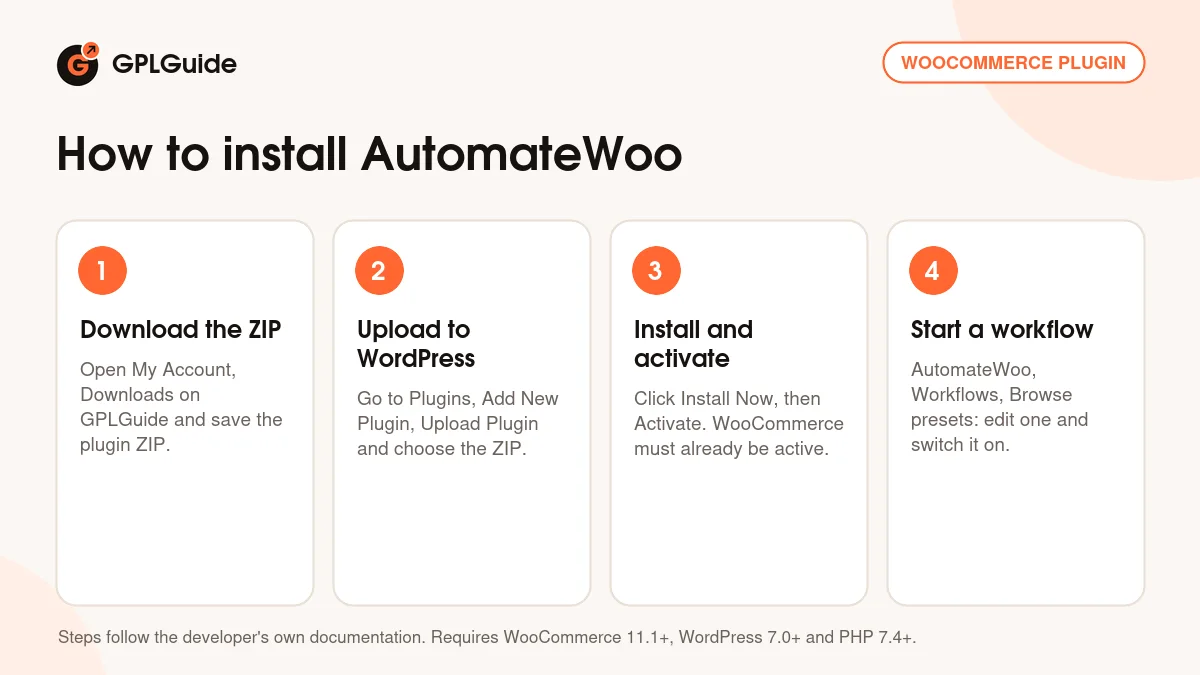
- Sign in to GPLGuide, open My Account, Downloads and save the AutomateWoo ZIP.
- In WordPress go to Plugins, Add New Plugin, Upload Plugin and choose the ZIP.
- Click Install Now, then Activate. WooCommerce 11.1 or newer must already be active.
- Open AutomateWoo, Settings, fill in your sender name and address under Email Sender Options and pick opt-in or opt-out mode.
For a good first setup, open Workflows, Browse presets and create the New Customers: Welcome email preset. Rewrite the text in your own voice, send yourself a test and only then switch it on. Next, turn on pre-submit capture and build the two-step cart reminder above. Leave Twilio for later, once email works.
Keeping it up to date
Updates from GPLGuide are manual. When a new version is listed here, download it from your account and upload it under Plugins, Add New Plugin, Upload Plugin. WordPress offers to replace the installed copy, and your workflows, carts and logs stay in the database. Check the requirements first, because some releases raise the minimum WooCommerce version. If you spot a newer version we haven't added, tell us on the Request Item/Update page.
Questions about AutomateWoo
Do I need an outside email service? No. It sends through the same mail system as WordPress. On a busy store a delivery service such as Postmark is still worth it, because many hosts limit hourly sending.
Can it send text messages? Yes, through Twilio. You need your own Twilio account and number.
Does it work with the block checkout? Yes. It's compatible with the cart and checkout blocks and HPOS, though pre-submit capture there only collects the billing email and name.
Do I need to enter a license key? No. The 6.9.4 file from GPLGuide comes with the license key already activated, so workflows and reports work right after activation.
Are birthday emails and referrals included? No. Those come from the separate AutomateWoo Birthdays and AutomateWoo Refer A Friend add-ons.
Can I run a workflow on old orders? Yes. Create a workflow with Manual instead of a trigger, choose orders or subscriptions, click Run, preview with Find matching items, then queue them.
Will opted-out customers still get order emails? Only from workflows marked Is transactional. Marketing workflows respect the opt-out.
Running a WooCommerce store? Browse more WooCommerce plugins on GPLGuide, or see what a GPLGuide membership includes if you use several premium extensions.
Features & capabilities
- 65 triggers for orders, customers, carts, reviews, guests and subscriptions
- 96 rules such as Customer Total Spent, Order Items and Cart Total
- Delayed, Scheduled, Fixed and variable-based timing on every workflow
- Abandoned cart tracking for customers and guests with pre-submit capture
- A unique coupon per recipient with the customer.generate_coupon variable
- SMS through Twilio plus Mailchimp, ActiveCampaign and MailPoet actions
- Open, click and conversion tracking with a 14-day default window
- Preset workflows, manual workflows and opt-in or opt-out consent modes


