All In One Addons for WPBakery

100% Original fileUnmodified copy of the developer's release
Developersike
Up to dateOriginal released Sep 1, 2026 · File last updated Oct 16, 2026
About this product
All In One Addons for WPBakery Page Builder is a bundle of more than 40 extra content elements for WPBakery Page Builder, made by the developer sike and sold on CodeCanyon. It adds image hotspots, hover effects, galleries, carousels, timelines and page transitions to the builder you already use. This page is for All In One Addons for WPBakery 3.6.8, released on September 1, 2026. On GPLGuide you download the original plugin file to install on your own websites.
Good for: designers, agencies and site owners who build pages with WPBakery Page Builder and want interactive images, galleries, sliders and timelines without buying a separate add-on for each one.
Requirements: WordPress 4.9 up to 7.0, the range the developer lists. WPBakery Page Builder must be installed and active, as its own plugin or bundled in your theme. It is a separate paid plugin and is not included. The developer gives no minimum PHP version, but the changelog notes PHP 8 compatibility from version 3.6.4. A few 3D effects need a modern browser.
What All In One Addons for WPBakery does
The developer, sike, first sold many of these WPBakery addons as separate items. All In One Addons for WPBakery puts them into one plugin. The new elements sit next to the standard ones, and each has its own settings panel. Some work as a container: you add the element first, then add its items one by one, such as cards, slides or hotspots.
The range is wide: image hover effects, boxes that flip or turn like a cube, more than ten galleries and carousels, image comparison, timelines, tabs, a price table, scrolling notices and page transitions. Many elements open a lightbox that can show a YouTube or Vimeo video, an image or a Google Map.
You won't need every element on every site, so the developer lets you switch each add-on on or off in the WPBakery Role Manager. If WPBakery came bundled with your theme, All In One Addons for WPBakery works straight after activation with no code to copy.
Image Hotspot, iHover and the hover elements
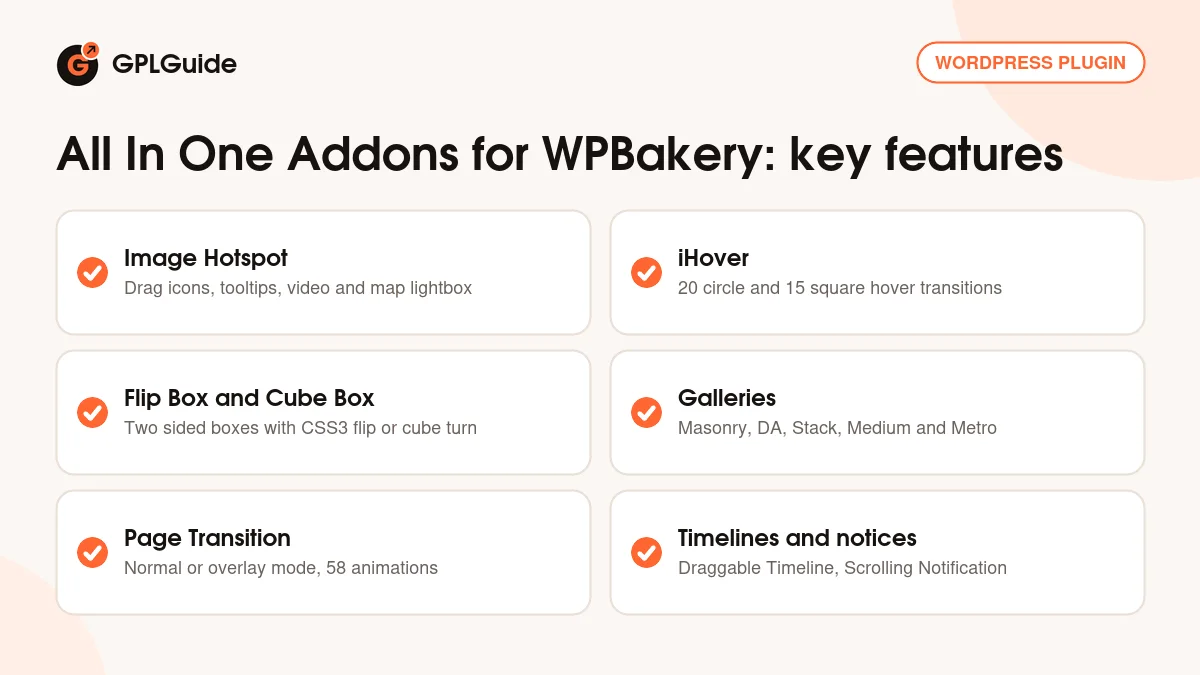
Image Hotspot with Tooltip. You place icons on top of an image and drag each one into position in the WPBakery frontend editor. An icon can be a Font Awesome icon or a number, with its own colors and an optional pulse in six colors. Each hotspot opens a tooltip, and its link can open a YouTube or Vimeo video, an image or a Google Map in a lightbox. Leave the link field blank and the hotspot only shows its tooltip.
Tooltips come in four styles (shadow, light, noir and punk), four animations (grow, slide, fade and fall) and eight arrow positions. You can open every tooltip when the page loads, which suits a labelled diagram. Since version 3.6.8 each hotspot can carry an aria-label for screen readers.
iHover. A hover caption for thumbnails, with 20 transitions for circle images and 15 for square ones. The caption slides in from any side, and the thumbnail opens an image or video lightbox or a custom link.
Flip Box and Cube Box. Both have a front and a back, each with its own background image and a round image or icon avatar. Flip Box turns over with a CSS3 flip, Cube Box with a cube turn, and you can link the whole box. Icons come from the Icon Picker in WPBakery Page Builder 4.4 and newer.
Before & After, Skew Box and Shadow Card. Before & After compares two images with a handle that can show a tooltip, plus an optional auto delay slide. Skew Box sets two images side by side with a text box. Shadow Card tilts an image in 3D on hover.
Galleries, sliders and carousels in the bundle
Metro Carousel and Tile. One element with two modes. As a carousel it can slide, fade, switch or slow down, with navigation in six positions, three navigation styles and 12 active colors. As a tile it uses one of six slide effects.
Masonry, DA and Medium galleries. Masonry Gallery builds a responsive grid with your own thumbnail width, padding and container offset. DA (Direction-Aware) Gallery adds a 3D hover effect and captions with a title and description. Medium Gallery takes a string of numbers that sets how many images go in each row, and can show ribbon labels.
Zoom or Magnify. Shows a large image with a zoom control bar on any side, or with a magnifying glass that moves when visitors press or hover.
Sliders. Testimonial Carousel has avatars, autoplay and an optional infinite loop. Recent versions added Parallax Slider, Coverflow, Card Carousel and Expand Slider, and Material Slider gives you a Google Material style slider.
Page elements: transitions, intros, timelines and notices
Page Transition. Animates the whole page as it loads and as visitors leave. It has two modes, normal and overlay, and 58 animations, with an optional overlay color and separate page in and page out speeds.
Fullscreen Intro. A full screen opening section with a background image or a solid color, plus intro text with a Font Awesome icon. Visitors can click the text to scroll to an element you choose, with your own scroll speed and offset.
Draggable Timeline. A timeline that visitors drag through. Labels can be a Font Awesome icon, an image or plain text, with autoplay, an optional drag button and your own bar color.
Scrolling Notification. A popup notice with more than 20 animate.css transitions. You can place it anywhere on the page, set its opacity, colors and width, and use the cookie option. Each post or page can have its own notification.
The bundle also brings Tabs with three styles, a CSS3 Accordion, a Separator with text or up to five icons, a To Do List or Price Table and Font Awesome Animation.
Page ideas you can build with All In One Addons for WPBakery
These setups use only elements and options the developer lists, so you can copy them.
- Product tour: an Image Hotspot over a product photo, with one numbered icon per part and the tooltips open on page load.
- Office map: hotspots on a floor plan, each opening a Google Map or a short video in the lightbox.
- Team page: Flip Box with a photo on the front and a short bio on the back.
- Portfolio: Masonry Gallery or DA Gallery with each thumbnail opening a large image.
- Renovation results: Before & After with a tooltip on the handle saying "Drag to compare".
- Company history: Draggable Timeline with one label per year and autoplay on.
- Landing page: Fullscreen Intro with click to scroll, plus a Page Transition in overlay mode.
Pick two or three of these WPBakery addons per page rather than ten, so the page stays easy to use.
What's new in All In One Addons for WPBakery 3.6.8
All In One Addons for WPBakery 3.6.8 came out on September 1, 2026 and is the newest release on the item page as of October 2026. It has one change: Image HotSpot now supports an aria-label on each hotspot, for WCAG and ADA accessibility. A customer asked for it because icon-only links need a text label, and the developer said the label goes in the text area of the element editor.
Before that, version 3.6.7 (December 25, 2024) added an alt attribute to all images. Version 3.6.6 (October 10, 2023) added Expand Slider, 3.6.5 (January 12, 2023) added Card Carousel, and 3.6.4 (August 31, 2022) added Coverflow and PHP 8 compatibility. Card Carousel and Coverflow are marked for modern browsers only.
Good to know before you buy
WPBakery Page Builder is required and is not part of this item. It is a paid plugin that we don't sell, so you need your own copy, as a plugin or bundled with your theme. All In One Addons for WPBakery is made only for that builder.
There is no separate documentation site. The CodeCanyon item page, its live preview and the comments are the main reference, and support runs through the item comments. Earlier in 2026 sike wrote that All In One Addons for WPBakery remains supported but has no plans for new add-ons, although the item description still promises more.
Hotspots can only be moved in the frontend editor, and a tooltip may still appear on an empty hotspot unless you add custom code. Users have reported PHP deprecation notices on newer PHP versions, and the developer's advice is to update to the latest version first. Theme CSS can also clash with some hover effects.
The item page describes no service on the developer's servers: no cloud library, no AI credits and no online account. Video and map lightboxes load from YouTube, Vimeo and Google Maps.
All In One Addons for WPBakery from GPLGuide vs the official subscription
From GPLGuide you get the original All In One Addons for WPBakery 3.6.8 plugin file to use on your own websites. Every element in the file works the same way, from Image Hotspot to Page Transition. The file from GPLGuide comes with the license key already activated, so there is no key to enter. Under Envato's licence for this item, its PHP code is licensed under the GPL.
The plugin is sold by sike on CodeCanyon, where the Regular licence costs $29. That includes future updates through your CodeCanyon account and 6 months of item support from sike, which you can extend to 12 months. Support covers questions and bugs, not customisation or installation. Support and refunds come only with a CodeCanyon purchase, so if you rely on the author's help, buy it there. If you need the plugin itself, you can get the same file here on its own or with a membership.
How to install All In One Addons for WPBakery
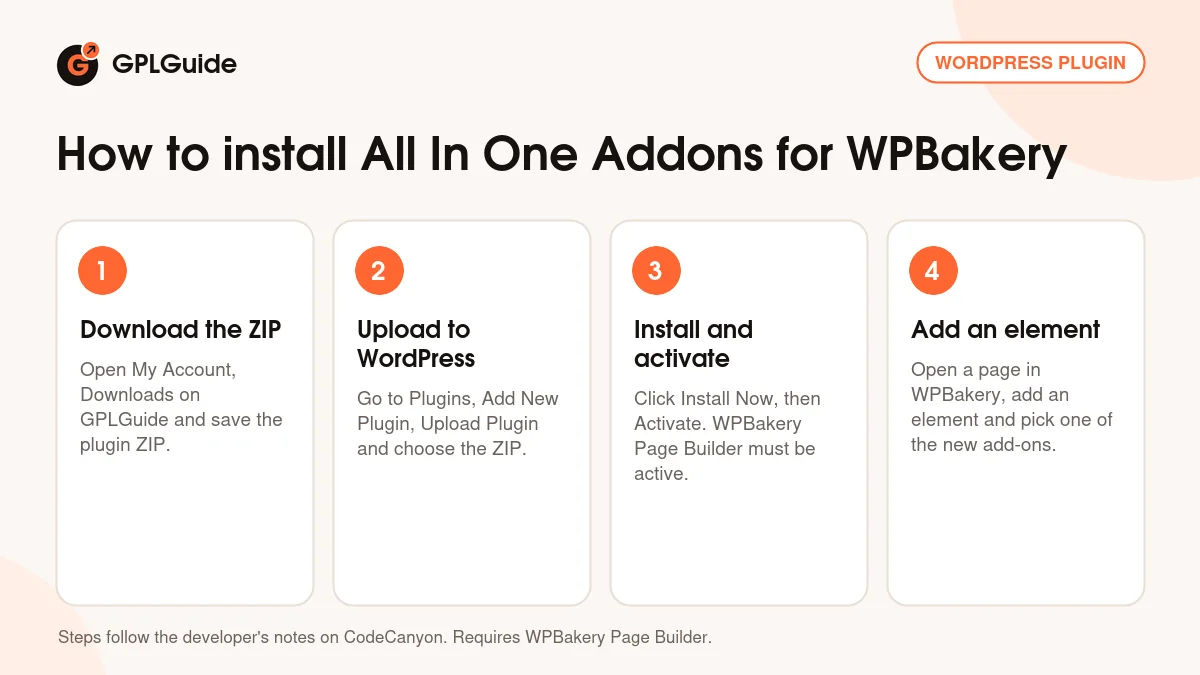
- Sign in to GPLGuide, open My Account, Downloads and save the All In One Addons for WPBakery ZIP.
- In WordPress go to Plugins, Add New Plugin, Upload Plugin, choose the ZIP and click Install Now.
- Click Activate. WPBakery Page Builder must already be active, as a plugin or in your theme.
- Open a page in WPBakery Page Builder, add a new element and pick one of the new add-ons.
A good first setup with All In One Addons for WPBakery starts in the WPBakery Role Manager: switch off the add-ons you won't use. Then build a test page with one Image Hotspot, place two or three hotspots and drag them into position in the frontend editor. If WordPress says the archive is incompatible during upload, the developer's tip is to unzip the download and upload the plugin ZIP inside it.
Keeping it up to date
Updates from GPLGuide are manual. When a new version of All In One Addons for WPBakery is listed here, download it from your account and upload it under Plugins, Add New Plugin, Upload Plugin. WordPress offers to replace the installed copy, and your elements stay in place because their settings are saved in your page content. If you see a newer version that we haven't added, let us know on the Request Item/Update page.
Questions about All In One Addons for WPBakery
Does All In One Addons for WPBakery work without WPBakery Page Builder? No. It is an add-on, so WPBakery Page Builder must be installed and active.
My theme came with WPBakery. Is that enough? Yes. The developer says the add-ons work when WPBakery is bundled in a theme.
Can I hide the WPBakery addons I don't need? Yes. Each add-on can be switched on or off in the WPBakery Role Manager.
How do I move a hotspot? Open the page in the frontend editor, click the hotspot and drag the icon. To change it again, refresh and reopen the editor.
Can iHover open a popup with my own content? No. The developer says iHover opens an image or video lightbox, or a custom link.
Is All In One Addons for WPBakery accessible? Version 3.6.8 adds aria-label support to Image HotSpot, and 3.6.7 added alt attributes to all images.
Does All In One Addons for WPBakery work with PHP 8? The changelog notes PHP 8 compatibility from version 3.6.4.
Building with WPBakery? Browse more WordPress plugins, or see what a GPLGuide membership includes if you need several premium plugins.
Features & capabilities
- More than 40 WPBakery Page Builder addons in one plugin
- Image Hotspot with drag positioning, tooltips, lightbox and aria-label support
- iHover with 20 circle and 15 square hover transitions
- Flip Box, Cube Box, Before & After, Skew Box and Shadow Card
- Masonry, DA, Medium and Metro galleries with lightbox
- Page Transition with two modes and 58 animations
- Draggable Timeline, Fullscreen Intro and Scrolling Notification
- Each add-on can be switched on or off in the WPBakery Role Manager