
Support Board Chat And Help Desk
100% Original fileUnmodified copy of the developer's release
DeveloperCode Canyon
Up to dateOriginal released Sep 20, 2026 · File last updated Nov 23, 2026
About this product
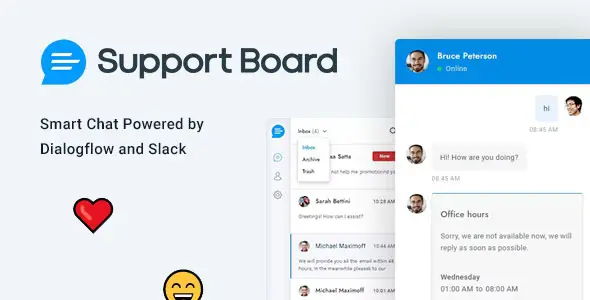
Support Board 3.9.2 is a self-hosted live chat and help desk plugin that puts a chat box on your WordPress site and gives your team one admin area to answer every conversation. It suits WooCommerce shops and service businesses that want to talk to customers in real time and keep all chats on their own server. The AI chatbot and the store tools come from the developer's separate Artificial Intelligence and WooCommerce apps, which you switch on under Settings, Apps; the chatbot runs on OpenAI and needs your own OpenAI API key. No free core plugin is needed. After activation a Support Board item appears in the WordPress sidebar, and the chat shows on all pages straight away.
How to install Support Board
- Check that your server runs PHP 8.0 or newer and MySQL 5.5 or newer with the CURL, ZIP and MBSTRING modules on. Install and activate WooCommerce under Plugins, Add New Plugin if you want the shop features.
- Log in to GPLGuide, open this product and click Download under Your downloads.
- Go to Plugins, Add New Plugin, Upload Plugin, choose the ZIP, click Install Now, then Activate.
- If you use a security plugin, make sure it does not block the supportboard/include/ajax.php file, or the chat will not load.
- Open Support Board in the WordPress sidebar, check your server under Settings, Miscellaneous, System requirements, and turn on the apps you use under Settings, Apps.
- For the AI chatbot, paste your OpenAI API key into Settings, Artificial Intelligence, OpenAI, API key, then tick the Chatbot option there.
Features & capabilities
- One admin area for agents and admins, with rich messages, attachments, notes and a dark mode.
- Office hours, with an automatic offline message when no agent is available.
- Departments, a queue and routing to share incoming chats among your agents.
- Alerts by email, push, desktop, text message, sound and Telegram.
- Email piping turns mail sent to your support addresses into chat conversations.
- An articles area that works as a help center next to the chat.
- Agents can edit messages they already sent from the admin area.
- With the WooCommerce app, the chatbot answers product and order questions, fills the cart and sends coupons for removed cart items.
- With the Artificial Intelligence app, an OpenAI chatbot handles common questions and hands over to a human agent when needed.
- Multilingual chat with WPML or Polylang, chosen under Settings, WordPress, Multilingual plugin.
Frequently asked questions
Is this the original file?
Yes. Every product on GPLGuide is the developer’s own release, unchanged. The license key comes already activated. If a product does ask for a key, the activation steps appear on its page once you have it.
Is it legal to use a GPL plugin or theme from GPLGuide?
Yes. WordPress plugins and themes are released under the GPL, which lets anyone use, share and change the code. The developer’s support desk and the developer’s own update service are not part of the file; those stay with the developer.
How do I install it?
Log in, open the product page and click Download under Your downloads. For a plugin go to Plugins, Add New Plugin, Upload Plugin, choose the ZIP, then Install Now and Activate. For a theme go to Appearance, Themes, Add New Theme, Upload Theme.
How do updates work?
When a newer version is listed on GPLGuide, download it from the product page and upload it over the installed copy; WordPress offers to replace the old version. Updates are manual.
Can I use it on more than one site?
Yes. The GPL lets you use it on as many of your own sites as you like.
What if the file does not work or a newer version is out?
Tell us on the Request Item page or through Support. We check the file and add the newer version when we have it.


