Updated 8 November 2026 · price and security notes checked that day
The short answer
- Flatsome is a WooCommerce-first WordPress theme with its own drag-and-drop UX Builder, a header designer and a large set of shop and product page options.
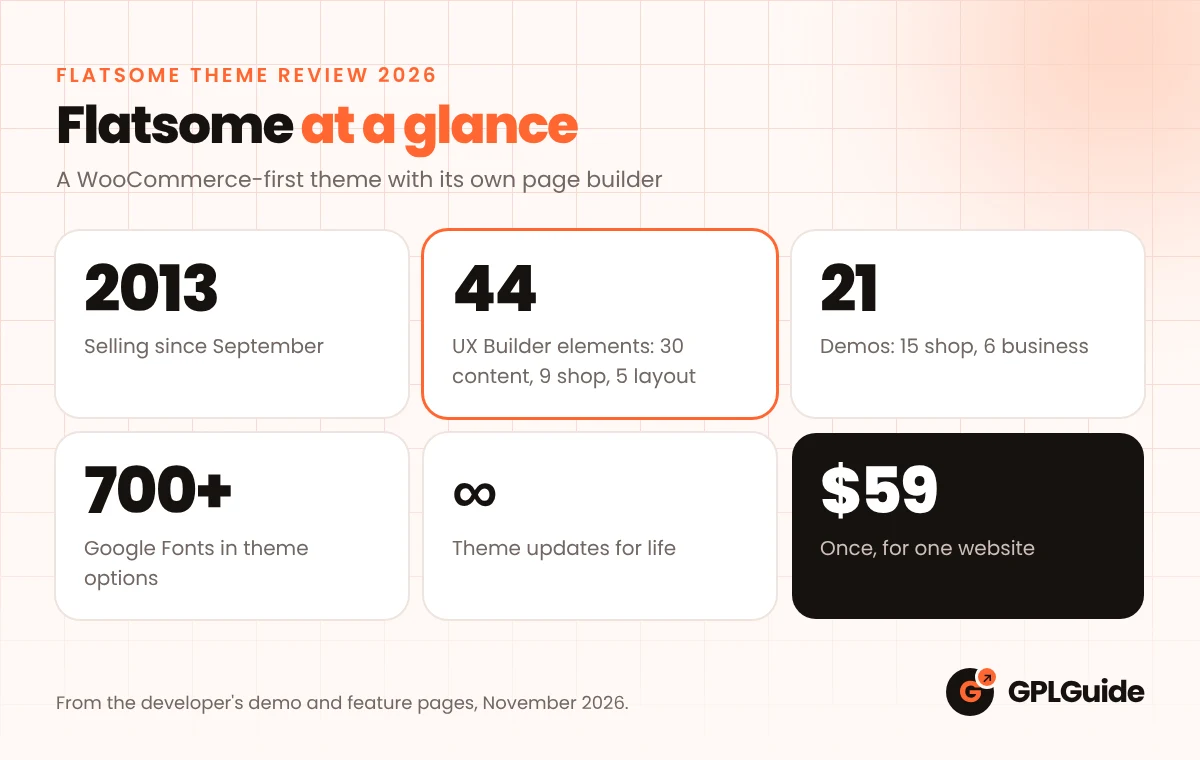
- It costs $59 once for one site, with updates for life and 6 months of support. There's no yearly renewal for updates.
- Our verdict: still worth it for a small or mid-sized store that wants one theme to design everything. Pick something else if you already build with Elementor.
- The catch: pages built with UX Builder use Flatsome shortcodes, so moving to another theme later means rebuilding those pages.
- Run 3.20.10 or newer. It fixed a cross-site scripting flaw published in July 2026.
What is the Flatsome theme?
Flatsome is a multipurpose WordPress theme built first for WooCommerce stores. It launched in September 2013 as a small shop theme, and version 3.0 rebuilt it from scratch with three things that still define it today: the UX Builder page builder, a drag-and-drop header builder and theme options you edit with a live preview.
The developer calls it the best-selling WooCommerce theme ever, and review sites put its sales above 200,000. That popularity matters in practice: tutorials are easy to find, and freelancers who know the theme are everywhere.
You buy it once and get theme updates for life. Out of the box you get 15 shop demos and 6 business demos to start from, so a new store doesn't begin with a blank page.
Flatsome theme features
Most themes hand the design work to a separate page builder. Flatsome keeps it inside the theme, and that's both its biggest strength and its main trade-off. For this Flatsome theme review we went through every feature page on the developer's demo site; here are the parts you'll use every day.
UX Builder: the built-in page builder
UX Builder is a front-end, drag-and-drop builder that only works with Flatsome. It comes with 30 content elements, 9 shop elements and 5 layout elements, and each element has presets and separate settings for desktop, tablet and mobile.
- Banners and sliders are built in, with a focus point you set on the image so it crops well on phones. You don't need a slider plugin.
- Shop elements place product grids, categories and sliders anywhere, including the home page and the top of category pages.
- Page presets give you ready layouts for new pages, and you edit text right on the canvas.
- Blocks are reusable sections you design once and drop into pages, the header, the footer or a category page.
UX Builder saves your layout as shortcodes in the normal WordPress editor. That keeps editing fast and the code readable, but it also ties your pages to the theme, which we cover below.
Header Designer
The Header Designer lets you drag elements into the top bar, the main header and the bottom header, with a separate layout for mobile. You can add menus with multi-column dropdowns, an off-canvas menu, a search box with live product search and a category filter, a mini cart or off-canvas cart, an account dropdown, a contact block with phone and opening hours, social icons, buttons and your own HTML or shortcodes. Sticky headers can shrink, fade or show only on scroll.
Flatsome Studio and demos
Flatsome Studio is an online library of ready sections and full page designs that you insert from inside UX Builder, and the developer says its images are free to use. Switch it on under Flatsome, Advanced, Integrations if you don't see it. Together with the 21 demos, it's the fastest way to get a store looking finished. The demos show their age in places, so plan to change fonts and colors rather than launching one as it is.
Live theme options
Global settings live in the WordPress Customizer with a live preview: colors, more than 700 Google Fonts, full-width, boxed or framed layouts, site width, footer styles and a custom CSS editor. The theme also includes a child theme, full right-to-left support, a setup wizard and translation files.
Flatsome for WooCommerce
This is where Flatsome earns its reputation. Many shop features that other themes leave to plugins are switches in the theme options:
| Where | What Flatsome gives you |
|---|---|
| Shop and category pages | Grid, list or masonry layouts; products per row for each screen size; no sidebar, left or right sidebar, or off-canvas filters; custom top content built with UX Builder. |
| Product cards | Quick view, a quick add-to-cart button, three sale bubble styles, image hover effects and wishlist buttons (with a wishlist plugin). |
| Product pages | Several layouts, vertical or horizontal galleries, hover zoom, product videos in a lightbox, next and previous product links, and tabs, accordions or sections for the description. |
| Search | Built-in live search in the header, with an optional category dropdown. |
| Catalogue mode | Hide prices, swap the add-to-cart button for a form or shortcode, and replace the header cart. Good for showroom and B2B catalogs. |
| Other product types | Variation images that switch with the chosen color, and external or affiliate products. |
The built-in live search is fine for a few hundred products. Bigger catalogs need typo tolerance and search by SKU, and our guide to the best WooCommerce product search plugins covers those.
Flatsome price in 2026
Flatsome is sold on a theme marketplace, not on its own website, and it uses the marketplace's license types rather than plans:
| Option | Price | What you get |
|---|---|---|
| Regular License | $59 once | One website, theme updates for life, 6 months of support from the developer |
| Support extension | Extra, at checkout or later | 12 months of support instead of 6; updates don't need it |
| Extended License | Much higher | Needed only when end users pay to use the site you build, such as a paid web app |
| GPLGuide | $3.99 | The theme file with the license key already activated, no developer support |

- One license, one site. A second store needs a second license.
- Updates never expire. Only support runs out, so after 6 months you can still update the theme; you just can't open support tickets.
- Compared with subscriptions, $59 once is cheap. Most premium themes now charge every year to keep updates coming.
- Marketplace sales sometimes drop the price, so check it on the day you buy.
Is the Flatsome theme fast?
Flatsome is reasonably fast, but not as light as GeneratePress or Astra, and your setup matters more than the theme. The theme minifies its CSS and JavaScript, lazy-loads images and section backgrounds, and loads Google Fonts in a way that doesn't block the page.
Read the developer's speed claims with care. Its own speed test page says the tests ran with a caching plugin, an image optimizer and lazy loading switched on, on a managed WordPress host. That's a fair setup, and it's the one you should copy:
- Turn on lazy loading in the theme's advanced settings.
- Use a caching plugin such as WP Rocket.
- Keep sliders off the top of mobile pages, or use a single banner instead.
- Don't run a second page builder on top of UX Builder.
Is Flatsome safe? The 2025 and 2026 security fixes
Flatsome is safe on a current version, but the 3.20 line had two cross-site scripting (XSS) flaws listed in the Patchstack database:
| Published | Affected versions | Who could use it | Fixed in |
|---|---|---|---|
| 6 October 2025 | 3.20.5 and older | A logged-in Contributor or higher (stored XSS through a shortcode) | 3.20.6 |
| 6 July 2026 | 3.20.9 and older | An attacker with no account, if a visitor or admin clicks a crafted link (reflected XSS, CVE-2026-57728, CVSS 7.1) | 3.20.10 |
What to do: update every Flatsome site to 3.20.10 or newer. Because updates never expire on a Flatsome license, there's no good reason to stay on an old version. The theme file we host is newer than both fixes.
Flatsome theme pros and cons
Pros
- Page builder, header builder and shop layouts in one theme.
- $59 once, with updates for life.
- Strong WooCommerce options, from quick view to catalogue mode.
- Mobile header and responsive settings for every element.
- Huge user base, so tutorials and help are easy to find.
- Child theme, right-to-left support and translation files included.
Cons
- UX Builder pages turn into shortcodes if you switch themes.
- Only 6 months of support unless you pay to extend it.
- One license covers one website.
- Heavier than lightweight themes such as GeneratePress.
- Some demos look dated without changes.
- Two security fixes in the 3.20 line mean you must keep it updated.
What happens if you leave Flatsome?
This is the part most Flatsome reviews skip. UX Builder stores every page as shortcodes such as [section], [row], [col] and [ux_banner]. Switch to another theme and those pages show raw shortcodes instead of your design. Your products, orders and blog posts are safe; it's the designed pages, like the home page, landing pages and custom category tops, that need rebuilding.
That's not a reason to avoid Flatsome, but it's a reason to choose it on purpose. If you think you'll move to Elementor or the block editor within a year or two, start there instead.
Flatsome vs WoodMart, Astra Pro and Elementor Pro
| Option | How you design pages | Best for |
|---|---|---|
| Flatsome | Built-in UX Builder | Store owners who want one theme for everything, with no extra builder to buy |
| WoodMart | Elementor or WPBakery, plus its own header builder | Bigger stores that want many modern demos and already use Elementor |
| Astra Pro | Any builder or the block editor | Light, fast sites where you choose the builder yourself |
| Elementor Pro | Elementor's Theme Builder and WooCommerce Builder | Designers who build every template themselves; see our Elementor Pro price guide |
Flatsome vs WoodMart is the comparison most store owners make. Flatsome is simpler and keeps everything in one place; WoodMart has more demos and fits better if your team already knows Elementor, and our list of the best Elementor addons covers the add-ons that go with it. If speed matters most and you'd rather build with blocks, a light theme such as GeneratePress with GP Premium is worth a look, and our GeneratePress Premium review covers it.
Who should buy Flatsome?
| You are | Our advice |
|---|---|
| Opening your first WooCommerce store | Flatsome, starting from a shop demo |
| A showroom or B2B business that doesn't sell online | Flatsome, with catalogue mode |
| A freelancer building stores for clients | Flatsome, one license per client store |
| A team that already builds with Elementor | WoodMart or Elementor Pro instead |
| A blogger or content site | A lighter theme such as GeneratePress or Astra |
| Someone who needs only the theme file | Flatsome on GPLGuide, $3.99 |
Flatsome theme review: our verdict
Thirteen years in, Flatsome is still one of the easiest ways to build a good-looking WooCommerce store without buying a separate page builder. UX Builder, the Header Designer and the shop options cover what most small and mid-sized stores need, and $59 with updates for life is fair value in a market full of yearly plans.
Its weak spots are real but manageable: the shortcode lock-in, short support and a theme that's not as light as the minimal ones. Keep it updated, add caching, and decide early whether you're happy to stay with UX Builder for the long run.
Flatsome on GPLGuide for $3.99
The features in this Flatsome theme review are all in the file we sell, because it's the same theme. Flatsome is a WordPress theme, so its PHP code is released under the GPL, and GPL stores can offer the same theme file for much less. We keep it up to date in our library. Here's what you get from us, and what stays with the official license.

Theme file only: $3.99
Flatsome on GPLGuide
The original Flatsome theme ZIP, with the license key already activated. It includes UX Builder, the Header Designer and the child theme, so you can install it, import a demo and start designing your store.
You get
- The original theme file from the developer's release
- License key already activated
- UX Builder, the Header Designer and the child theme
- Use on as many of your own sites as you like
- New versions in your GPLGuide account, ready to download
- Included in every GPLGuide membership
Not included
- Support from the developer
- The developer's own update service (updates are manual)
- Product photos and images used in the demo sliders and banners
- The marketplace's refund policy
Is it legal to buy Flatsome from a GPL store?
Yes. Flatsome's PHP code is licensed under the GPL, like all WordPress themes, which lets anyone share it and charge for it. The Flatsome name belongs to its developer, and developer support comes only with an official license. Read our GPL license guide for WordPress plugins to see what that covers, and when it's better to buy straight from the developer.
Building a full WooCommerce store?
A GPLGuide membership includes Flatsome, WoodMart, WP Rocket and more than 2,000 other plugins and themes.
Frequently asked questions
Is Flatsome a good theme?
Flatsome is a good theme for WooCommerce stores. It has sold since 2013 and includes its own UX Builder page builder, a header designer, quick view, catalogue mode and many product page layouts. It suits small and mid-sized stores that want one theme instead of two tools.
How much does Flatsome cost?
Flatsome costs $59 once for a Regular License in 2026. That covers one website, theme updates for life and 6 months of support from the developer. Extending support to 12 months costs extra. An Extended License, needed only when end users pay to use the site, costs much more.
Does Flatsome have a lifetime license?
Flatsome works like a lifetime license, because the $59 Regular License never expires and includes theme updates for life. Only support has a time limit: 6 months, or 12 months if you pay to extend it. There is no yearly renewal needed to keep updating the theme.
What is the Flatsome UX Builder?
UX Builder is the drag-and-drop page builder included with the Flatsome theme. It has 30 content elements, 9 shop elements and 5 layout elements, with separate settings for desktop, tablet and mobile. It works only with Flatsome and saves pages as shortcodes in the WordPress editor.
Is Flatsome good for WooCommerce?
Flatsome is one of the strongest WooCommerce themes, because it was built for shops first. It includes live search, quick view, off-canvas filters, product page layouts, product videos, variation images and a catalogue mode that hides prices, all set in the theme options.
Does Flatsome work with Elementor?
Flatsome works with Elementor, but most Flatsome sites use the built-in UX Builder instead. Running both adds weight and splits your design between two tools. If you already build with Elementor, a theme designed around it, such as WoodMart or Hello with Elementor Pro, is a better fit.
Is Flatsome fast?
Flatsome is reasonably fast with the right setup, though heavier than lightweight themes like GeneratePress or Astra. It minifies its files and lazy-loads images and backgrounds. For good scores, switch on lazy loading, add a caching plugin, optimize images and avoid large sliders at the top of mobile pages.
Is Flatsome safe to use?
Flatsome is safe to use on version 3.20.10 or newer. Patchstack listed two cross-site scripting flaws in the 3.20 line: one fixed in 3.20.6 in October 2025, and CVE-2026-57728, fixed in 3.20.10 in July 2026. Updates never expire on a Flatsome license, so update older sites.
What happens to my pages if I switch from Flatsome?
Pages built with UX Builder show raw shortcodes such as [section] and [row] after you switch from Flatsome to another theme. Products, orders and blog posts stay safe, but designed pages like the home page and landing pages need rebuilding in the new theme or builder.
Flatsome vs WoodMart: which is better?
Flatsome is better for store owners who want one simple theme with a built-in page builder. WoodMart is better for bigger stores and teams that already use Elementor or WPBakery and want more modern demos. Both are WooCommerce-first themes sold for a one-time price.
Can I use Flatsome on multiple sites?
A Flatsome Regular License covers one website, so each extra site needs its own license, and an Extended License does not add sites. A GPL copy from a store like GPLGuide can be used on as many of your own sites as you like.
What is the cheapest way to get Flatsome?
The cheapest way to get the Flatsome theme is a GPL store: Flatsome on GPLGuide costs $3.99 and comes with the license key already activated. It does not include support from the developer, which comes only with the official $59 license.
How we wrote this review
- Flatsome demo site: UX Builder, Header Designer, WooCommerce, Studio and speed pages
- Patchstack: Flatsome 3.20.9 and older, reflected XSS (CVE-2026-57728)
- Patchstack: Flatsome 3.20.5 and older, stored XSS
- Flatsome on GPLGuide
For this Flatsome theme review we went through every feature page on the developer's demo site, the theme's changelog notes, the Patchstack vulnerability database and the theme files we host. We did not run our own speed tests, so this review has no speed scores or star rating. When the price or the theme changes, we update this review and the date at the top.