3D Flip Book for WPBakery Page Builder

Note
Note: This is an Addon for WPBakery Page Builder for WordPress
100% Original fileUnmodified copy of the developer's release
DeveloperWebCodingPlace
Up to dateOriginal released Jun 26, 2026 · File last updated Oct 23, 2026
About this product
3D Flip Book for WPBakery 3.1 is an add-on for WPBakery Page Builder that shows your content as a book whose pages turn when a visitor clicks or swipes. It's meant for sites that already build their pages in WPBakery and want a magazine, a newspaper, a flyer or a greeting card that people can leaf through right on the page. That beats sending them off to a PDF or making them scroll past a long stack of images.
What's in the 3D Flip Book for WPBakery download
Our download is the original 3D Flip Book for WPBakery ZIP for version 3.1, with the license key already activated. It holds the add-on itself and nothing else. WPBakery Page Builder is a separate plugin from another developer and is not in this file, so you need your own copy installed and active before the flip book element shows up in the editor.
Good to know
You need WordPress with WPBakery Page Builder running. The developer lists it as compatible with WordPress 4.9 up to 7.0, and this release added compatibility with WordPress 7.0 and WPBakery Page Builder 8.7 or newer. To use it, open a page in WPBakery, click Add Element and choose 3D Flip Book. Save the book settings first, then add each page with the plus icon inside the element.
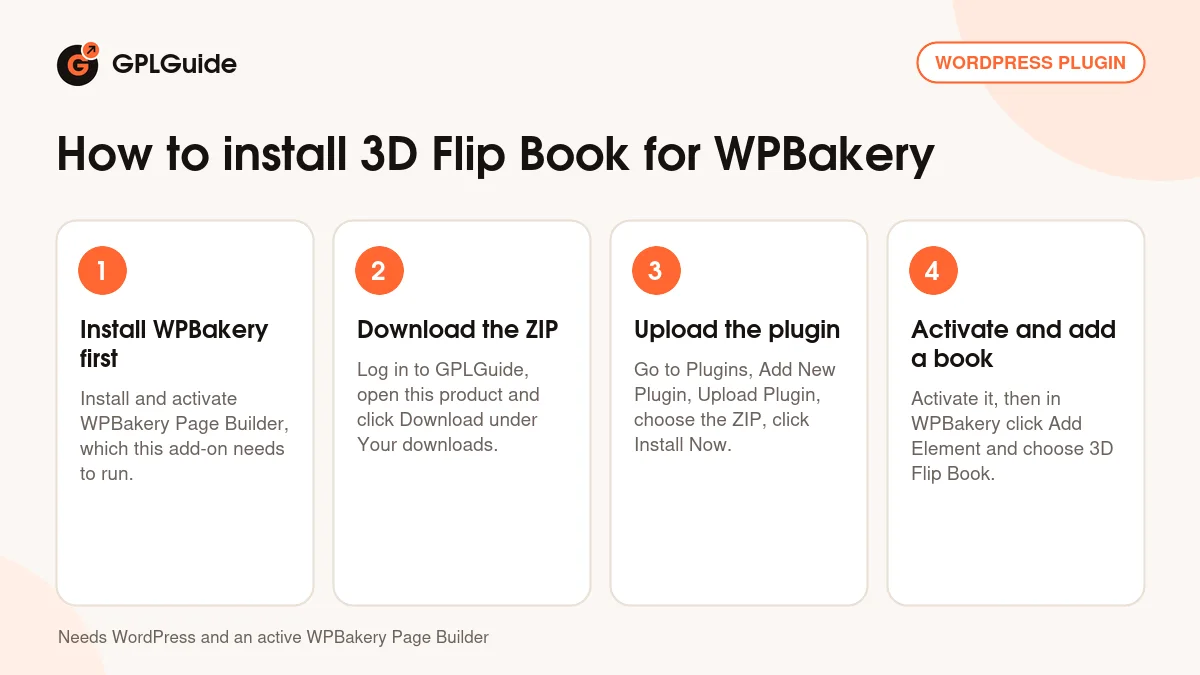
How to install 3D Flip Book for WPBakery
Features & capabilities
- Pages turn with a mouse click, or with a finger swipe on phones and tablets.
- Two display modes to choose from: single and dual.
- Each page takes its own content: text, images, video or any shortcode.
- Set the book's width and height yourself instead of a fixed size.
- Give the book a custom background to match the page around it.
- Responsive layout that scales down on small screens.
- Built with CSS and JavaScript, with no Flash and a light footprint.
- Add or duplicate pages from inside the WPBakery element as the book grows.
Frequently asked questions
Is this the original file?
Yes. Every product on GPLGuide is the developer’s own release, unchanged. The license key comes already activated. If a product does ask for a key, the activation steps appear on its page once you have it.
Is it legal to use a GPL plugin or theme from GPLGuide?
Yes. WordPress plugins and themes are released under the GPL, which lets anyone use, share and change the code. The developer’s support desk and the developer’s own update service are not part of the file; those stay with the developer.
How do I install it?
Log in, open the product page and click Download under Your downloads. For a plugin go to Plugins, Add New Plugin, Upload Plugin, choose the ZIP, then Install Now and Activate. For a theme go to Appearance, Themes, Add New Theme, Upload Theme.
How do updates work?
When a newer version is listed on GPLGuide, download it from the product page and upload it over the installed copy; WordPress offers to replace the old version. Updates are manual.
Can I use it on more than one site?
Yes. The GPL lets you use it on as many of your own sites as you like.
What if the file does not work or a newer version is out?
Tell us on the Request Item page or through Support. We check the file and add the newer version when we have it.