Adning Advertising – Professional, All In One Ad Manager for WordPress
100% Original fileUnmodified copy of the developer's release
DeveloperCode Canyon
Up to dateFile last updated Oct 23, 2026
About this product
Adning Advertising 1.6.3 is an all-in-one ad manager for WordPress that runs every ad on your site from one admin panel. It suits blogs, magazines and community sites that sell banner space straight to advertisers, run Google AdSense next to their own promotions, or need different ads for visitors from different countries and devices. If you look after several sites or a multisite network, you can control the ads for all of them in one place instead of editing widgets and theme files by hand.
What's in the Adning Advertising download
Our download is the developer's original Adning Advertising package for version 1.6.3, with the license key already activated. The plugin you install from it is angwp.zip. The developer's page lists no paid add-ons: selling ad spots, the smarTrack statistics module and the AdSense tools are part of the plugin itself, so you don't need extra plugins for them.
Good to know
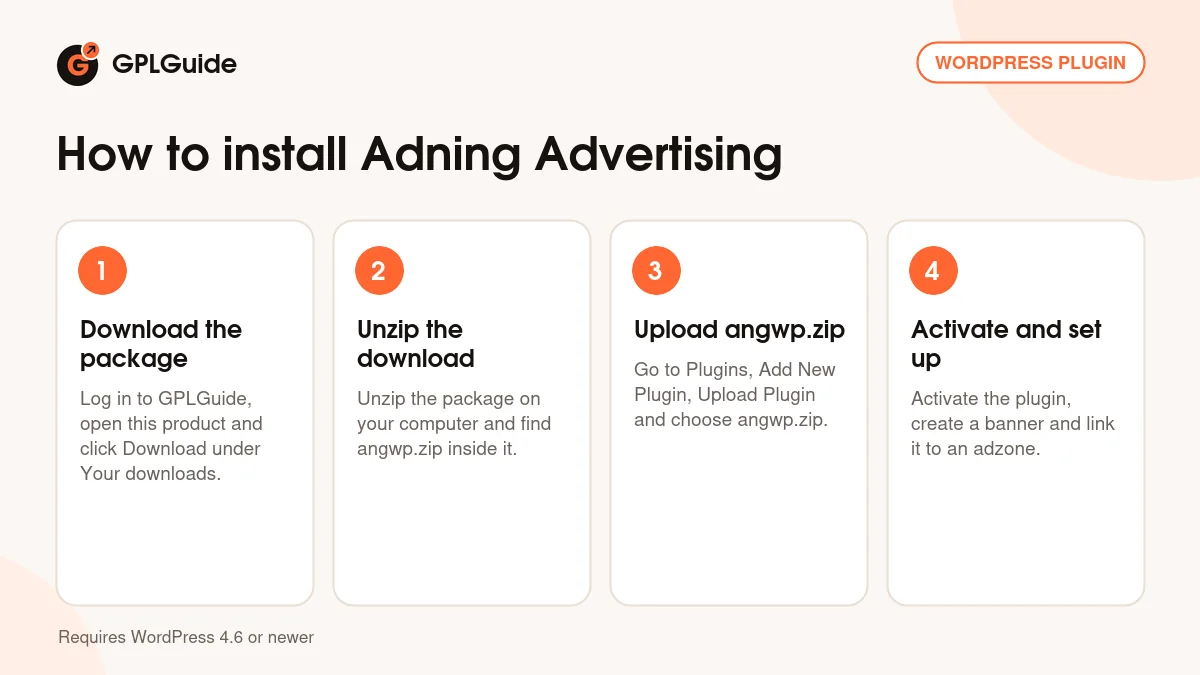
The plugin header asks for WordPress 4.6 or newer; the developer's pages give no PHP minimum. Our download is the developer's package, so unzip it on your computer first and upload angwp.zip, not the whole package. To rotate several banners in one spot, link them to an adzone from each banner's settings page, then place the adzone. Campaigns only show their banners and adzones during the run time you set, so check the dates when an ad doesn't appear.
How to install Adning Advertising
Features & capabilities
- Image, external URL, HTML, HTML5 package, MP4 video and Google AdSense banners
- Adzones that rotate banners as a slideshow, show one random banner or fill a grid of rows and columns
- Pop-up, fly-in, pre-post, background takeover, corner peel and parallax scrolling ad formats
- Auto positioning, insertion after a CSS class or ID, shortcode, widget, template tag and embed code for other sites
- Campaigns that group banners and adzones with run dates and country limits
- Targeting by country, device, mobile operator and phone brand, plus scroll position or time delay triggers
- smarTrack stats for impressions, clicks and CTR per banner, adzone, campaign and advertiser, with PDF export
- Sell ad spots on your own site with a front-end banner manager, plus a GDPR consent option and multisite support
Frequently asked questions
Is this the original file?
Yes. Every product on GPLGuide is the developer’s own release, unchanged. The license key comes already activated. If a product does ask for a key, the activation steps appear on its page once you have it.
Is it legal to use a GPL plugin or theme from GPLGuide?
Yes. WordPress plugins and themes are released under the GPL, which lets anyone use, share and change the code. The developer’s support desk and the developer’s own update service are not part of the file; those stay with the developer.
How do I install it?
Log in, open the product page and click Download under Your downloads. For a plugin go to Plugins, Add New Plugin, Upload Plugin, choose the ZIP, then Install Now and Activate. For a theme go to Appearance, Themes, Add New Theme, Upload Theme.
How do updates work?
When a newer version is listed on GPLGuide, download it from the product page and upload it over the installed copy; WordPress offers to replace the old version. Updates are manual.
Can I use it on more than one site?
Yes. The GPL lets you use it on as many of your own sites as you like.
What if the file does not work or a newer version is out?
Tell us on the Request Item page or through Support. We check the file and add the newer version when we have it.


