Appointment Booking Square Payments

100% Original fileUnmodified copy of the developer's release
DeveloperMotoPress
Up to dateFile last updated Oct 23, 2026
About this product
Appointment Booking Square Payments 1.0.2 is a paid add-on that lets clients pay with Square while they book an appointment on your WordPress site. It works only with the developer's paid Appointment Booking plugin, a booking system for salons, barbershops, spas, clinics, tutors and fitness instructors, and you need your own Square account. It suits service businesses that already take payments through Square and want online booking payments and gift card sales to end up in that same account.
What's in the Appointment Booking Square Payments download
Our download is the original Appointment Booking Square Payments ZIP for version 1.0.2, with the license key already activated. It holds the Square add-on only. The Appointment Booking plugin itself is sold separately by the developer and is not in this file, and neither are its other paid add-ons, such as WooCommerce Payments, Twilio SMS and PDF Invoices.
Good to know
You need WordPress 5.7 or newer, PHP 7.4 or newer, Appointment Booking 1.18.1 or newer and a Square account. Your clients don't need a Square account to pay. In the Square Developer Dashboard, create or open an application, copy the Application ID and Access Token from Credentials, then the Location ID from Locations. Sandbox and Production each have their own tokens, so copy the pair that matches the mode you tick in the add-on.
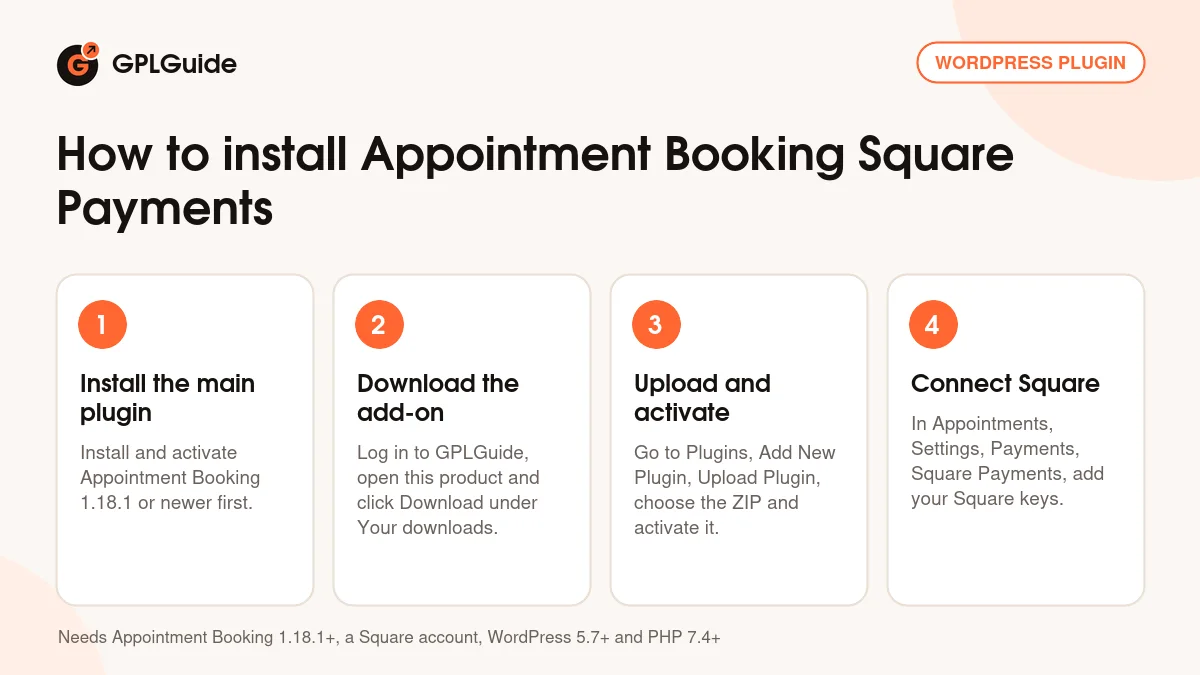
How to install Appointment Booking Square Payments
Features & capabilities
- Adds Square as a payment method in the booking widget once you save the settings.
- Takes card payments through the Square API during checkout.
- Accepts Square gift cards, and you pick card, gift card or both.
- Lets you sell digital or physical Square gift cards on a Square-hosted page you can link from your site menu.
- Sandbox mode for trial bookings before you switch to Production.
- Your own checkout title and description, so clients know what they're paying for.
- All settings sit under Appointments, Settings, Payments, Square Payments, Manage.
- Sales stats, graphs and daily email summaries show up in your Square account.
Frequently asked questions
Is this the original file?
Yes. Every product on GPLGuide is the developer’s own release, unchanged. The license key comes already activated. If a product does ask for a key, the activation steps appear on its page once you have it.
Is it legal to use a GPL plugin or theme from GPLGuide?
Yes. WordPress plugins and themes are released under the GPL, which lets anyone use, share and change the code. The developer’s support desk and the developer’s own update service are not part of the file; those stay with the developer.
How do I install it?
Log in, open the product page and click Download under Your downloads. For a plugin go to Plugins, Add New Plugin, Upload Plugin, choose the ZIP, then Install Now and Activate. For a theme go to Appearance, Themes, Add New Theme, Upload Theme.
How do updates work?
When a newer version is listed on GPLGuide, download it from the product page and upload it over the installed copy; WordPress offers to replace the old version. Updates are manual.
Can I use it on more than one site?
Yes. The GPL lets you use it on as many of your own sites as you like.
What if the file does not work or a newer version is out?
Tell us on the Request Item page or through Support. We check the file and add the newer version when we have it.