Book Your Travel Online Booking WordPress Theme
100% Original fileUnmodified copy of the developer's release
DeveloperThemeForest
Up to dateFile last updated Nov 21, 2026
About this product
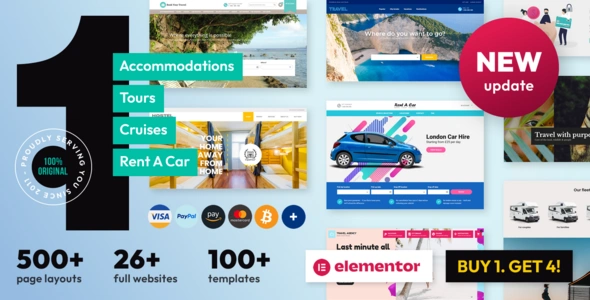
Book Your Travel Theme 8.19.69 is a WordPress theme for travel and hospitality sites that take bookings online. It suits hotels and guest houses, tour operators, car rental companies, cruise sellers and travel agencies, and it lets one site sell rooms, tours, cars and cruises side by side, with availability checks and payments through WooCommerce. The developer ships it with a child theme, importable demo content, a page builder, a slider plugin and a mega menu plugin, so you can start from a demo instead of a blank page.
How to install Book Your Travel Theme
- Install and activate WooCommerce under Plugins, Add New Plugin first. The theme needs it to collect online payments for bookings.
- Log in to GPLGuide, open this product and click Download under Your downloads.
- If the download holds more than one ZIP, unzip it on your computer first and upload the theme's own ZIP, BookYourTravel.zip, not the whole package.
- Go to Appearance, Themes, Add New Theme, Upload Theme, choose the ZIP, click Install Now, then click Activate.
- After activation, open Appearance, Install Plugins and install and activate the plugins the developer lists before any demo import: WooCommerce, its currency and multilingual add-ons, the slider, Contact Form 7 and the mega menu plugin.
- Ask your host for PHP 7.4 or higher, a memory limit of 512M and max execution time of 300, then import demo content with the setup wizard or under Book Your Travel, Demos. It can take 5 to 15 minutes.
- Find the theme settings under Appearance, Theme Options. Set your front page under Settings, Reading and set permalinks to Post name under Settings, Permalinks.
Features & capabilities
- Separate booking modules for accommodations, tours, rental cars and cruises
- Availability checker and seasonal pricing
- Deposits and partial payments through WooCommerce payment gateways
- Travel agency mode and a vendor marketplace where other businesses list their own offers
- Calendar sync with other booking sites through iCal
- Guest reviews and destination pages
- A user dashboard where customers follow their bookings
- Surcharges, extras and booking emails
- A search box designer for building your own search forms
- Multi-currency and WPML multilingual support
Frequently asked questions
Is this the original file?
Yes. Every product on GPLGuide is the developer’s own release, unchanged. The license key comes already activated. If a product does ask for a key, the activation steps appear on its page once you have it.
Is it legal to use a GPL plugin or theme from GPLGuide?
Yes. WordPress plugins and themes are released under the GPL, which lets anyone use, share and change the code. The developer’s support desk and the developer’s own update service are not part of the file; those stay with the developer.
How do I install it?
Log in, open the product page and click Download under Your downloads. For a plugin go to Plugins, Add New Plugin, Upload Plugin, choose the ZIP, then Install Now and Activate. For a theme go to Appearance, Themes, Add New Theme, Upload Theme.
How do updates work?
When a newer version is listed on GPLGuide, download it from the product page and upload it over the installed copy; WordPress offers to replace the old version. Updates are manual.
Can I use it on more than one site?
Yes. The GPL lets you use it on as many of your own sites as you like.
What if the file does not work or a newer version is out?
Tell us on the Request Item page or through Support. We check the file and add the newer version when we have it.