Carter - Advanced WooCommerce Cart for Elementor

100% Original fileUnmodified copy of the developer's release
DeveloperMerkulove
Up to dateOriginal released Feb 16, 2026 · File last updated Oct 23, 2026
About this product
Carter Advanced WooCommerce Cart 1.0.3 is an Elementor widget that lets you build the WooCommerce shopping cart in the Elementor editor and style it like the rest of your pages. It's for WooCommerce stores built with Elementor whose default cart looks out of place next to a custom design, and for shop owners who want the product table, coupon field, totals and checkout button arranged and styled to match their theme without code.
What's in the Carter Advanced WooCommerce Cart download
Our download is the original Carter Advanced WooCommerce Cart ZIP for version 1.0.3, with the license key already activated. It holds the plugin with the cart widget. WooCommerce and Elementor are not part of the file; both are free plugins you add from the WordPress plugin screen. The developer lists Elementor Pro as compatible, but the widget doesn't need it.
Good to know
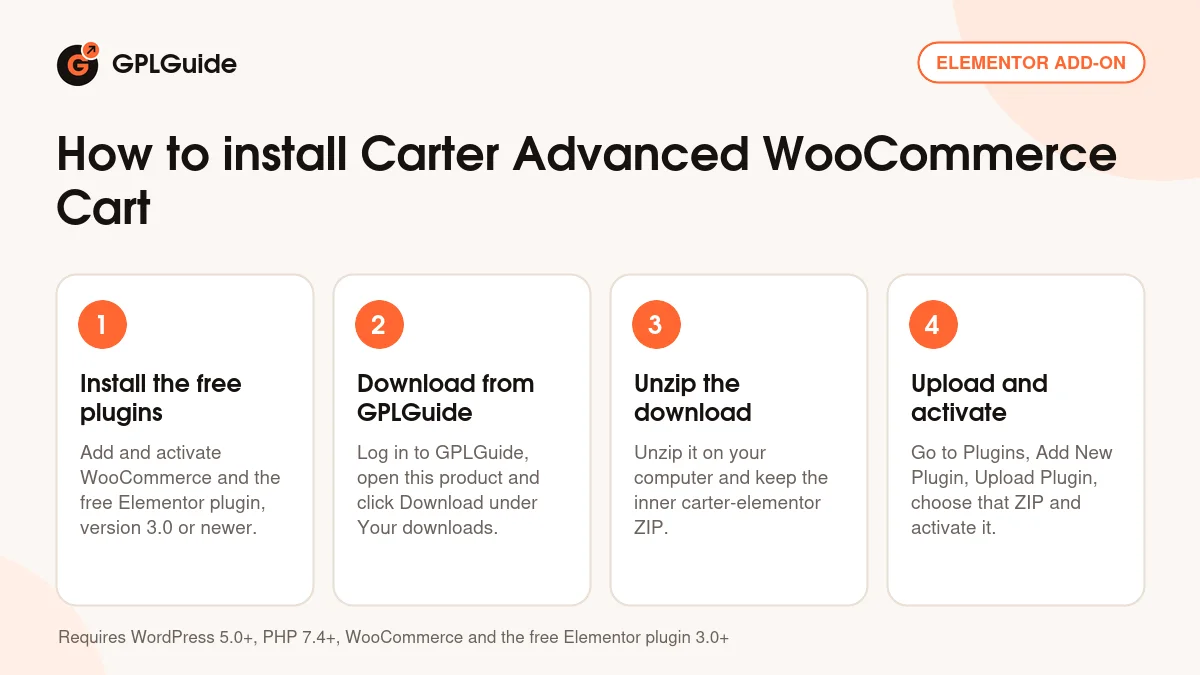
Carter needs WordPress 5.0 or newer, PHP 7.4 or newer, WooCommerce and the free Elementor plugin, version 3.0 or newer, so set up both plugins first. Unzip the download on your computer first and upload the inner carter-elementor ZIP, not the whole package. The Sticky right column switch only works with the Two columns layout. To show an Elementor template when the cart is empty, save that template in Elementor first, then pick it under Customize empty cart.
How to install Carter Advanced WooCommerce Cart
Features & capabilities
- One column or Two columns layout, with a sticky right column in the two-column view
- Empty cart view made from plain text or a saved Elementor template
- Switches for the coupon block and for updating the cart automatically
- Totals block where you show or hide subtotal, tax, fees, shipping and total
- Text, alignment and an icon for the coupon and checkout buttons, from Font Awesome or your own SVG
- More than 25 hover animations for the cart buttons
- Style controls for the product table, thumbnails, titles, prices, quantities and totals, with normal and hover states
- Margin, padding and width set separately for desktop, tablet and phone
Frequently asked questions
Is this the original file?
Yes. Every product on GPLGuide is the developer’s own release, unchanged. The license key comes already activated. If a product does ask for a key, the activation steps appear on its page once you have it.
Is it legal to use a GPL plugin or theme from GPLGuide?
Yes. WordPress plugins and themes are released under the GPL, which lets anyone use, share and change the code. The developer’s support desk and the developer’s own update service are not part of the file; those stay with the developer.
How do I install it?
Log in, open the product page and click Download under Your downloads. For a plugin go to Plugins, Add New Plugin, Upload Plugin, choose the ZIP, then Install Now and Activate. For a theme go to Appearance, Themes, Add New Theme, Upload Theme.
How do updates work?
When a newer version is listed on GPLGuide, download it from the product page and upload it over the installed copy; WordPress offers to replace the old version. Updates are manual.
Can I use it on more than one site?
Yes. The GPL lets you use it on as many of your own sites as you like.
What if the file does not work or a newer version is out?
Tell us on the Request Item page or through Support. We check the file and add the newer version when we have it.