Consoel – Consulting Business WordPress Theme

100% Original fileUnmodified copy of the developer's release
Developerwpoceans
Up to dateFile last updated Oct 21, 2026
About this product
The Consoel theme is a WordPress theme for consulting firms and the businesses close to them: accountants, financial advisors, HR consultants, insurance brokers and corporate service companies. It's built for Elementor, comes with six home page styles and a one-click demo import, and styles the WooCommerce shop pages. This page is for Consoel 1.0.3. On GPLGuide you download the original theme file to install on your own websites.
Good for: management consultants, accounting and bookkeeping firms, financial advisors and brokers, HR and recruitment consultancies, insurance agencies and small corporate service companies that want service pages, project case studies, a team page and a contact form on one site.
Requirements: WordPress 5.9 or newer (the item page lists 5.9.x through 7.0.x). The theme's style.css asks for PHP 7.4 and says it's tested up to WordPress 6.9, and the docs add MySQL 5 or MariaDB 10.0 or greater. Consoel Core and Codestar Framework ship inside the theme and install from its plugin prompt. The free plugins it asks for are Elementor, Contact Form 7, WooCommerce, MailChimp for WordPress and One Click Demo Import. The docs recommend memory_limit 256M, max_execution_time 600, upload_max_filesize 128M and max_input_vars 3000.
What the Consoel theme does
The Consoel theme has a narrow job. It presents a consulting company, its services and its past work, then asks the visitor to get in touch. The item page lists six home styles and inner pages for about, contact, testimonials, projects with a single project layout, and a blog for company news.
With the Consoel theme, most of the editing happens in Elementor. Its companion plugin, Consoel Core, ships inside the theme and adds the shortcodes, the custom Elementor widgets and three post types: service, project and team. Global settings sit in a Theme Options panel built on the Codestar Framework, and colors are set in the Customizer.
The look is calm and businesslike. The demo uses the PT Serif and Roboto Google Fonts, Themify and Flaticon icon sets, a sticky menu and light animations on a Bootstrap 5 grid. The item page marks the Consoel theme as widget ready, high resolution and Gutenberg optimized.
Six home styles and the Consoel demo import
Start with the demo import. Once the plugins are active, go to Appearance, Install Demo and click Import Demo Data. It brings in the same three parts the manual route uses: the content, the widgets and the theme options. Then pick the home style that's closest to your firm and replace its text and photos.
Two settings right after the import save a lot of head scratching. Open Elementor, Settings, tick Disable Default Colors and Disable Default Fonts, and select the service, project and team post types so Elementor can edit them. If a service or project page won't open in Elementor, check this first.
If the one-click import stalls, the docs describe a manual route. Import content.xml under Tools, Import with the WordPress importer, load the widgets file with the Widget Importer & Exporter plugin, then paste the text from theme-options.txt into Appearance, Theme Options, Backup and click Import a Backup. The docs keep these files in a Demo Data folder of the developer's full package.
Before either route, raise your PHP limits to the values in the docs, including max_input_time 600 and post_max_size 128M. Imports on budget shared hosting usually fail on exactly these limits. Run the import on a fresh install.
Theme Options, page settings and the Customizer
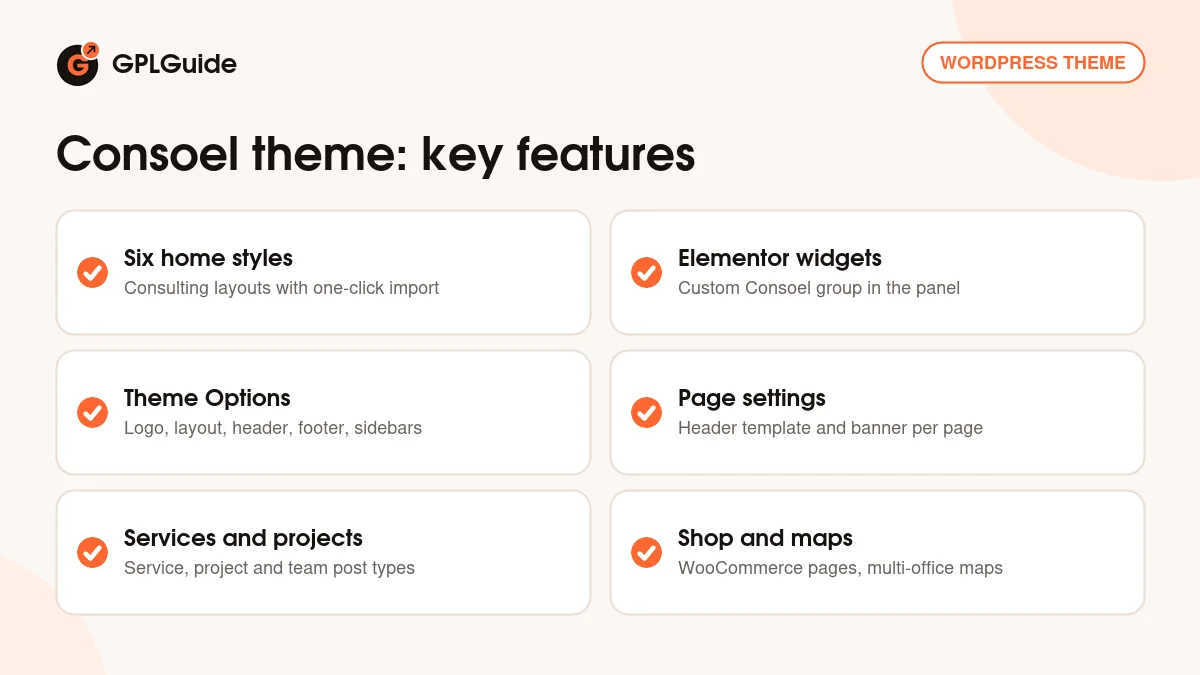
The Consoel theme splits its settings across three places. Appearance, Theme Options holds the global settings: Logo, Layout Options, Header and Footer. The same panel has Custom Sidebar, where you create extra sidebars, and Backup, where a saved options string can be pasted back in.
Page Settings work one page at a time. Each page can use its own header template and banner image, hide the header and footer, and show a topbar shortcode. That's handy for a single-service landing page with one form and nothing else on it.
Colors live in Appearance, Customizer. A consulting site rarely needs more than one brand color and one accent, whatever the item page says about unlimited colors. Pick them on day one. With Elementor's defaults switched off, the theme's palette and fonts stay in charge.
Services, projects, team pages and the shop
In the Consoel theme, the three post types do the heavy lifting. Every service gets its own post, project posts become case studies with the single project layout, and team posts hold your consultants' profiles. Blog, service and project pages each have a sidebar of their own, and you can add as many custom widget areas as you need under Appearance, Widgets.
The custom widgets show up in their own Consoel group in the Elementor panel. The footer logo and description come from the theme's shortcode builder at Appearance, Widgets, Add Shortcode, so look there when the footer blurb needs changing.
Forms run on Contact Form 7. The docs include sample markup with name, email and phone fields, a services dropdown, a message box and a Get in Touch button. Funny detail: the dropdown in that sample lists Photography, The Rehearsal Dinner and Perfect Cake, clearly carried over from a wedding theme. Swap them for your own services before you publish.
Google Maps with multiple locations suits a firm with two or three offices. WooCommerce 8.x and 9.x are listed as compatible, and a paid strategy call or a downloadable checklist fits the shop pages well.
Consulting site plans to copy with the Consoel theme
Before you open Elementor, write down your services, three or four past projects, short bios for each consultant and a few client quotes. The Consoel theme is built around exactly those pieces, so the build goes quickly when they're ready.
- Accounting firm with two offices: one service post each for bookkeeping, payroll and tax returns, team posts for every accountant and a contact page with a two-location map.
- HR consultancy: service posts for recruitment, policy writing and payroll audits, a testimonials page and a blog for monthly hiring tips.
- Insurance broker: a topbar shortcode with the phone number and office hours, plus a Contact Form 7 quote form with a dropdown for the cover type.
- Financial advisor: project posts as anonymous client case studies, each on the single project layout with the result in the first line.
- Management consultant who sells workshops: WooCommerce product, cart and checkout pages for workshop seats or a paid first session.
- Solo business coach: one home style, an about page, three services and a landing page with the header and footer hidden for ads.
What's new in the Consoel theme 1.0.3
The style.css in our file names Consoel 1.0.3, with Requires PHP 7.4 and Tested up to 6.9. The developer's changelog uses different numbers, so it has no entry for 1.0.3, and we can't give this release a date or a list of changes.
For background, the changelog's own entries are 1.0.0, the first release (November 22, 2022, in the docs), 1.0.1 (August 17, 2023: PHP 8, WordPress 6.3 and WooCommerce 8.0.1 compatibility and a demo import fix), 2.0.2 (May 9, 2024: PHP 8.1 and 8.2 compatibility and a post type select fix) and 2.0.3 (January 11, 2026: WordPress 6.9 compatibility, deprecation fixes and a comments fix). Those numbers belong to a separate line of releases and describe them, not this file.
Good to know before you buy
The plugin list matters. The Consoel theme asks for seven plugins. Consoel Core and Codestar Framework come inside the theme, and Consoel Core carries the post types, shortcodes and widgets, so keep it active. The other five are free, and WooCommerce is among them even if you never open a shop. MailChimp for WordPress is the one to set up if you want a newsletter sign-up.
The documentation is short. It covers the setup steps but says nothing about translation or updates, and it doesn't list the custom widgets one by one. The six home styles aren't named on the item page either, so open each one after the import and decide.
The item page credits fonts and icons but no photos, and it doesn't say the demo images are included. Plan to use your own. The two bundled plugins install from the theme's own prompt. In the developer's full package the Consoel theme ZIP also sits next to a child theme ZIP and demo data files; if you want a child theme and your download doesn't have one, a basic one takes two small files. Nothing in the docs points to a service on the developer's servers.
Consoel theme from GPLGuide vs the official subscription
On ThemeForest the Consoel theme's Regular License costs $59. It includes future updates and six months of support from the developer, and support can be extended to 12 months for $17.63. The Extended License is $1,800. Under Envato's licence for this item, its PHP code is licensed under the GPL.
From GPLGuide you get the original Consoel 1.0.3 theme file, with its Theme Options panel and page settings built in and the Consoel Core and Codestar Framework plugin ZIPs inside it. The file comes with the license key already activated, so there's no purchase code to enter.
Help on the developer's support forum, refunds under Envato's rules and updates through an Envato account come only with a ThemeForest purchase. If you expect to lean on the developer during setup, buy the licence there.
How to install the Consoel theme
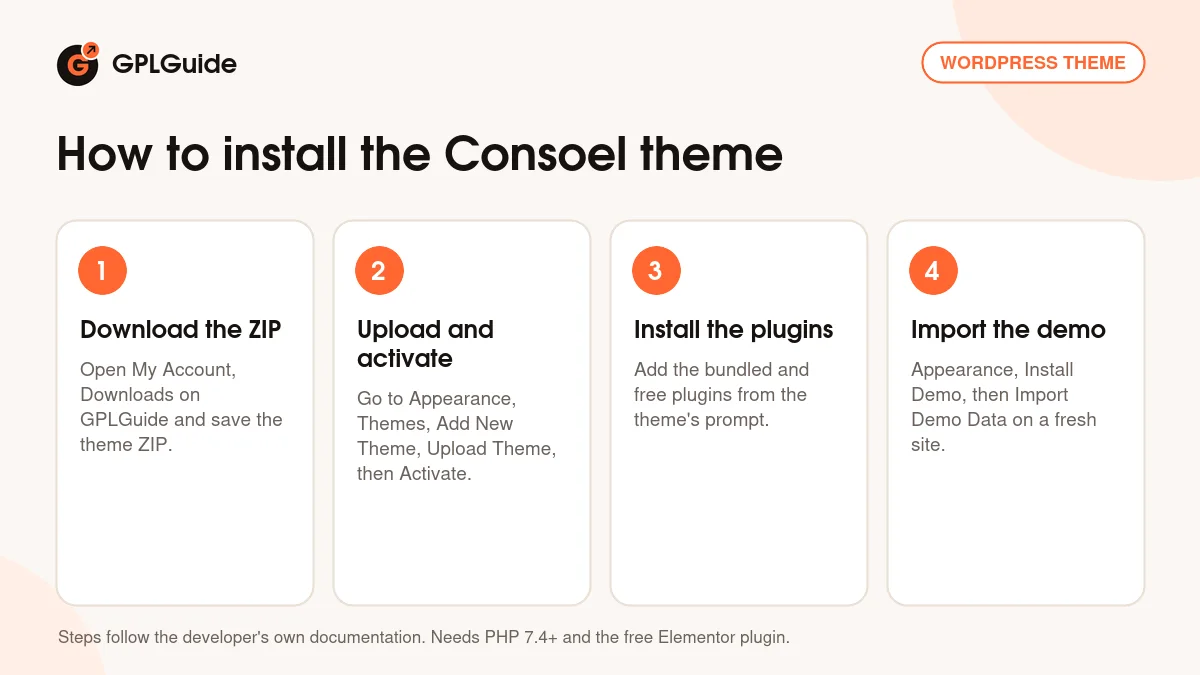
- Sign in to GPLGuide, open My Account, Downloads and save the Consoel theme ZIP.
- Go to Appearance, Themes, Add New Theme, Upload Theme, choose the ZIP and click Activate.
- Use the theme's plugin prompt to install and activate the bundled Consoel Core and Codestar Framework, plus the free Elementor, Contact Form 7, WooCommerce, MailChimp for WordPress and One Click Demo Import.
- Go to Appearance, Install Demo, click Import Demo Data, then set the Elementor options described above.
A good first setup of the Consoel theme takes about an hour. Upload your logo under Theme Options, Logo, set the brand color in the Customizer, then delete the demo services you don't offer and rewrite the ones you do. Add two or three team posts and one real project. Fix the Contact Form 7 dropdown, send yourself a test enquiry and check the home page on a phone before anything else.
Keeping it up to date
Updates from GPLGuide are manual. When a new version of the Consoel theme is listed here, download it from your account and upload it under Appearance, Themes, Add New Theme, Upload Theme. WordPress offers to replace the installed copy, and your Elementor pages and Theme Options stay in the database. Put code changes in a child theme, as the docs advise, so an update doesn't wipe them. If you spot a newer release we haven't added, tell us on the Request Item/Update page.
Questions about the Consoel theme
Which page builder does the Consoel theme use? Elementor. Its custom widgets come from the Consoel Core plugin, and Elementor Pro is listed as compatible but isn't required.
How many home pages does it have? Six. The item page lists six home styles, though it doesn't name them.
Why can't I edit a service page in Elementor? Usually one setting. Go to Elementor, Settings and select the service, project and team post types.
Do I need WooCommerce for the Consoel theme? Yes. The theme's plugin prompt lists it with the other free plugins, though you don't have to sell anything.
What PHP version does the Consoel theme need? PHP 7.4 or newer. That's the minimum in the style.css of Consoel 1.0.3, which also says it's tested up to WordPress 6.9.
Are Consoel Core and Codestar Framework included? Yes. Both plugin ZIPs ship inside the theme and install from its plugin prompt.
Can I use a different header on one page? Yes. Page Settings let each page pick its own header template, banner image and topbar shortcode.
Is the license key activated in Consoel 1.0.3 from GPLGuide? Yes. The key is already activated in the file, so you skip the purchase code step.
Does the Consoel theme work with the block editor? Yes. It's marked Gutenberg optimized, so blog posts can use the block editor while the demo pages stay in Elementor.
Want to compare other business designs? Browse the WordPress themes on GPLGuide, or see what a GPLGuide membership includes. For extra builder tools, Elementor Pro is listed as compatible with the Consoel theme.
Features & capabilities
- Consulting business design with six home styles and one-click demo import
- Consoel Core plugin with service, project and team post types
- Custom Elementor widgets in their own Consoel group
- Theme Options for logo, layout, header, footer and custom sidebars
- Per-page header templates, banner images and topbar shortcode
- Contact Form 7 forms and Google Maps with multiple locations
- WooCommerce product, cart and checkout pages
- Bootstrap 5 base, sticky menu and Customizer colors with live preview