Darna – Building & Construction WordPress Theme

100% Original fileUnmodified copy of the developer's release
DeveloperG5Theme
Up to dateOriginal released Apr 22, 2026 · File last updated Oct 21, 2026
About this product
The Darna theme is a building and construction WordPress theme for contractors, home builders and construction companies that want a solid company website with projects, a team page and a way to collect quote requests. It comes with four home pages, a one-click demo import, WPBakery Page Builder and Revolution Slider bundled, and a Theme Options panel for headers, logos, colors, fonts and the shop. This page is for Darna 1.4.3, released on April 22, 2026. On GPLGuide you download the original theme file to install on your own websites.
Good for: general contractors, home builders, renovation and remodeling firms, plumbers and other trades, architecture practices, building material suppliers who want a small shop, and agencies that build sites for construction clients.
Requirements: WordPress 6.0 to 6.9, the versions named on the item page. The docs still list old minimums (WordPress 3.9, PHP 5.4) and no current PHP version is published. The developer's knowledge base asks for max_input_vars 3000, memory_limit 128M, max_execution_time 300 and upload_max_filesize 64M. WPBakery Page Builder, Revolution Slider and the Darna framework plugin ship with the theme, and WooCommerce 5 to 9 is supported.
What the Darna theme does
The Darna theme has been on ThemeForest for about eleven years, and as we write this it shows 1,341 sales and a 4.66 rating from 56 reviews. You get four home pages, a Coming Soon page, a styled 404 page, a built-in mega menu and four header and menu styles.
Pages are built in WPBakery Page Builder, which comes inside the theme package. The look lives in Theme Options, built on the Redux framework. Projects and staff get their own post types, so your work and your people sit in proper archives instead of on one long page.
Around the company pages, the Darna theme is WooCommerce ready, works with Contact Form 7 for quote forms, shows Google Maps and supports MailChimp for WP for a newsletter. It's WPML compatible, translation ready with .po and .mo files, supports RTL and includes a child theme. The item page marks it as not Gutenberg optimized, so plan on WPBakery for layouts.
Darna theme headers, logos and Theme Options
The header settings go deeper than the four-style list suggests. Under Header you pick the Header Layout, show or hide the Top Bar, choose a Top Drawer Type and set the navigation to Container or Full Width. Header Float lets the header sit over your slider, Sticky Header keeps it in view as visitors scroll, and Search Box Type offers Standard or Ajax search. The mobile header has its own options, such as Menu Drop Type as Dropdown or Fly and a sticky mobile header.
The Logo panel takes a Logo, a Light Logo, a Dark Logo and a Sticky Logo, plus Logo Max Height and padding. Upload all of them on day one. A floating header over a dark hero image needs the light version, and the sticky bar usually looks better with something smaller.
Styling Options holds the Primary and Secondary colors plus text, heading and link colors. After any change, click "Save & Generate CSS", or the front end won't change. Font Options sets Body, H1, H2 and H3. Under General you'll find Home Preloader, Back to Top, Page Transition, Enable RTL Mode, a Maintenance setting and the 404 Page. The Darna theme also has a Custom CSS & JavaScript box (paste code without style or script tags) and Import/Export for backing up settings.

Projects, team profiles and one-page layouts
Your finished jobs go into the Portfolio post type. Each project takes a featured image and a Portfolio Extra info box, and the "Link to detail" option decides whether a thumbnail opens a full project page. Categories double as filter buttons, so Residential, Commercial and Renovation become a filterable grid. The docs say each post type's slug and display name can be changed, which helps if your clients say "projects" rather than "portfolio".
The Our Team post type holds staff profiles. For a builder that's more useful than it sounds: a site manager's face and name on the website does a lot for trust. The documentation says the Darna theme has three custom post types but only describes these two, so check what you get after activation.
Each page also has meta options that override Theme Options. Page Title controls the title bar and breadcrumbs, and Header lets one page use its own Header Layout or logo. Page Layout sets the sidebar to none, left, right or both, with Small 1/4 or Large 1/3 widths. For a one-page site, give each WPBakery row a Row ID, point your menu links at those IDs and tick "Is One Page" in the page's meta options.
Building pages, sliders and the shop in the Darna theme
You build pages under Pages, Add New with the WPBakery Backend Editor. A row can be Container, Container Fluid with a maximum width of 1170px, or Full Width, and takes a column gap, equal height columns and a background overlay with opacity from 0 to 100. The docs also offer a shortcut: in Classic Mode, open the Text tab and paste the Content Block code to get a Darna theme page like the demo.
The demo hero slides are Revolution Slider. The one-click import brings in pages, posts, sliders, widgets and theme options together, and the package also holds an exported slider file. Keep it to three slides. Long loops mostly delay the phone number.
For a materials supplier or a firm that sells a few products, the WooCommerce panel covers Products Per Page (12 by default), Product Display Columns, Show Rating, Sale Flash as Text or Percent, Result Count, Catalog Ordering, Quick View and an Add To Cart Animation. That's enough for a simple catalog without extra shop plugins.
Site plans to copy with the Darna theme
Before you import the demo, collect eight to ten good project photos of your own, a list of your services and a short description of each person on the team. The Darna theme's sections are built around exactly those pieces.
- General contractor: the first home page, a three-slide Revolution Slider of finished builds, Residential, Commercial and Renovation as portfolio filters and a Contact Form 7 quote form.
- Home builder: Our Team profiles for the people who run your sites, a Google Map on the contact page and your phone number in the Top Bar.
- Plumber or electrician: a one-page layout with Is One Page, rows for Services, Projects, About and Contact, and a sticky header so the menu stays in reach.
- Architecture practice: Full Width rows, large project images, the "Link to detail" pages for each project and the Light Logo over a floating header.
- Building materials supplier: a WooCommerce catalog with Quick View, Sale Flash set to Percent and three product columns.
- New firm still building its site: the Maintenance setting pointed at a custom page while you finish, using the Coming Soon design.
Whatever you build, put a quote button and a phone number in the header. Visitors mostly want to know two things: can you do their job, and how do they reach you?
What's new in the Darna theme 1.4.3
Darna 1.4.3 is the current version on the item page, released on April 22, 2026. The item page links to a full changelog on the developer's demo server, but that page wouldn't load when we checked, so we can't list line by line what 1.4.3 changed.
The item page now lists WordPress 6.0 to 6.9 and WooCommerce 5 to 9 as compatible. Buyers in the comments mention earlier releases such as 1.3.5 and 1.4.2, so expect point releases rather than redesigns. Read the notes before you update a live site.
Good to know before you buy
The Darna theme is a WPBakery theme, full stop. When a buyer asked about Elementor, the developer replied that it isn't compatible, and the block editor isn't a good fit either. If you want to design in Elementor, pair Elementor Pro with a different theme.
The documentation and the item page don't always agree. The docs talk about eight home pages and nine header layouts where the item page lists four of each, and their requirements still name WordPress 3.9 and PHP 5.4. Go by the item page and try the Darna theme on a staging site first, which is what the developer told a buyer before a WordPress update. Low PHP limits are the usual reason a demo import stops halfway.
Two more things. The developer has said it can't let buyers use the demo images, so plan for your own photos. And after a buyer reported a security plugin warning about the framework plugin, the developer's latest reply asks buyers to make sure the framework is on version 3.0. Update it whenever you update the theme. We found no service on the developer's servers that the Darna theme depends on.
Darna theme from GPLGuide vs the official subscription
The Darna theme is sold on ThemeForest, where the Regular License costs $60 and the Extended License $2950. A Regular License includes future updates through Envato and six months of support from the developer, and extending support to 12 months is listed at $42. Under Envato's licence for this item, its PHP code is licensed under the GPL.
From GPLGuide you get the original Darna 1.4.3 theme file, with the same four home pages, demo import, bundled plugins, framework plugin and Theme Options. The license key is already activated, so there's nothing to enter before you start.
The developer's help desk, refunds under Envato's rules and updates through your Envato account come only with a ThemeForest purchase. If you expect to need the developer's help with a tricky import, buy the licence there.
How to install the Darna theme
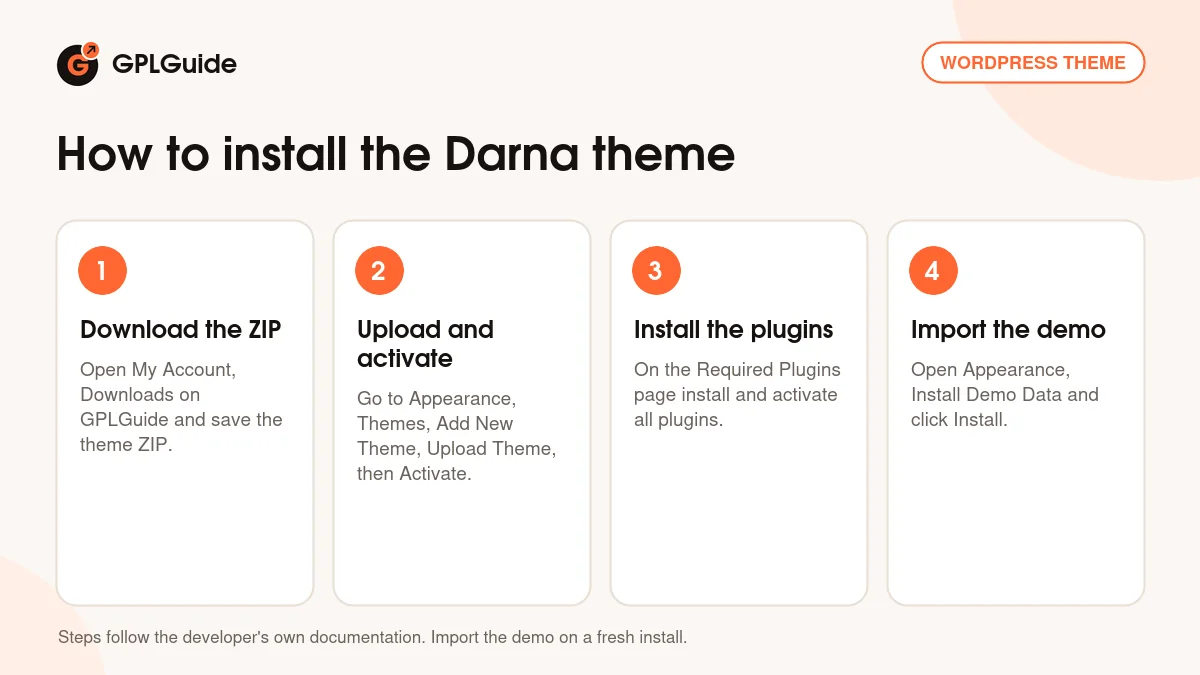
- Sign in to GPLGuide, open My Account, Downloads and save the Darna theme ZIP.
- Go to Appearance, Themes, Add New Theme, Upload Theme, choose the ZIP, click Install Now and then Activate.
- On the Required Plugins page select all plugins, choose Install and Apply, then select them again, choose Activate and Apply.
- Open Appearance, Install Demo Data and click Install, then set a static front page under Settings, Reading.
A good first setup takes an afternoon. Set Settings, Permalinks to Post name, upload your logos and change the Primary color in Styling Options, then click "Save & Generate CSS". Rename the portfolio categories to your project types and swap every demo image. Then connect WP Mail SMTP and send yourself a test quote through Contact Form 7. Quote mail that never arrives costs a contractor real jobs.
Keeping it up to date
Updates from GPLGuide are manual. When a new version of the Darna theme is listed, download it from your account and upload it under Appearance, Themes, Add New Theme, Upload Theme. WordPress offers to replace the installed copy, and your pages and Theme Options stay in the database. Update the Darna framework plugin at the same time, as the docs remind you, and keep code changes in the child theme. If you spot a newer release we haven't added, tell us on the Request Item/Update page.
Questions about the Darna theme
Which page builder does the Darna theme use? WPBakery Page Builder. It's bundled with the theme and installs from the Required Plugins page.
Does it work with Elementor? No. The developer said in the item comments that Darna isn't compatible with Elementor.
How many home pages does the Darna theme have? Four, according to the item page. The docs mention more, but the item page is the current list.
Can I sell products with the Darna theme? Yes. It's WooCommerce ready, lists WooCommerce 5 to 9 as compatible and has Quick View and sale badge settings.
Can I use the demo photos? No. The developer has said it doesn't have permission to let buyers use the demo images.
Does it support right-to-left languages? Yes. Turn on Enable RTL Mode under General. The theme is also WPML compatible and ships .po and .mo files.
Is a child theme included? Yes. A child theme ZIP comes in the package, and it's the right place for code changes.
Do I need a purchase code? No. The GPLGuide file comes with the license key already activated.
Looking for more designs for trades and service companies? Browse the WordPress themes on GPLGuide, or see what a GPLGuide membership includes if you build sites for several construction clients.
Features & capabilities
- Building and construction design with four home pages
- One-click demo import for pages, posts, sliders, widgets and options
- WPBakery Page Builder and Revolution Slider bundled
- Four header and menu styles with a built-in mega menu
- Portfolio and Our Team custom post types with filters
- Redux based Theme Options for colors, fonts, logos and layout
- WooCommerce ready, with Quick View and sale badge settings
- RTL support, WPML compatible, translation ready, child theme included