Distance Based Shipping Rates for WooCommerce

100% Original fileUnmodified copy of the developer's release
DeveloperOctolize
Up to dateOriginal released Sep 21, 2026 · File last updated Oct 16, 2026
About this product
Distance Based Shipping Rates for WooCommerce is an Octolize plugin that prices shipping by how far the customer is from you, or by how long the trip takes. It uses Google Maps to work out the route and adds Distance and Duration conditions to the Flexible Shipping rules table, so local deliveries can cost less, long trips more, and addresses beyond your range can be turned away. This page is for version 3.0.22, released on September 21, 2026. On GPLGuide you download the original distance based shipping plugin to install on your own WooCommerce stores.
Good for: restaurants, bakeries, florists, grocery shops, furniture stores and any WooCommerce business that delivers with its own vans, bikes or couriers and wants the shipping price to follow the real distance instead of a flat rate or a postcode list.
Requirements: PHP 7.4 or newer, WooCommerce (the developer lists it as fully compatible with versions 10.8 to 11.2), the Flexible Shipping plugin in its free or PRO version, and a Google Maps API key. The free Flexible Shipping plugin on WordPress.org is enough to get started.
How distance based shipping works in this plugin
The plugin does not add a separate shipping method. Instead it plugs into Flexible Shipping, which already lets you build shipping rules from conditions such as cart value, weight or item count. Distance Based Shipping Rates adds two more conditions to that rules table: Distance, measured from your origin to the customer's address, and Duration, the estimated travel time.
When a customer enters their address at checkout, the plugin asks Google for the route between your origin and that address. The answer is matched against your rules, and the customer sees the shipping price for their distance or travel time. Each rule can cover a range, for example 0 to 5 kilometres, and carry its own cost.
Because the conditions sit inside Flexible Shipping, you can combine them with the others. Octolize gives price, weight and quantity as examples when you use Flexible Shipping PRO, so one rule could offer free delivery up to 10 km on larger orders while a second rule charges a fee for the same distance on smaller ones.
Pricing ideas you can build with it
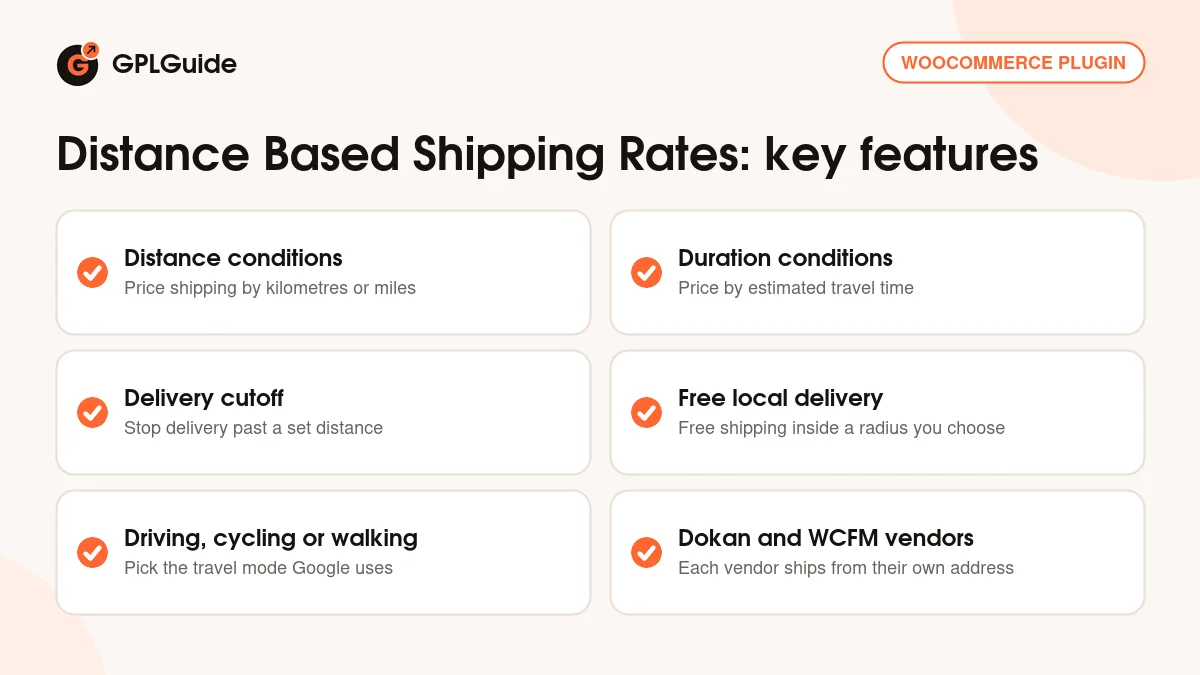
Distance bands. Split your delivery area into rings, each with its own price. For example, a shop could charge nothing up to 3 km, a small fee from 3 to 10 km and a higher fee from 10 to 25 km. These numbers are only an illustration; you set your own ranges and prices.
A per-kilometre charge. Each rule can add an Additional Cost with the "+" button next to its price. Octolize's docs show two ways to use it: a charge for every started kilometre, or a cost multiplied by the distance. It suits businesses whose real cost grows with every kilometre driven.
A delivery cut-off. Set a maximum delivery distance and addresses further away simply don't get this shipping option. That stops orders you can't deliver before they are placed.
Free local delivery. Offer free or cheaper delivery inside a radius you choose, a simple way to reward nearby customers and compete with local shops.
Time instead of distance. In a busy city, 5 km can take longer than 15 km on an open road. The Duration condition prices delivery by estimated travel time instead, and with Google's Routes API real-time traffic is taken into account by default.
Origin, travel mode and units
Distances are measured from your WooCommerce store address by default, or from one custom origin address that you enter in the settings. You also choose the travel mode Google should use: driving, cycling or walking. Cycling and walking are handy for bike couriers and on-foot deliveries in town centres. Distances can be set in metric or imperial units.
On marketplaces built with Dokan or WCFM Marketplace, the plugin can use each vendor's own address as the origin, so every vendor's customers pay for the real distance from that vendor. The integrations appear as checkboxes once those plugins are active. Octolize advises against using Dokan and WCFM together, and notes that the integration shows the shipping cost but does not pass fees on to the site admin.
One limit to know: multiple origins are not available yet. Octolize's own docs say this "hasn't been implemented yet", so a store with several warehouses can only measure from one address, apart from the vendor setup above.
Google Maps API: Routes or Distance Matrix
The distance data comes from Google, so you need your own Google Maps API key. In the plugin's settings, the Google API Type field offers two options: the Distance Matrix API and the Routes API. Google has moved Distance Matrix to Legacy status and recommends Routes for new customers, so Routes is the better choice for a new setup. Make sure the Routes API is enabled in Google Cloud Console under APIs and Services.
After you save the key, the API Connection Status field shows whether the connection works. If you see "Your request was denied. Incorrect authentication", Octolize's troubleshooting guide says to check that the Routes API is enabled, add your site address to the key's allowed referrers and re-check the key character by character.
For checking your rules, a Debug Mode shows the exact parameters, rules and calculations that were used for a quote. The distance in metres and the travel time in seconds are also saved with each order, which helps if you later need to see why an order was charged a certain amount.
What's new in Distance Based Shipping Rates 3.0.22
Version 3.0.22 came out on September 21, 2026. It is a maintenance release that adds support for WooCommerce 11.2. There are no new features in it.
The releases before it kept the plugin current with WordPress and WooCommerce: 3.0.21 (September 4, 2026) added WooCommerce 11.1 support, 3.0.20 (August 17, 2026) added WordPress 7.1 support and updated dependencies, 3.0.19 (July 13, 2026) added WooCommerce 11.0 support and 3.0.15 (May 18, 2026) added WordPress 7.0 support.
The biggest recent change was version 3.0.0 on March 5, 2025, which added Google Routes API support and the Dokan and WCFM Marketplace integrations. The plugin was first released in November 2022 and has declared compatibility with WooCommerce High-Performance Order Storage since version 1.1.0.
Is distance based shipping right for your store?
Distance based shipping makes the most sense when you deliver yourself or pay a courier by the trip. A pizza place, a garden centre or a furniture shop usually knows its real cost per kilometre, and a flat rate either overcharges nearby customers or loses money on the long runs.
It is less useful if you send everything by post or a national carrier that charges by weight and zone. In that case the carrier's own rates matter more than the road distance from your shop, and a weight-based Flexible Shipping table may be all you need.
Also check the practical side before you buy. You need a Google Cloud account with an API key, every quote is a request to Google, and the plugin measures from a single origin. If those fit your business, distance based shipping gives customers a fair price they can understand.
Distance Based Shipping Rates from GPLGuide vs an Octolize subscription
From GPLGuide you get the original Distance Based Shipping Rates for WooCommerce 3.0.22 plugin file, released under the GPL, to use on your own stores. You still need Flexible Shipping and your own Google Maps API key, exactly as with a copy bought from the developer.
An Octolize subscription adds a subscription API key for automatic updates in your dashboard, 1-on-1 email support from Octolize and a 30-day money-back guarantee. If you need the developer's help with your setup, buy from Octolize. If you need the plugin itself, GPLGuide gives you the same file at a lower price, on its own or with a GPLGuide membership.
How to install Distance Based Shipping Rates for WooCommerce
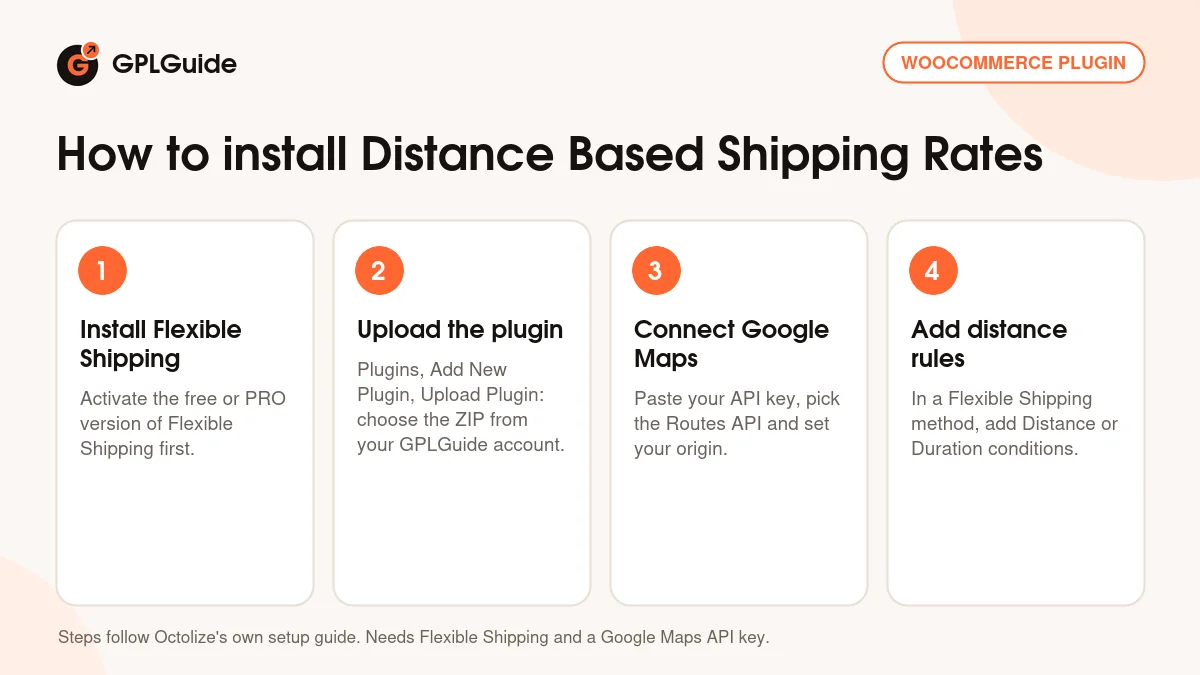
- Install and activate Flexible Shipping (free or PRO) first.
- Sign in to GPLGuide, open My Account, Downloads and save the plugin ZIP. In WordPress go to Plugins, Add New Plugin, Upload Plugin, choose the ZIP, then click Install Now and Activate.
- Go to WooCommerce, Settings, Shipping, Flexible Shipping Distance Based Shipping Rates. Pick the Google API Type, paste your API key, save and check the API Connection Status. Then set the travel mode, distance unit and origin.
- Open a shipping zone, add a Flexible Shipping method, and in its rules table add Distance or Duration conditions with your ranges and costs.
Test with a few real addresses at different distances before you go live, and turn on Debug Mode if a price looks wrong. It shows which rule matched and how the cost was worked out. Once your distance based shipping rules give the prices you expect, switch Debug Mode off again.
Keeping it up to date
Updates from GPLGuide are manual. When a new version of Distance Based Shipping Rates is listed here, download it from your account and upload it under Plugins, Add New Plugin, Upload Plugin, and WordPress will offer to replace the installed copy. Your shipping rules are saved in your database, not in the plugin folder. Spotted a newer version that we haven't added? Tell us on the Request Item/Update page.
Questions about Distance Based Shipping Rates
Do I need another plugin? Yes. Distance Based Shipping Rates works inside Flexible Shipping, so the free or PRO version of Flexible Shipping has to be installed and active. The free version is available on WordPress.org, and Octolize mentions combining distance with price, weight and quantity when you use the PRO version.
Which Google API should I choose? Routes. Google now treats Distance Matrix as a legacy API and recommends Routes for new customers, and Routes counts real-time traffic by default.
Can I ship from several warehouses? Not yet. You get one origin, either your store address or a custom address. On Dokan or WCFM marketplaces each vendor's address can be used instead.
Can I offer free delivery nearby and charge more further out? Yes. Create one rule with a free price for the short range and further rules with higher prices for longer distances, and set a maximum distance if you don't deliver beyond a certain point.
Does it measure a straight line or the real route? The real route. Distances come from Google's routing for the travel mode you pick, not from a straight line on the map.
Does distance based shipping work with the WooCommerce block checkout? Octolize doesn't state this on its product page or in its docs. If your store uses the block-based checkout, test the plugin on a staging copy of your site before you rely on it.
Can I see the distance for an order later? Yes. The plugin saves the distance in metres and the travel time in seconds with each order, so you can check what a customer was charged for.
Is it the same as WooCommerce Distance Rate Shipping? No. That is a different plugin made by WooCommerce. This page is for the Octolize plugin that works with Flexible Shipping.
Looking for more tools for your store? Browse all WordPress plugins on GPLGuide and our WooCommerce extensions, or see what a GPLGuide membership includes.
Features & capabilities
- Distance and Duration conditions for Flexible Shipping rules
- Distance bands, each with its own shipping cost
- Additional cost per started kilometre or multiplied by distance
- Maximum delivery distance to stop orders you can't deliver
- Free or cheaper local delivery inside a radius you choose
- Driving, cycling or walking travel modes, metric or imperial units
- Store address or one custom address as the origin
- Vendor addresses as origins with Dokan or WCFM Marketplace
- Google Routes API (with real-time traffic) or Distance Matrix API
- Debug Mode, API connection check and distance saved with each order