Divi Supreme Pro
100% Original fileUnmodified copy of the developer's release
DeveloperDivi Supreme
Up to dateOriginal released Oct 14, 2026 · File last updated Oct 16, 2026
About this product
Divi Supreme Pro is a plugin by Divi Supreme that adds a large set of extra modules and extensions to the Divi Builder, from card carousels and flipboxes to popups, scheduled content and a dark mode. The developer counts more than 70 modules and 16 extensions, and since version 5.0 the plugin is rebuilt natively for Divi 5 while still supporting Divi 4. This page is for Divi Supreme Pro 5.0.83, released on October 14, 2026. On GPLGuide you download the original plugin file to install on your own Divi websites.
Good for: Divi designers, freelancers and agencies who want more building blocks than Divi ships with, such as carousels, galleries, tables and text effects, plus site tools like popups, password protection and a maintenance page, without a separate plugin for each one.
Requirements: The Divi theme, the Extra theme or the Divi Builder plugin from Elegant Themes. Divi is a separate paid product and is not included. The developer's requirements page lists WordPress 4.5 or greater, PHP 7.0 or greater and MySQL 5.0 or greater, with Divi 4.1+, Extra 3.1+ or Divi Builder 3.1+. Version 5.x works with both Divi 5 and Divi 4: the developer says it was "natively rebuilt for Divi 5" and keeps "full backward compatibility with Divi 4".
What Divi Supreme Pro does
Once active, Divi Supreme Pro puts its own modules into the Divi Builder next to the standard ones, with the usual Content, Design and Advanced tabs. Many are visual, such as Typing Effect, Glitch Text, Tilt Image, Card Carousel and Masonry Gallery.
The other half of the plugin is extensions. They add options to the sections, rows and modules you already have, or switch on a tool for the whole site. The Popup extension turns any module into a popup trigger, and Scheduled Element shows or hides content at set times. You switch extensions on from the Divi Supreme Pro menu in your WordPress admin.
The developer also describes a Dynamic Assets feature: the CSS and JavaScript for a module or extension only load on pages that use it, so pages without them stay light.
The module library in Divi Supreme Pro
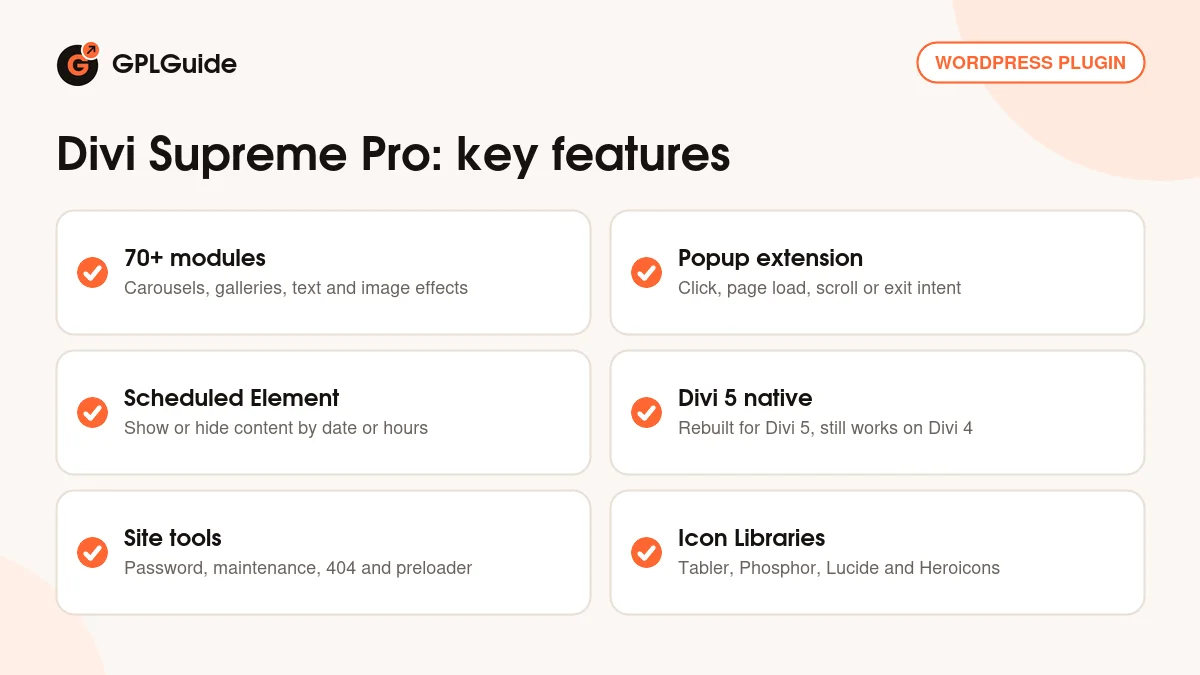
The developer's module list is long, so here is a sample in groups. For text there are Gradient Text, Dual Heading, Typing Effect, Text Rotator, Glitch Text, Mask Text, Text Path and Text Badges. For images there are Image Carousel, Image Accordion, Image Hotspots, Before/After Image Slider, Scroll Image, Blob Shape Image, Masonry Gallery and Filterable Gallery.
For content and layout you get Card, Card Carousel, Flipbox, Advanced Tabs, Content Toggle, FAQ, Content Timeline, Step Flow, Price List, Business Hours and Lottie, plus Blog Carousel and Post Carousel for your posts.
The 5.0 series added more. The 5.0 launch in May 2026 brought native Divi 5 modules such as Animated Headlines, Line Hover, Table of Contents and Stacking Card. Later releases added Chart, Divi Marquee, Table, Testimonial, Supreme Loop Filter, Post Reading Time and a Dark Mode Toggle module.
Card Carousel shows how far the settings go. You add cards with "+ Add new Item", then choose a Carousel Effect (Slide, Coverflow, Flip or Cube), Slides to Show, Slides to Scroll, Infinite Looping, Equalize Card Heights, arrows and pagination. Since version 5.0.41 the pagination can be Default, Dynamic Bullets or Progress Bar.
Popups, scheduling and the other extensions
The Popup extension is one of the most practical parts of Divi Supreme Pro. Turn on Enable Supreme Popup in the settings, open a module, go to Advanced, Visibility and switch on Use Popup. Pick a Popup Type (Layout, iFrame, Image or Video) and the Divi Library layout to show. Trigger On decides when it opens: Module Click, Button Click, Image Click, Hyperlink Click, By ID, By Class, Page Load, Scroll or Exit Intent.
Page Load and Scroll popups get a Timed Delay and a Cookie Expiry, so returning visitors don't see them every time. A popup can close on an outside click, a close button or a timer. You get nine positions and more than 40 entrance and exit animations.
Scheduled Element adds a Use Scheduled Element switch to the same Visibility area. Choose the Show Option or Hide Option, set a date and time, and optionally use Use Between Date/Time for a window with an end. Use Business Hour/Time takes an Opening Time, a Closing Time and the days.
Newer extensions in Divi Supreme Pro cover site tools: Password Protection (whole site, single pages, or one section, row or column), Maintenance and Coming Soon, Custom 404 Page, Preloader, Tooltip, Dark Mode and Icon Libraries. Contact Form Pro saves submissions from Divi's own Contact Form in your admin, and Client Handoff (added in 5.0.77) is billed as a one-click way to make a site client-safe.
Divi 5, Divi 4 and the settings page
Version 5.0 came out of beta in May 2026. The developer calls it a native rebuild for Divi 5 rather than a compatibility patch, with full backward compatibility with Divi 4, and its Divi Marketplace listing says it works with both. The modules from the 5.0 launch were introduced as native Divi 5 modules, and the developer doesn't say they also work in Divi 4.
A few tools help with the move. There is a Convert Legacy Modules tab on the Divi Supreme Pro settings page, and the Divi Supreme Shortcode extension renders Divi Library content when you go from Divi 4 to Divi 5. The 5.0 launch post also mentions a Divi 4 folder holding the latest production Divi Supreme Pro 4 for a safe rollback.
The settings page holds other useful switches: Auto-clear Divi Cache on plugin update, a Beta updates option, and the toggles for the extensions. Supreme Loop Filter is one of those toggles, and version 5.0.83 turns it on by default.
Setups you can copy with Divi Supreme Pro
These ideas use only options the developer documents. Change the details to suit your site.
- Newsletter popup on exit: Attach a signup layout from the Divi Library with Use Popup, set Trigger On to Exit Intent and add a Cookie Expiry.
- Popup from the menu: Add an empty Text module to the Global Footer with the trigger set to By Class, for example open-popup, then give that class to a menu item under Appearance, Menus.
- Weekend sale banner: With Scheduled Element and Use Between Date/Time, a promo section shows from Friday morning to Sunday night.
- Opening hours row: Use Business Hour/Time so a "Call us now" row only shows while someone can answer the phone.
- Client launch: Use Maintenance and Coming Soon while you build, then Client Handoff before you pass the site over.
Start small: each extension can stay off until you need it.
What's new in Divi Supreme Pro 5.0.83
Divi Supreme Pro 5.0.83 was released on October 14, 2026. It fixes the Card Carousel Infinite Loop so it works even when you have no more cards than Slides to Show, with pagination bullets that match the real number of cards. Advanced Tabs now plays Divi scroll animations on tabs that were hidden when the page loaded. Supreme Loop Filter is now on by default. Sites that had it off under the old default get it switched on once, while a filter you turned off yourself stays off.
Just before it, 5.0.82 (October 13, 2026) fixed a "module not found" error for Loop Filter inside Advanced Tabs and kept multi-column Popup layouts side by side. 5.0.81 (October 7, 2026) added the Post Reading Time module, and 5.0.80 (October 6, 2026) brought escaping fixes for several Divi 4 modules.
Good to know before you buy
This plugin does nothing on its own. You need the Divi theme, the Extra theme or the Divi Builder plugin, and that license comes from Elegant Themes, not with this download. Supreme Mega Menu, Supreme Maps Pro, Supreme AI Writer and Supreme Store are separate products from the same developer and are not part of Divi Supreme Pro.
The developer ships often, with five releases between October 3 and October 14, 2026, so any copy falls behind quickly. The docs articles we read don't mention Divi 5, so some steps may look different there, and the requirements page lists minimum versions without mentioning Divi 5. The "70+ modules" figure is the developer's own; its features page names fewer, and newer additions appear only in the changelog.
Some extras depend on the developer's account. The license key, managed under Divi Supreme Pro, License, is what brings updates into your dashboard, so the Beta updates option only matters with a key. The free landing page layouts in the plans come from the developer's website, not the plugin file.
Divi Supreme Pro from GPLGuide vs the official subscription
From GPLGuide you get the original Divi Supreme Pro 5.0.83 plugin file, released under the GPL. Everything inside the file works the same: the modules, the extensions, Dynamic Assets and the Divi 4 and Divi 5 support. The developer itself says that when a license expires "everything will still work normally" and only support and updates stop.
Buying from the developer adds updates through the license key, premium support from Divi Supreme and a 14-day money-back guarantee. On its pricing page the Professional plan costs $79 for one year of updates and support on unlimited sites, with 30% off renewals, and the Agency plan costs $269 once for lifetime updates and support. The Divi Marketplace listing is $79 with a 30-day money-back guarantee. We don't provide the developer's support, so if you rely on it, buy from them. If you need the plugin itself, GPLGuide gives you the same file for less.
How to install Divi Supreme Pro
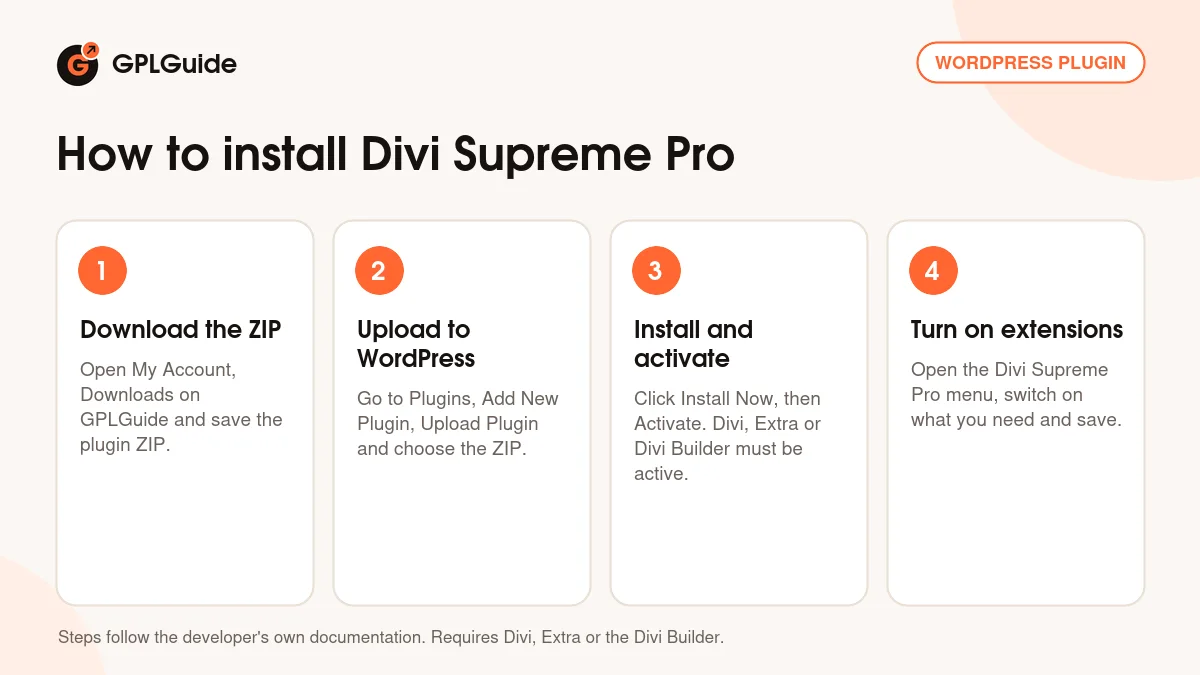
- Sign in to GPLGuide, open My Account, Downloads and save the Divi Supreme Pro ZIP.
- In WordPress go to Plugins, Add New Plugin, Upload Plugin and choose the ZIP.
- Click Install Now, then Activate. The Divi theme, Extra or the Divi Builder must already be active.
- Open the Divi Supreme Pro menu in your admin, switch on the extensions you want and save your changes.
A good first setup is to turn on only Popup and Scheduled Element. Build one Divi Library layout for a popup and attach it to a button on your home page with the Button Click trigger. Then try a Card Carousel on a test page to get a feel for the settings, and turn on Auto-clear Divi Cache on plugin update.
Keeping it up to date
Updates from GPLGuide are manual. When a new version of Divi Supreme Pro is listed here, download it from your account and upload it under Plugins, Add New Plugin, Upload Plugin. WordPress offers to replace the installed copy, and your pages and settings stay in place. If you spot a newer release than ours, ask for it on the Request Item/Update page.
Questions about Divi Supreme Pro
Does Divi Supreme Pro work with Divi 5? Yes. Version 5.0 and later are rebuilt natively for Divi 5, and the developer says the plugin keeps full backward compatibility with Divi 4.
Is the Divi theme included? No. You need the Divi theme, the Extra theme or the Divi Builder plugin from Elegant Themes, bought separately.
Do I also need the free Lite version? Lite is the free version with 20+ modules, and Pro is the larger paid one. For Divi 5 sites, the developer's team said in October 2025 that Lite isn't needed and could cause issues if left installed.
Do I need to enter a license key? No. The file from GPLGuide comes with the license key already activated, and the developer says the plugin keeps working normally even after a license expires.
Can a popup open from a menu link? Yes. Set the popup trigger to By Class and give the same CSS class to a menu item.
Which extra icon sets come with Divi Supreme Pro? The Icon Libraries extension adds Tabler, Phosphor, Lucide and Heroicons icons to the Divi Builder.
Can I show content only at certain times? Yes. Scheduled Element shows or hides a section, row or module by date, date range or business hours.
Building with Divi? Browse more WordPress plugins on GPLGuide, or see what a GPLGuide membership includes if you need several premium plugins. To try the developer's modules first, the free Divi Supreme Lite is on WordPress.org.
Features & capabilities
- More than 70 modules by the developer's count, from Card Carousel and Flipbox to Chart, Table and Testimonial
- Popup extension with click, page load, scroll and exit intent triggers
- Scheduled Element for dates, time windows and business hours
- Natively rebuilt for Divi 5, with backward compatibility for Divi 4
- Site tools: Password Protection, Maintenance and Coming Soon, Custom 404 Page and Preloader
- Icon Libraries with Tabler, Phosphor, Lucide and Heroicons icons
- Dynamic Assets loads module files only where they are used
- Supreme Loop Filter, switched on by default since 5.0.83