StudioPress Foodie Pro Genesis WordPress Theme
100% Original fileUnmodified copy of the developer's release
DeveloperFeast Design Co
Up to dateOriginal released Sep 2, 2019 · File last updated Oct 29, 2026
About this product
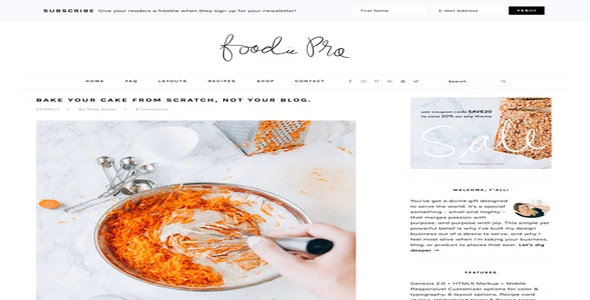
Foodie Pro Theme 4.2.0 is a Genesis child theme for food blogs: recipe sites, home cooks and bloggers who publish dishes step by step and want readers to find older recipes through a clear home page and recipe index. The developer pitches it as a starter theme for new food blogs in their first year, with a clean, minimal design, readable type and a 720 pixel content width. It doesn't include a recipe card, so you pair it with a recipe plugin; the developer recommends WP Recipe Maker. The developer ships the child theme with demo content and widgets to import, plus tutorials for setting up the home page, recipe index and category pages.
How to install Foodie Pro Theme
- Install and activate the Genesis Framework parent theme first, because this child theme does not run without it. The Genesis Framework is also available on GPLGuide. The developer asks for self-hosted WordPress (not wordpress.com) and hosting with PHP 7.4 or later.
- Log in to GPLGuide, open this product and click Download under Your downloads.
- In WordPress, go to Appearance, Themes, Add New Theme, Upload Theme, choose the theme ZIP and click Install Now.
- Click Activate. Genesis stays installed as the parent theme while Foodie Pro controls the design.
- Install a recipe card plugin such as WP Recipe Maker, since the theme has no recipe card of its own.
- Import the demo content and widgets as the developer's install tutorial describes, then set up the home page and recipe page widgets under Appearance, Widgets. Moving from an older version works like a new theme install, so redo your customizations.
Features & capabilities
- Color and typography options in the Customizer
- Widget-based home page and recipe page layouts
- Featured posts widget for showing recipes with their images
- Ad spaces placed in the layout for display ads
- Demo content and widgets you can import in a few clicks
- Styling for block editor elements
- Image sizes set to 360 and 720 pixel widths to match the content width
- Category pages laid out in thirds on desktop and halves on mobile
- Styling for lazy-loaded images from a caching plugin
- Works with Genesis 3.1 and its footer changes
Frequently asked questions
Is this the original file?
Yes. Every product on GPLGuide is the developer’s own release, unchanged. The license key comes already activated. If a product does ask for a key, the activation steps appear on its page once you have it.
Is it legal to use a GPL plugin or theme from GPLGuide?
Yes. WordPress plugins and themes are released under the GPL, which lets anyone use, share and change the code. The developer’s support desk and the developer’s own update service are not part of the file; those stay with the developer.
How do I install it?
Log in, open the product page and click Download under Your downloads. For a plugin go to Plugins, Add New Plugin, Upload Plugin, choose the ZIP, then Install Now and Activate. For a theme go to Appearance, Themes, Add New Theme, Upload Theme.
How do updates work?
When a newer version is listed on GPLGuide, download it from the product page and upload it over the installed copy; WordPress offers to replace the old version. Updates are manual.
Can I use it on more than one site?
Yes. The GPL lets you use it on as many of your own sites as you like.
What if the file does not work or a newer version is out?
Tell us on the Request Item page or through Support. We check the file and add the newer version when we have it.