Headinger - Customizable headings for Elementor

100% Original fileUnmodified copy of the developer's release
DeveloperMerkulove
Up to dateOriginal released Feb 24, 2026 · File last updated Oct 23, 2026
About this product
Headinger for Elementor 1.1.5 adds one heading widget to the Elementor editor for titles that need more than a font and a colour. It's aimed at blogs, magazines, portfolios and small shops built with Elementor, where post and section titles carry much of the design and you want a subheader, a decorative line or a rotated extra word next to the title without writing CSS.
What's in the Headinger for Elementor download
Our download is the original Headinger for Elementor ZIP for version 1.1.5, with the license key already activated. It holds the plugin that adds the Headinger widget, plus a small settings screen under Settings, Headinger for Elementor with Status, Activation and Uninstall tabs. Elementor itself is not in the file. The widget runs on the free Elementor plugin, so you don't need Elementor Pro for it.
Good to know
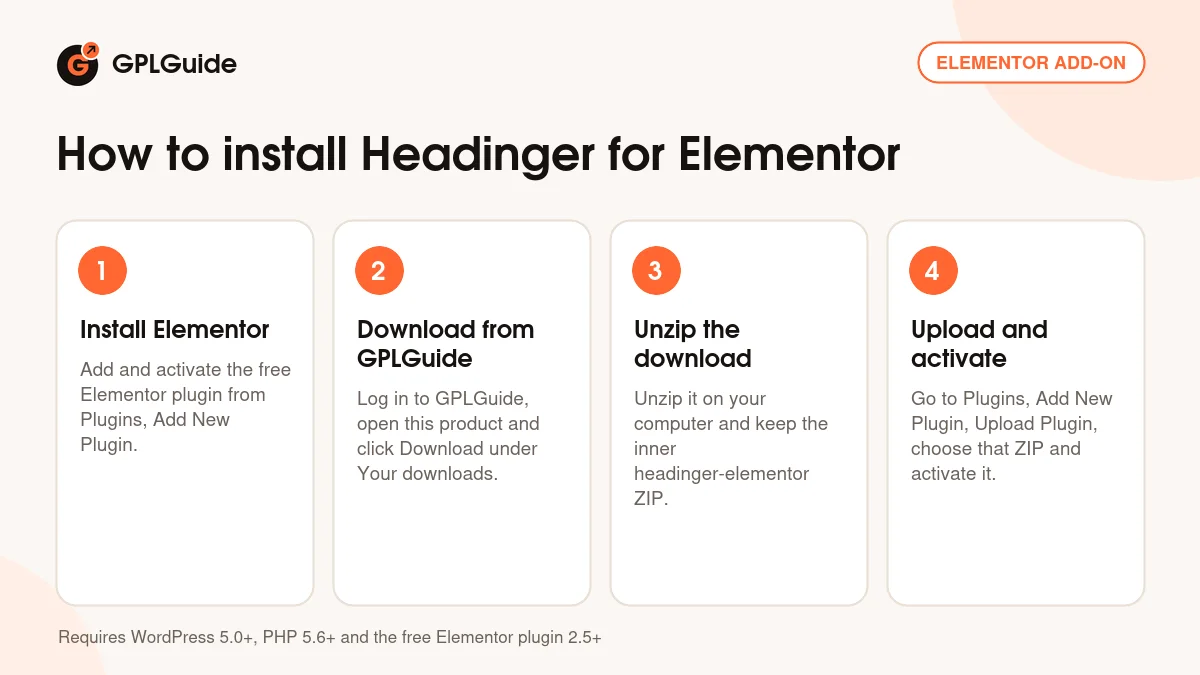
Headinger needs WordPress 5.0 or newer, PHP 5.6 or newer and the free Elementor plugin, version 2.5 or newer, so install Elementor first. Unzip the download on your computer first and upload the inner headinger-elementor ZIP, not the whole package. In the editor some style groups stay hidden until you switch their part on in the Content tab: Line Style appears only after you turn on Line, and the Subheader and Additional Header styles only after you enable those parts.
How to install Headinger for Elementor
Features & capabilities
- Header, Subheader and Additional Header parts, each with its own text and style settings
- Subheader placed above or below the main title with one switch
- Split header option that puts extra text on a new line
- Text stroke with its own colour and a size you can change per device
- Decorative line before, after, below or on both sides of the title
- Rotate, transform origin and X and Y offsets for the additional header
- Colour, gradient or image backgrounds and solid, double, dotted, dashed or groove borders for the title box
- Link, HTML tag and word break settings for the heading, with RTL support and a POT file for translation
Frequently asked questions
Is this the original file?
Yes. Every product on GPLGuide is the developer’s own release, unchanged. The license key comes already activated. If a product does ask for a key, the activation steps appear on its page once you have it.
Is it legal to use a GPL plugin or theme from GPLGuide?
Yes. WordPress plugins and themes are released under the GPL, which lets anyone use, share and change the code. The developer’s support desk and the developer’s own update service are not part of the file; those stay with the developer.
How do I install it?
Log in, open the product page and click Download under Your downloads. For a plugin go to Plugins, Add New Plugin, Upload Plugin, choose the ZIP, then Install Now and Activate. For a theme go to Appearance, Themes, Add New Theme, Upload Theme.
How do updates work?
When a newer version is listed on GPLGuide, download it from the product page and upload it over the installed copy; WordPress offers to replace the old version. Updates are manual.
Can I use it on more than one site?
Yes. The GPL lets you use it on as many of your own sites as you like.
What if the file does not work or a newer version is out?
Tell us on the Request Item page or through Support. We check the file and add the newer version when we have it.