
Plainseek – AI Product Search for WooCommerce
100% Original fileUnmodified copy of the developer's release
DeveloperJawad Ahbab
Up to dateOriginal released Sep 25, 2026 · File last updated Oct 30, 2026
About this product
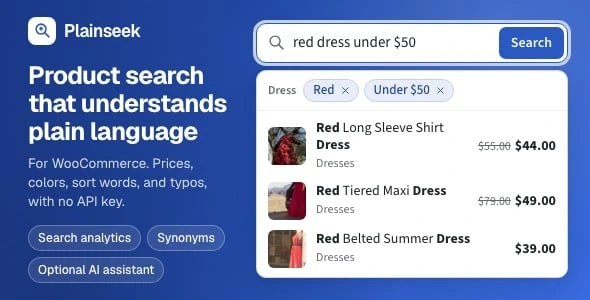
Plainseek 1.0.0 is a product search plugin for WooCommerce that reads what shoppers mean instead of matching exact words. It suits online stores with many products, where visitors type things like red dress under $50, misspell a name or use words your product titles don't. The plugin takes over the search bar on your shop, turns what it understands into filters shoppers can remove, and adds a Plainseek menu to the WordPress admin for ranking, synonyms and analytics. Keyword search works on its own, and the AI features are optional and use your own provider account.
How to install Plainseek
- Install and activate WooCommerce first under Plugins, Add New Plugin if your site doesn't run it yet. Plainseek needs WordPress 6.8 or newer, WooCommerce 10.0 or newer and PHP 8.1 or newer.
- Log in to GPLGuide, open this product and click Download under Your downloads.
- In WordPress go to Plugins, Add New Plugin, Upload Plugin, choose the ZIP, click Install Now, then Activate.
- Open Plainseek, Dashboard. Your products are indexed in the background and the Index card shows progress. Indexing depends on WP-Cron, so if it is turned off, set up a real cron job that calls wp-cron.php.
- Try a search in the Dashboard's Try it box, then visit your shop, where the theme search now uses Plainseek. To change where the search bar appears, open Plainseek, Search, Where the search bar appears.
- All settings sit under the Plainseek menu in the WordPress sidebar: Dashboard, Search, Appearance, Synonyms, Analytics, Tools, AI and Assistant. AI stays off until you open Plainseek, AI and turn it on with your own provider key.
Features & capabilities
- Turns prices, colors, sizes, materials and brands typed into a search into filters that shoppers can remove with one click.
- Understands sort and stock words such as cheapest, newest, best selling and in stock.
- Fixes typos and tells shoppers what it searched for, with singular and plural matching on English stores.
- Two-way and one-way synonyms, CSV import and export, and suggestions drawn from real searches.
- Live dropdown results as shoppers type, with keyboard support.
- Ranking weights for name, SKU, categories, attributes and descriptions, a best seller boost, and lower rank for out-of-stock items.
- Search analytics: top searches, searches that found nothing and most clicked products, with CSV export.
- Optional AI search by meaning that turns long questions into product searches, with a daily request limit you set.
- Optional shopping assistant with product cards, live prices and an add to cart button, answering shipping and returns questions from pages you pick.
- Search bar placed with a block, shortcode or Elementor widget, on block or classic themes, with WPML and Polylang support.
Frequently asked questions
Is this the original file?
Yes. Every product on GPLGuide is the developer’s own release, unchanged. The license key comes already activated. If a product does ask for a key, the activation steps appear on its page once you have it.
Is it legal to use a GPL plugin or theme from GPLGuide?
Yes. WordPress plugins and themes are released under the GPL, which lets anyone use, share and change the code. The developer’s support desk and the developer’s own update service are not part of the file; those stay with the developer.
How do I install it?
Log in, open the product page and click Download under Your downloads. For a plugin go to Plugins, Add New Plugin, Upload Plugin, choose the ZIP, then Install Now and Activate. For a theme go to Appearance, Themes, Add New Theme, Upload Theme.
How do updates work?
When a newer version is listed on GPLGuide, download it from the product page and upload it over the installed copy; WordPress offers to replace the old version. Updates are manual.
Can I use it on more than one site?
Yes. The GPL lets you use it on as many of your own sites as you like.
What if the file does not work or a newer version is out?
Tell us on the Request Item page or through Support. We check the file and add the newer version when we have it.


