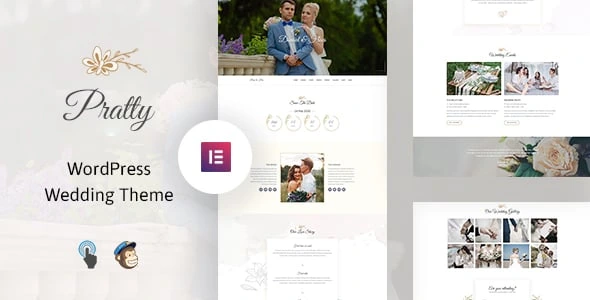
Pratty – Wedding WordPress Theme
100% Original fileUnmodified copy of the developer's release
Developerthemexshaper
Up to dateOriginal released Jan 9, 2026 · File last updated Oct 17, 2026
About this product
The Pratty theme is a wedding WordPress theme by themexshaper for couples who want their own wedding website. It has ready sections for the couple, the love story, a countdown, the wedding party and the events of the day, all built with the Elementor page builder. This page is for Pratty 1.0.6, released on January 9, 2026. On GPLGuide you download the original theme file to install on your own websites.
Good for: engaged couples who want a single place for the date, the venue, the schedule and their story, and for friends or family members who build a wedding site as a gift. It also suits anyone planning a small celebration site for an engagement or a vow renewal.
Requirements: The item page lists WordPress 5.9 up to 6.9, and Elementor or Elementor Pro. It gives no minimum PHP version; the changelog added PHP 8 support in 1.0.4 and PHP 8.2 support in 1.0.6. The theme uses Elementor, the Codestar Option Framework for its settings and Contact Form 7 for forms, and the changelog mentions a core plugin that the item page does not name.
What the Pratty theme does
A wedding site has a short life and a clear job: tell guests who, when and where, and make them feel part of the story. The Pratty theme is built for exactly that. It comes with four home page layouts and wedding sections you can rearrange, plus a blog or news area for updates before and after the big day.
The style is clean and flat with room for photos. The demo pairs Great Vibes, a flowing script font, with Muli for body text, which gives headings a handwritten feel while the details stay easy to read. A sticky menu stays at the top as guests scroll, and smooth animations bring sections in as they appear. Icons come from Font Awesome, Flaticon and Themify.
Every page of the Pratty theme is responsive, which matters for a wedding site more than most. Many guests will open the link on a phone from an invitation or a group chat, often on the day itself when they need the venue address.
The wedding sections in the Pratty theme
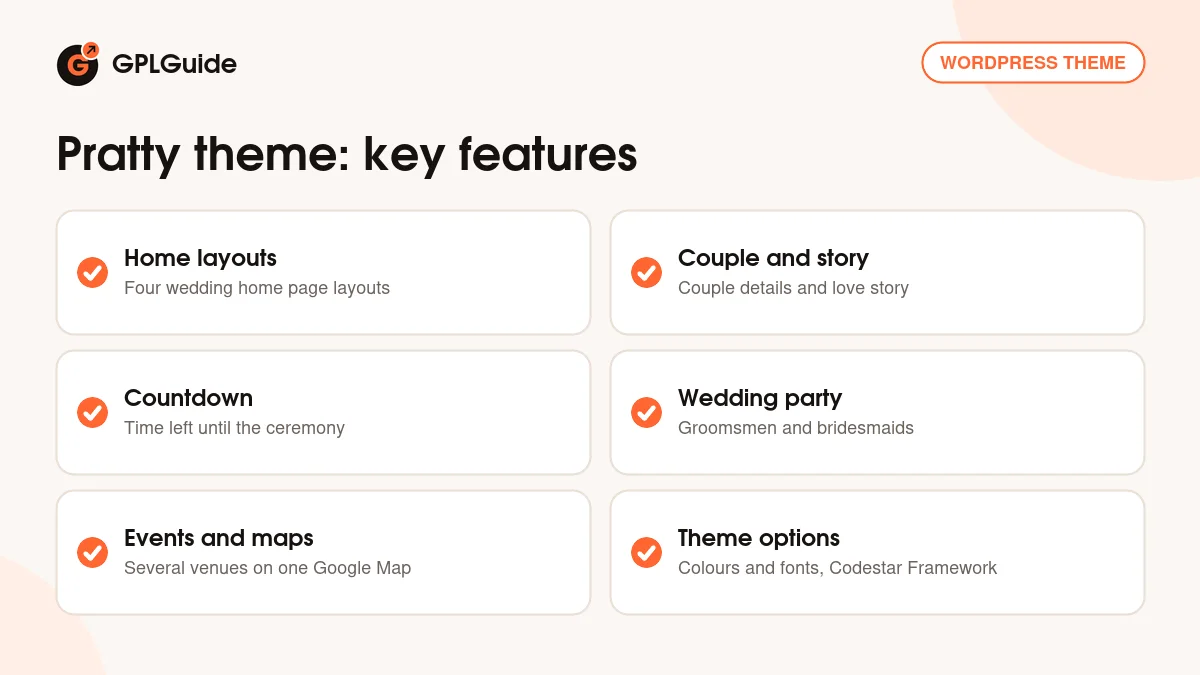
The item page lists five wedding-specific sections. Couple details is where you introduce the two of you, with a photo and a few words about each person. Love story is the place to tell how you met, for example the first date, the proposal and the move to a shared home. Countdown shows the time left until the ceremony, which guests tend to check more than once.
Groomsmen and bridesmaids introduces the wedding party, so guests can put names to faces before the day. Events is where you set out the parts of the celebration, for example the ceremony, the reception and a brunch the next morning. Google Maps with multiple locations can then show every venue on one map.
The developer says every section can be changed. Because the pages are built in Elementor, you can reorder the sections, drop the ones you don't need and copy others to new pages.
Elementor, theme options and styling
The Pratty theme is built for Elementor. The item page lists Elementor and Elementor Pro as compatible and does not say that Pro is required. The theme adds its own custom Elementor widget for its sections, which the developer improved in version 1.0.2, and version 1.0.3 fixed an Elementor deprecation issue.
Site-wide settings for the Pratty theme sit in the theme options panel, built on the Codestar Option Framework. The item page names unlimited colours and advanced typography among its controls, and the changelog shows the options page was tweaked in 1.0.1 and improved again in 1.0.4. The developer does not publish the full list of options online, and we found no public documentation, so we don't name settings we could not check.
Pick two colours from your invitation, such as a soft blush and a deep green, and set them in the theme options before you touch any page. Fonts work the same way. The script font suits names and headings, but keep it out of long paragraphs where it gets hard to read.
Demo import and forms
The Pratty theme has a one-click demo importer, so you can start from one of the four home layouts instead of an empty page. The changelog fixed demo import issues in 1.0.3 and 1.0.4, and 1.0.1 updated the demo content itself. Forms in the Pratty theme use Contact Form 7, which the theme integrates.
The item page does not say whether the demo photos are included, and wedding demos rely heavily on pictures. Plan to use your own engagement shoot or favourite snapshots from the start. It is also the part guests care about most.
Wedding site plans you can copy
These setups use the sections listed above and a few Contact Form 7 forms. Mix them to suit your plans.
- Save-the-date site: Go live six to nine months ahead with the couple section, the countdown and a short note that full details will follow. Add the events and maps later.
- Destination wedding: Use the events section for the welcome drinks, ceremony and farewell lunch, and put each venue, the airport and the guest hotel on one Google Map.
- Reply form: The item page names no RSVP feature, but a Contact Form 7 form can ask for each guest's name, the number in the party, a meal choice and a song request.
- Wedding party page: Give the bridesmaids and groomsmen a page of their own with a line on how each person knows the couple.
- Story timeline: Write the love story in five short moments with one photo each, ending with the proposal.
- After the day: Turn the blog into a thank-you page with a few photos from the celebration and a note for guests.
A simple build plan for the Pratty theme: import the demo in week one, add your story and photos in week two, and add the events, maps and reply form once the venues are booked. Then share the link with the invitations.
Keep the home page focused on the date, the place and the next thing guests need to do. Guests rarely read long text, so put the details they will look for again, such as dress code and parking, on a separate page.
What's new in Pratty 1.0.6
Version 1.0.6 came out on January 9, 2026. It adds PHP 8.2 compatibility and WordPress 6.9 compatibility, and fixes a PHP deprecated issue. The item page shows a last update of January 10, 2026, and 1.0.6 is still the newest version listed there.
Before that, version 1.0.5 (January 25, 2025) added PHP 8 and WordPress 6.6 compatibility along with WooCommerce 8.0.1 compatibility. Version 1.0.4 (August 21, 2024) updated the core plugin, improved the theme options and framework files and fixed a demo import issue. Version 1.0.3 (February 23, 2023) added WordPress 6.0 support and fixed an Elementor deprecation.
The earliest releases set the base. Version 1.0.2 (September 26, 2021) updated the Pratty theme for WordPress 5.8, improved its custom Elementor widget and replaced a deprecated function. Version 1.0.1 (December 30, 2019) tweaked the theme options page and refreshed the demo content.
Good to know before you buy
The Pratty theme presents a wedding, but it is not a guest management tool. The item page does not mention an RSVP system, a guest list, a gift registry or a photo gallery, so plan those around Contact Form 7 forms or other plugins of your choice. WooCommerce appears only in the changelog, not in the list of compatible software.
The item page lists WordPress versions up to 6.9 and does not yet list 7.0. There is no public online documentation, the core plugin is not named and the option names are not published, so we can't confirm those details here. The theme uses Bootstrap 3, an older version of the framework. We found no services on the developer's servers; the parts listed run on your own site.
Pratty from GPLGuide vs the official subscription
The Pratty theme is sold by themexshaper on ThemeForest. The Regular licence costs $39 there and includes future updates through the marketplace and six months of item support from the developer, with the option to extend support to 12 months. Under Envato's licence for this item, its PHP code is licensed under the GPL.
From GPLGuide you get the original Pratty theme file, with the four home layouts, the wedding sections, the theme options and the demo importer that are in the file. The file from GPLGuide comes with the license key already activated, so there is no key to enter.
Only the developer can give you item support, refunds under Envato's rules and updates through an Envato account. If you want themexshaper's help with your setup, buy the licence on ThemeForest.
How to install the Pratty theme
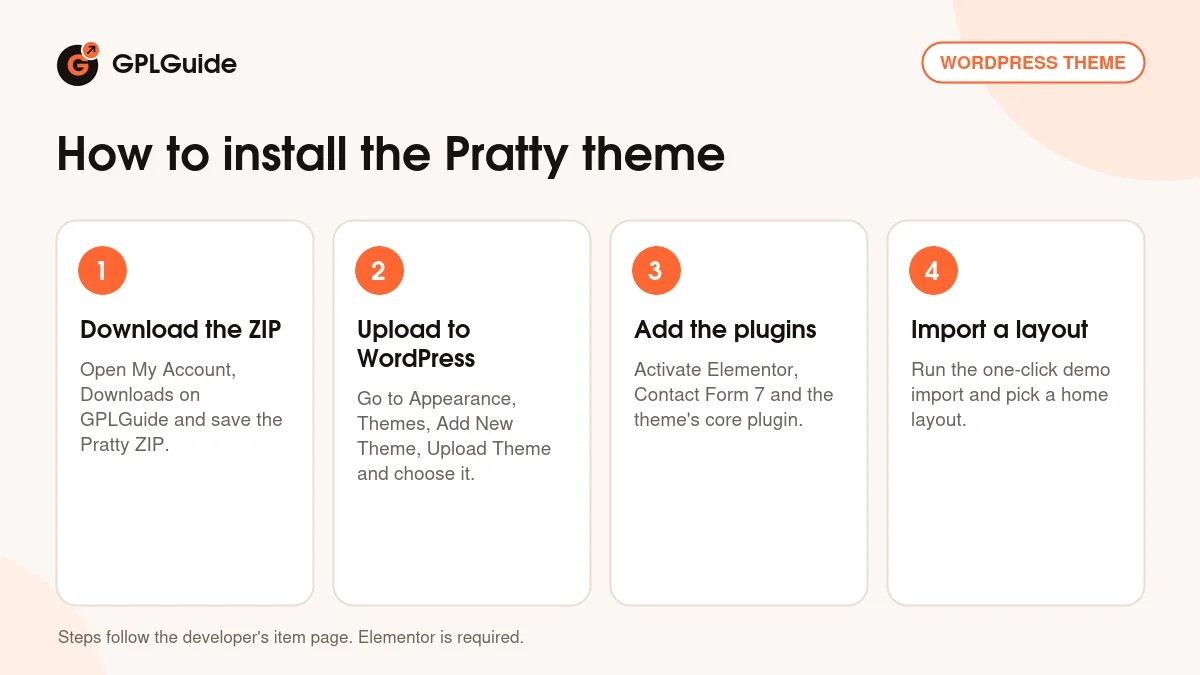
- Sign in to GPLGuide, open My Account, Downloads and save the Pratty ZIP.
- In WordPress go to Appearance, Themes, Add New Theme, Upload Theme, choose the ZIP and click Install Now.
- Activate the theme, then install and activate Elementor, Contact Form 7 and the theme's core plugin.
- Run the one-click demo import and choose the home layout you want to start from.
For a good first setup, set your two invitation colours and fonts in the theme options, then fill in the couple section and the countdown with your real date. Add the events with times and venues, check the map pins, and send the link to one friend to test it on a phone before you share it with everyone.
Keeping it up to date
Updates from GPLGuide are manual. When a new version of the Pratty theme is listed here, download it from your account and upload it under Appearance, Themes, Add New Theme, Upload Theme. WordPress offers to replace the installed copy, and your pages, photos and settings stay in place. Update the core plugin from the same release as well. If you see a newer version that we haven't added, let us know on the Request Item/Update page.
Questions about the Pratty theme
Does the Pratty theme have an RSVP form? No RSVP feature is named on the item page. You can build a reply form with Contact Form 7, which the theme integrates.
Is there a countdown to the wedding? Yes. A countdown is one of the wedding sections the developer lists.
How many home page layouts does it have? Four. You can see them in the live preview on the item page.
Can I show the ceremony and reception venues on a map? Yes. Google Maps with multiple locations is part of the theme.
Do I need Elementor Pro? The item page lists Elementor and Elementor Pro as compatible and does not say Pro is required.
Does it work on PHP 8.2? Yes. Version 1.0.6 added PHP 8.2 compatibility.
Is the Pratty theme ready for WordPress 7.0? The item page lists WordPress 5.9 to 6.9 as tested and does not list 7.0 yet.
Can I post news before the wedding? Yes. The Pratty theme includes a blog or news area, handy for travel tips, hotel deadlines and last-minute changes.
Can a wedding planner use it? It is designed around one couple's wedding, so it fits a single event best. A planner could use the blog and events sections, but the theme is not built as a business site.
Want to compare designs? Browse the WordPress themes in our shop, or see what a GPLGuide membership includes. The Pratty theme is built with the free Elementor page builder on WordPress.org.
Features & capabilities
- Four home page layouts for a wedding website
- Couple details, love story and countdown sections
- Groomsmen and bridesmaids section for the wedding party
- Events section with Google Maps for several venues
- Elementor page builder with the theme's own widget
- Theme options on the Codestar Option Framework with unlimited colours
- Great Vibes and Muli fonts with advanced typography settings
- One-click demo import and Contact Form 7 integration