Vouge Fashion Shopify Theme

100% Original fileUnmodified copy of the developer's release
Developerthemeforest
Up to dateFile last updated Oct 23, 2026
About this product
The Vouge theme is a WooCommerce theme for fashion and clothing stores, built to be edited with the Elementor page builder on WordPress. It suits shop owners who sell apparel, accessories, jewelry or cosmetics and want quick view, a sticky add to cart bar and live product search already designed for them. This page is for the Vouge theme 1.0.6. On GPLGuide you download the original theme file to install on your own websites.
Good for: clothing boutiques, fashion labels that sell direct, accessory and jewelry shops, cosmetics stores, single product brands and agencies that build WooCommerce stores for fashion clients.
Requirements: WordPress 6.0 up to 6.9, as named on the item page, WooCommerce (5.x to 9.x are listed), the free Elementor plugin and the theme's core plugin. No PHP version is published for the theme. The One Click Demo Import plugin used for the demo lists PHP 7.4 as its minimum. Elementor Pro, Contact Form 7 and WPML are listed as compatible, not as required.
What the Vouge theme does
Vouge is a WooCommerce theme aimed at fashion retail. The item page calls the design multipurpose, and its tags reach past clothing to jewelry, cosmetics, furniture and single product stores. What you get is a shop front with styled product grids, a product page with the tools shoppers expect, and a blog, all edited in Elementor.
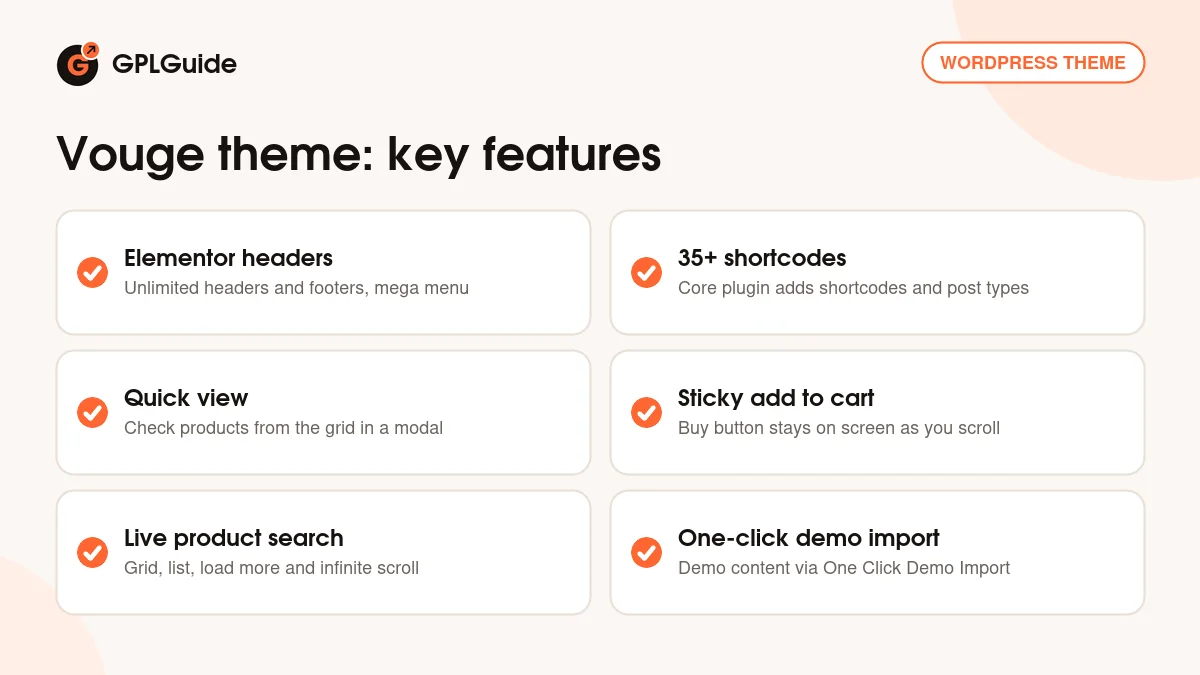
The work is split in two. The Vouge theme handles the design, the shop templates and a theme options panel. Its core plugin adds more than 35 shortcodes and the custom post types the demo pages are built from, and it is made to work with Elementor. Shortcodes only render while the plugin that registers them is active, so leave it switched on.
Around the shop sit the smaller pieces a store needs: a newsletter popup, a 404 page you can customize, tabs and accordions, and blog layouts in list, grid or masonry style. The Vouge theme is WPML compatible, has an RTL demo and lists multi-currency support. It isn't marked as Gutenberg optimized, so build your store pages in Elementor.
Shop pages, product pages and the cart
Most of the Vouge theme's work happens on the shop pages. Products can show in a grid view or a list view, and the item page describes the shop layouts and styles as unlimited. Long collections load with a load more button or with infinite scroll instead of page numbers. Live product search shows matching items while a visitor is still typing, which helps once a catalog runs into hundreds of products.
On the product page, a sticky add to cart option keeps the buy button on screen as the shopper scrolls through the description and reviews. Product images open in a popup and can be zoomed, which matters when people want to see fabric and stitching. Quick view lets a shopper check a product from the grid in a modal window. Add to cart and the wishlist both run over AJAX, so the page doesn't reload each time someone clicks.
Two smaller tools earn their place in a fashion store. A countdown timer can be set on selected products, good for a weekend sale or a limited drop. There are also shortcodes for recently viewed products, so a shopper who opened three dresses sees them again further down the page. Version 1.0.5 added a global product template for the single product page, which gives every product one shared layout to edit.
Elementor headers, menus and theme options
Headers and footers in the Vouge theme are built with Elementor, and the item page says you can make as many as you like. That's handy for a store with sale seasons. Keep a second header with a promo strip ready for Black Friday week. Menus can be simple dropdowns or a mega menu, which is what you want once Women, Men, Shoes and Accessories each have five subcategories.
The theme options panel holds the design settings. Colors are open to change, and the Google Fonts library comes with a live preview of each font, which beats guessing from font names. Blog options include several settings for post meta. Simple animations are there for sections you want to fade or slide in, though on a product grid a little animation goes a long way.
The 35+ shortcodes come from the core plugin, including the recently viewed products blocks. If you hire someone to extend the site later, tell them about this plugin first. It holds the custom post types, and a developer who removes it to tidy the plugin list will break the demo pages of the Vouge theme.
Demo import and the demo photos
Demo content goes in through the free One Click Demo Import plugin. The theme has a plugin installation step, and version 1.0.2 fixed an error in its bulk plugin installation, so you can install the plugins together. Then open Appearance, Import Demo Data and click the import button. The importer brings in the demo content, widgets and settings that the developer has prepared for the Vouge theme.
One thing to know before you import. The photos on the live demo aren't in the download. The item page says they are copyrighted, and the developer offers links to buy licences if you want the same images. So have your own product shots and banners ready. Buyers want to see your actual garments anyway.
Import on a fresh install or a staging site, not on a shop that already takes orders. Cleaning demo pages out of a live store takes longer than the import itself. Stores that read right to left have had their own Vouge theme demo since version 1.0.1.
Store setups to copy with the Vouge theme
The item page tags the Vouge theme for apparel, jewelry, cosmetics, furniture and single product stores. Here is how the listed tools fit each kind of shop.
- Clothing boutique: grid view with a load more button, quick view so shoppers can check a dress without leaving the grid, a mega menu for Women, Men and Kids, and a newsletter popup offering a first order code.
- Jewelry shop: popup and zoom images for close detail, list view for longer descriptions, and tabs for care and sizing notes.
- Cosmetics store: recently viewed products under each product, the AJAX wishlist for shoppers comparing shades, and accordions for ingredients.
- Single product brand: the global product template, sticky add to cart and a countdown timer for launch week.
- Arabic or Hebrew fashion store: start from the RTL demo added in 1.0.1.
- Store in two languages: WPML for translated products and pages, with the multi-currency support for prices.
- Furniture or homeware: list view and infinite scroll for a large catalog.
Start with the shop page and one product page, not the home page. Those two templates carry most of your sales.
What's new in the Vouge theme 1.0.6
The changelog lists 1.0.6 as the newest release, with one line: minor fixes and improvements. Its entries carry no dates. The item page shows a last update of 18 December 2025 and 1.0.6 is the top entry, but the page doesn't say outright that the two belong together, so we leave the release date open.
Earlier releases say more about how the theme is kept up. Version 1.0.5 added the global product template for the single product page and fixed notice errors. Version 1.0.4 fixed deprecated errors, 1.0.3 fixed a logo scroll issue and minor bugs, and 1.0.2 fixed the bulk plugin installation error and updated outdated WooCommerce files. Version 1.0.1 added the RTL demo. Each of these was also updated for the latest WordPress and Elementor versions of its day.
Good to know before you buy
The Vouge theme is a small item, with 104 sales and three reviews, all five stars, at the time of writing. The item page labels it well documented, but we couldn't find documentation published online, so give yourself an hour on a test install to learn where the settings live.
Elementor, WooCommerce and the theme's core plugin are the ones you'll use every day. WPML is listed as compatible, not included, and it's a paid plugin. The item page doesn't name the plugins behind the wishlist or the multi-currency support, so check what the theme asks for during setup.
Nothing on the item page points to a service on the developer's servers, such as a cloud template library. One install tip from the developer's support FAQ: a "missing style sheet" error means the Vouge theme wasn't uploaded the right way, not that it's broken. Upload the installable theme ZIP itself.
Vouge theme from GPLGuide vs the official subscription
On ThemeForest the Vouge theme costs $59 for a Regular licence, which covers one end product that end users aren't charged for. The Extended licence is $1,600. A purchase includes future updates and six months of support from the developer, and support can be extended to 12 months, shown at $17.63 when we checked. Under Envato's licence for this item, its PHP code is licensed under the GPL.
From GPLGuide you get the original Vouge 1.0.6 theme file, with the same theme code and shop tools as the copy sold on ThemeForest. The file comes with the license key already activated, so there's nothing to enter before you start building.
Some things come only with a ThemeForest purchase: the developer's support, with replies in up to one business day and no help with installation or customization, refunds under Envato's rules and updates through your Envato account.
How to install the Vouge theme
- Sign in to GPLGuide, open My Account, Downloads and save the Vouge theme ZIP.
- Go to Appearance, Themes, Add New Theme, Upload Theme, choose the ZIP and activate it.
- Install and activate the plugins the theme asks for, including WooCommerce, Elementor, the core plugin and One Click Demo Import.
- Open Appearance, Import Demo Data, run the import, then swap in your own products and photos.

A good first setup starts in WooCommerce. Run its setup wizard before the demo import so currency, shipping zones and tax are in place. After the import, open the theme options panel, set your brand colors and choose two Google Fonts, one for headings and one for body text. Then switch on sticky add to cart, test quick view on a phone and place a test order before you open the shop.
Keeping it up to date
Updates from GPLGuide are manual. When a newer Vouge theme release appears here, download it from your account and upload it under Appearance, Themes, Add New Theme, Upload Theme. WordPress offers to replace the installed copy, and your Elementor pages, products and theme options stay in the database. Keep CSS and template edits in a child theme so an update doesn't overwrite them. Spot a release we haven't added? Tell us on the Request Item/Update page.
Questions about the Vouge theme
Which page builder does the Vouge theme use? Elementor. Headers and footers are built with it, and Elementor Pro is listed as compatible.
Do I need Elementor Pro? No. The item page lists Elementor Pro as compatible, not as required.
How does the demo import work? Through the free One Click Demo Import plugin. Once the theme's plugins are active, go to Appearance, Import Demo Data and run the import.
Are the demo images included? No. The item page says they are copyrighted and not included, and the developer offers links to buy licences for them.
Which plugins does the Vouge theme rely on? WooCommerce, Elementor and its core plugin, which adds 35+ shortcodes and custom post types. Contact Form 7 and WPML are listed as compatible.
Does it support RTL and translation? Yes. An RTL demo arrived in version 1.0.1, and the theme is WPML compatible.
Can I use it for a jewelry or cosmetics shop? Yes. The item page tags it for jewelry, cosmetics, furniture and single product stores as well as clothing.
Does the Vouge theme work with the block editor? Partly. It isn't marked as Gutenberg optimized, so write blog posts in the block editor and build store pages in Elementor.
Do I need a purchase code? No. The GPLGuide file comes with the license key already activated.
Comparing store designs? Browse the WordPress themes on GPLGuide, or see what a GPLGuide membership includes if you build shops for several clients. If you want Elementor's theme builder on top, Elementor Pro is in the catalog too.
Features & capabilities
- Fashion and clothing WooCommerce design with one-click demo import
- Unlimited Elementor headers and footers, plus mega menu options
- 35+ shortcodes and custom post types from the core plugin
- Live product search, grid and list views, load more and infinite scroll
- Quick view, sticky add to cart, AJAX add to cart and wishlist
- Countdown timer for selected products and recently viewed products
- Global product template for the single product page
- WPML, RTL demo, multi-currency support and Google Fonts with preview