
WooCommerce MultiStep Checkout Wizard
100% Original fileUnmodified copy of the developer's release
DeveloperKole Roy
Up to dateFile last updated Oct 27, 2026
About this product
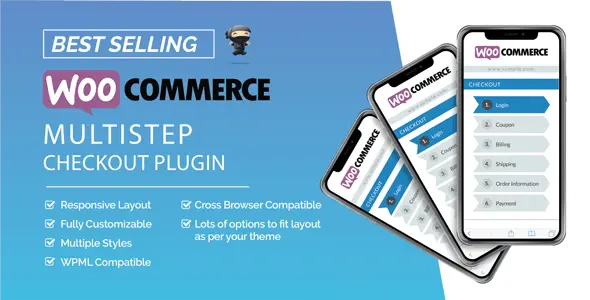
WooCommerce MultiStep Checkout Wizard 4.2 splits the standard WooCommerce checkout page into a step by step wizard, so shoppers fill in their details one section at a time instead of facing one long form. It suits stores whose checkout feels crowded or confusing, for example shops with extra checkout fields, many mobile buyers, or a login and coupon form they want to keep in plain view. Each part of the checkout gets its own step with a progress bar on top, and on desktop an order summary stays beside the form while the shopper moves through it. You pick the wizard design and step options in the plugin's settings in the WordPress dashboard, and developers can add their own steps with hooks.
How to install WooCommerce MultiStep Checkout Wizard
- If the site doesn't run WooCommerce yet, install and activate it under Plugins, Add New Plugin. The developer lists WooCommerce 7.x to 9.x and WordPress 6.0 to 6.8 as compatible.
- Log in to GPLGuide, open this product and click Download under Your downloads.
- In WordPress go to Plugins, Add New Plugin, Upload Plugin, choose the ZIP, click Install Now, then Activate.
- To show a login step for returning customers, enable Display returning customer login reminder on the Checkout page under WooCommerce, Settings, Accounts.
- Open the plugin's settings page under the WooCommerce menu in the WordPress sidebar and choose the wizard design, such as Classic, Modern or Elegant.
- If a date picker from another plugin stops working in the wizard, change the Code Location setting, the last option there, from footer to header.
Features & capabilities
- The default WooCommerce checkout split into separate steps, with login, coupon and registration forms inside the wizard.
- Classic, Modern and Elegant wizard designs, plus several progress bar styles.
- An option to combine billing and shipping into a single step.
- An order review step before the shopper pays.
- A progress sidebar with a live order summary that stays in place on desktop.
- A progress bar laid out for small screens.
- A trust badges section and admin settings to adjust the look.
- Hooks to add your own steps at the start, before or after shipping, before or after order information, or at the end.
- WPML support and compatibility with High-Performance Order Storage.
Frequently asked questions
Is this the original file?
Yes. Every product on GPLGuide is the developer’s own release, unchanged. The license key comes already activated. If a product does ask for a key, the activation steps appear on its page once you have it.
Is it legal to use a GPL plugin or theme from GPLGuide?
Yes. WordPress plugins and themes are released under the GPL, which lets anyone use, share and change the code. The developer’s support desk and the developer’s own update service are not part of the file; those stay with the developer.
How do I install it?
Log in, open the product page and click Download under Your downloads. For a plugin go to Plugins, Add New Plugin, Upload Plugin, choose the ZIP, then Install Now and Activate. For a theme go to Appearance, Themes, Add New Theme, Upload Theme.
How do updates work?
When a newer version is listed on GPLGuide, download it from the product page and upload it over the installed copy; WordPress offers to replace the old version. Updates are manual.
Can I use it on more than one site?
Yes. The GPL lets you use it on as many of your own sites as you like.
What if the file does not work or a newer version is out?
Tell us on the Request Item page or through Support. We check the file and add the newer version when we have it.


