Ad Inserter Pro

100% Original fileUnmodified copy of the developer's release
DeveloperCode Canyon
Up to dateOriginal released May 31, 2026 · File last updated Oct 23, 2026
About this product
Ad Inserter Pro is the premium edition of Ad Inserter, a WordPress ad management plugin that puts AdSense, Ad Manager, affiliate banners or any HTML, JavaScript and PHP code exactly where you want it. It's built for bloggers, publishers and agencies who run ads on content sites and want control over position, devices, visitors and timing. This page is for Ad Inserter Pro 2.8.16, released on May 31, 2026. On GPLGuide you download the original plugin file to install on your own websites.
Good for: AdSense publishers, niche and news sites, affiliate bloggers and agencies that look after ad slots on client sites. It also helps when you just need analytics or a consent script in the header without editing theme files.
Requirements: WordPress 6.0 or higher and PHP 7.4 or higher, according to the developer. No other plugin is needed. Ad Inserter Pro replaces the free Ad Inserter instead of running next to it, so deactivate and delete the free plugin before you activate Pro. Your blocks stay in the database and Pro picks them up.
What Ad Inserter Pro does
Everything is built around code blocks. A block is a piece of code plus its settings: what to insert, on which page types, and where on the page. Ad Inserter Pro gives you 96 of them, and the developer says that number is fixed. You manage them on one screen under Settings, Ad Inserter, with a syntax highlighting editor and a code preview.
A block can go in automatically, by position, or manually through a widget, a shortcode, a PHP function call or a Gutenberg block. On top of that, Pro adds what a serious ad setup needs: fixed sticky ads, parallax and background ads, rotation with A/B testing, impression and click tracking, frequency capping, click fraud protection, country targeting, ad blocking detection and lazy loading.
The free Ad Inserter on WordPress.org covers basic placement. Ad Inserter Pro is for the day you start asking which ad actually earns, and for whom.
Code blocks and insertion positions in Ad Inserter Pro
Automatic Insertion is a dropdown on every block. Besides Before post, Before content, After content and After post, you get Before and After paragraph, Before and After image, excerpt and comment positions, Between posts, Footer, Above header, and Before, Inside or After HTML element. Custom hook positions can be added on the Hooks tab of the plugin settings.
Paragraph positions are where most content ads go. Set Before paragraph, type 2, and the block lands before the second paragraph. Leave the number empty and it goes before every paragraph, which is rarely what you want. Before image and After image count figure and img tags, so an ad never ends up between a photo and its caption.
The HTML element positions take a CSS selector and run server-side when Output buffering is on, or client-side with JavaScript. One catch: post, excerpt and comment positions only work if your theme uses the standard WordPress hooks. Show positions in the admin toolbar tells you what a page really offers.
Page type checkboxes (Posts, Static pages, Homepage, Category pages, Search pages, Archive pages) decide where a block may appear. The Conditions button holds black and white lists for categories, tags, taxonomies, post IDs, URLs, URL parameters, cookies, referrers and clients, and Ad Inserter Pro adds IP addresses, countries and cities.

Sticky ads, rotation and caching
Pick Sticky as a block's Alignment and the ad stays fixed while the visitor scrolls. Horizontal position runs from Stick to the left to Stick to the right, with content-edge and Center options between. Vertical position offers Stick to the top, Center, Scroll with the content and Stick to the bottom.
Show triggers include Page loaded, Page scrolled (%) and Element scrolls in, and animations such as Fade, Slide and Flip. You can delay the show by up to 3000 ms and put a Close button in any corner. Tick Background and a top or bottom sticky ad becomes a skin ad. The developer suggests the Footer position for sticky ads, and they don't work on AMP pages.
Rotation is easy to start. Put [ADINSERTER ROTATE] between two ad codes in one block and the plugin shows one at random. The Rotation Editor gives each option a name and a Share. In Ad Inserter Pro, share="ctr" on the first option gives 75% of impressions to the version with the best click-through rate, recalculated hourly once there are 1,000 impressions from the last 30 days.
If you use a page cache, read this part twice. Server-side rotation, device detection, scheduling and GEO checks don't run on cached pages. Set Dynamic blocks on the General tab to Client-side insert (the developer's pick for AdSense) or Client-side show for plain banners. With WP Rocket, add the plugin's js files, b2a and b64d to Excluded JavaScript Files.
Tracking, limits and ad blocking detection in Ad Inserter Pro
Tracking starts on the Tracking tab, the gear icon after the block tabs. Switch it on there, then on each block you want to measure. Internal tracking stores impressions and clicks in your own WordPress database and draws charts with CTR and a 30-day average. External tracking sends the events to Google Analytics or Matomo instead.
Standard click detection catches clicks on linked banners. Advanced click detection also estimates clicks on iframe ads such as AdSense, but only on desktop. Every rotation option gets its own numbers, which is what makes the A/B tests useful, and PDF or public web reports help when a client wants proof.
The block's Misc button has a Limits tab. General limits cap impressions or clicks for everyone. Individual visitor limits use a cookie and accept fractions, so 0.5 means 12 hours. Click fraud protection sets Global visitor limits and a Protection time (24 hours by default), then hides protected blocks from anyone who clicks too often.
Ad blocking detection has its own Ad Blocking tab. The Action can be None, Popup message or Page redirection, with Delay action and No Action Period to keep it polite. Per block, Ad Inserter Pro can Replace, Show or Hide content when a blocker is found. The developer is upfront that detection is not 100% reliable.
Setups you can copy with Ad Inserter Pro
- In-article AdSense: only Posts ticked, Before paragraph set to 3, and a minimum on the Word Count tab so short posts stay clean.
- Sticky footer banner: Sticky, Center and Stick to the bottom, Footer insertion, Slide animation and a Close button.
- Country offers: two blocks in one spot, one with Countries US,CA as a whitelist, one with the same list as a blacklist.
- Banner A/B test: two codes split by [ADINSERTER ROTATE], tracking on, then compare CTR after a week or two.
- Sidebar ad that follows the reader: an Ad Inserter widget with Sticky ticked, one per sidebar.
- Ad blocker message: Popup message, Delay action 3, No Action Period 7, No action for administrators.
- Site-wide scripts: Google Analytics or AdSense Auto ads code on the Header tab, with the Enable header/footer code button switched on.
What's new in Ad Inserter Pro 2.8.16
Ad Inserter Pro 2.8.16 came out on May 31, 2026. It fixes a reflected cross-site scripting issue and adds support for Gutenberg blocks, so you can drop an ad block straight into a post and pick which code block it shows. The Lists button is now called Conditions. The rest is minor fixes and code improvements.
Before it, 2.8.15 (May 7, 2026) optimized the AdSense API code, 2.8.14 (April 6, 2026) fixed a possible false positive security warning, 2.8.13 (April 4, 2026) added remote management for global custom fields and 2.8.12 (March 2, 2026) gave image custom fields their own viewports. Newer versions exist: 2.8.17 (July 3, 2026) and 2.8.19 (September 25, 2026) are mostly security fixes, and 2.8.18 (July 29, 2026) fixed dynamic blocks with W3 Total Cache.
Good to know before you buy
Ad Inserter Pro places code. It doesn't sell ads or decide which ads Google shows. Blank AdSense blocks on fresh code are normal for a few hours, and the developer reminds you to switch off your own ad blocker while testing.
Caching causes most of the trouble. Rotation, geotargeting and limits need client-side Dynamic blocks on cached sites. Tracking and rotation don't run on AMP pages. Advanced click detection doesn't work on touchscreens, and aggressive blockers such as uBlock Origin stop the plugin's scripts altogether.
The 96 blocks can't be increased. That sounds tight, but one block can list several paragraph numbers, so you rarely need them all.
A few parts rely on outside servers. Connecting your AdSense account to list ad units runs the authorization through the developer's site. City targeting uses the MaxMind GeoLite2 database, a download of about 60 MB, and reCAPTCHA v3 needs your own Google keys.
Ad Inserter Pro from GPLGuide vs the official subscription
From GPLGuide you get the original Ad Inserter Pro 2.8.16 plugin ZIP, the same code the developer ships. The license key is already activated, so the Pro settings are there as soon as you switch the plugin on.
Buying from the developer gets you their support, updates inside WordPress for a year and 20% off renewals. Refunds are possible within 14 days only if you haven't downloaded the file. Licences are one-off payments for one year: Personal is €20 for 2 sites, Freelancer €30 for 5, Business €50 for 25 and Corporate €100 for 100 sites.
How to install Ad Inserter Pro
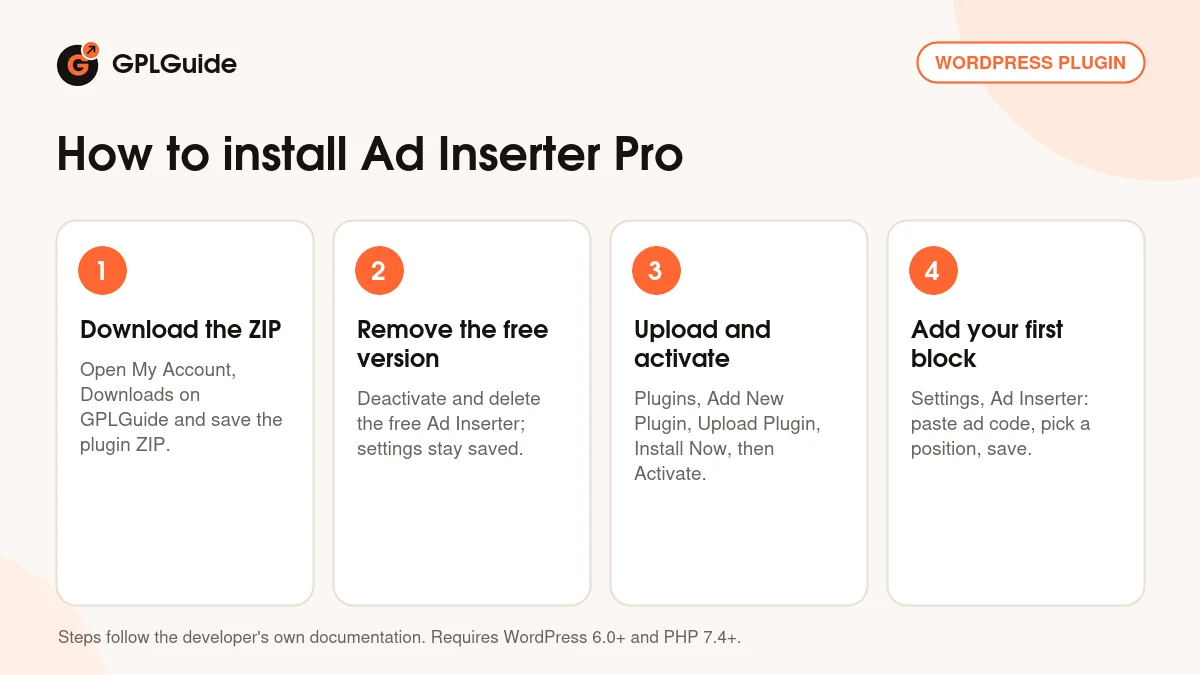
- Sign in to GPLGuide, open My Account, Downloads and save the Ad Inserter Pro ZIP.
- If the free Ad Inserter is installed, deactivate and delete it. Its settings stay in the database.
- Go to Plugins, Add New Plugin, Upload Plugin, choose the ZIP, click Install Now and then Activate.
- Open Settings, Ad Inserter. The license key is already activated, so paste your first ad code into block 1.
For a first setup, copy the developer's own test. Rename block 1 to Posts, paste a test image tag, leave only Posts ticked, set Before paragraph to 2 and click Save Settings. Open a post and the banner sits before the second paragraph. Then swap in real ad code, with Label blocks on so you can tell blocks apart.
Keeping it up to date
Updates from GPLGuide are manual. When a new version of Ad Inserter Pro is listed here, download it from your account and upload it under Plugins, Add New Plugin, Upload Plugin. WordPress offers to replace the installed copy, and your blocks stay because they live in the database. Export the plugin settings first if you like having a backup. If you see a newer version we haven't added, tell us on the Request Item/Update page.
Questions about Ad Inserter Pro
Do I need the free Ad Inserter as well? No. Ad Inserter Pro is standalone, and running both can cause a Cannot redeclare error.
Will my blocks from the free version carry over? Yes. The developer says Pro imports the existing settings.
Does it work with caching plugins? Yes. Set Dynamic blocks to Client-side insert, or Server-side using W3 Total Cache if you use that plugin.
Can I place ads in the block editor? Yes. Add the Ad Inserter Pro block from the TEXT section and pick a code block.
How many ad positions can I set up? 96 code blocks. The number is fixed, but one block can cover several paragraphs.
Will it show ads on AMP pages? Only when you turn it on. Tick AMP pages under Misc, or use the [ADINSERTER AMP] separator.
Does it help with GDPR consent? Yes. It supports IAB TCF 2.0 and can skip ad codes until a visitor consents.
Who helps me if an ad won't show? The developer, for official licence holders. Their troubleshooting pages are public, and Show positions answers most questions.
Building a site that runs on ads? Browse more WordPress plugins on GPLGuide, or see what a GPLGuide membership includes if you use several premium plugins.
Features & capabilities
- 96 code blocks for ads, HTML, JavaScript or PHP
- Automatic insertion at paragraphs, images, posts, comments and HTML elements
- Widgets, shortcodes, PHP calls and a Gutenberg block for manual placement
- Fixed sticky ads with triggers, animations, close button and skin ads
- Ad rotation, timed rotation and CTR-based A/B testing
- Impression and click tracking, also sent to Google Analytics or Matomo
- Frequency capping and click fraud protection for each visitor
- Conditions by country, URL, cookie or referrer, plus ad blocking detection