Barta – News & Magazine WordPress Theme
100% Original fileUnmodified copy of the developer's release
DeveloperRadiusTheme
Up to dateOriginal released Jul 17, 2025 · File last updated Oct 25, 2026
About this product
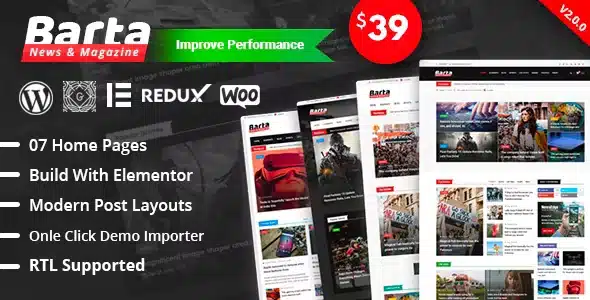
Barta Theme 2.0.5 is a news and magazine theme for WordPress, built on the Elementor page builder. It is designed for online newspapers, specialized magazines, daily blogs, and video news websites that require a busy homepage with distinct parts, a slider, and fixed ad placements. An advertisement manager is provided for the header and footer sections to publishers that manage AdSense or sell banner space. The theme comes with a one-click demo import, custom Elementor plugins, and the developer's own core plugin, so you may start from a completed homepage layout rather than a blank page.
How to install Barta Theme
- Install and activate the Elementor plugin under Plugins, Add New Plugin first, because Barta is built on it. The developer's compatibility list runs from WordPress 4.9 to 7.0 and names no minimum PHP version.
- Log in to GPLGuide, open this product and click Download under Your downloads.
- In your WordPress dashboard, go to Appearance, Themes, Add New Theme and click Upload Theme.
- Choose the theme's ZIP file, click Install Now, and click Activate when the install finishes.
- Open Plugins, Installed Plugins and make sure the theme's core plugin and its demo importer plugin are active. Install them if WordPress prompts you to.
- Run the one-click demo import to load a sample homepage, then adjust colors and layout in the live Customizer under Appearance, Customize, or edit pages with Elementor.
- If pages fail to display on a host with a 128M PHP memory limit, raise it. The developer's support has advised at least 256M for that problem.
Features & capabilities
- Seven homepage layouts, four category page layouts and three single post layouts to start from
- Five header styles, plus an ad manager with spots in the header and footer areas
- More than 20 custom Elementor addons with over 30 layouts for news boxes, grids and lists
- A tabbed news block that groups up to four categories in one place
- Video news grids and a video post format design
- Reading progress bar, star ratings and category-specific colors
- Infinite scroll and a Load More button for the blog page, plus a latest modified date option on posts
- A news ticker addon and a homepage slider with multi-category selection
- Lazy loading, Gutenberg support and compatibility with WPML and WooCommerce
Frequently asked questions
Is this the original file?
Yes. Every product on GPLGuide is the developer’s own release, unchanged. The license key comes already activated. If a product does ask for a key, the activation steps appear on its page once you have it.
Is it legal to use a GPL plugin or theme from GPLGuide?
Yes. WordPress plugins and themes are released under the GPL, which lets anyone use, share and change the code. The developer’s support desk and the developer’s own update service are not part of the file; those stay with the developer.
How do I install it?
Log in, open the product page and click Download under Your downloads. For a plugin go to Plugins, Add New Plugin, Upload Plugin, choose the ZIP, then Install Now and Activate. For a theme go to Appearance, Themes, Add New Theme, Upload Theme.
How do updates work?
When a newer version is listed on GPLGuide, download it from the product page and upload it over the installed copy; WordPress offers to replace the old version. Updates are manual.
Can I use it on more than one site?
Yes. The GPL lets you use it on as many of your own sites as you like.
What if the file does not work or a newer version is out?
Tell us on the Request Item page or through Support. We check the file and add the newer version when we have it.