Custom Twitter Feeds Pro By Smash Balloon

100% Original fileUnmodified copy of the developer's release
DeveloperCode Canyon
Up to dateOriginal released Sep 30, 2026 · File last updated Oct 23, 2026
About this product
Custom Twitter Feeds Pro is a WordPress plugin that pulls posts from X (formerly Twitter) into your pages as feeds you build and style in a visual editor, without pasting embed code from X. It suits site owners, marketers and agencies who want a brand timeline, a hashtag wall or a carousel of posts that matches the theme. The developer now also calls it X (Twitter) Feed Pro. This page is for Custom Twitter Feeds Pro 2.10.0, released on September 30, 2026. On GPLGuide you download the original plugin file to install on your own websites.
Good for: businesses that show their own X account on the home page or in a sidebar, event sites that run a hashtag wall, community sites that pull several accounts into one feed, and agencies that need X posts styled to fit a client's theme.
Requirements: the developer's free version listing asks for WordPress 5.3 or newer and PHP 7.4 or newer. The Pro changelog says 2.9.0 was tested on WordPress 7.1 and 2.5.3 added PHP 8.4 support. You need an X account to authorize the connection, and WP-Cron has to run, because it triggers feed updates. If the free Custom Twitter Feeds plugin is installed, deactivate and delete it before you add Custom Twitter Feeds Pro.
What Custom Twitter Feeds Pro does
Everything starts from the Twitter Feed menu in your dashboard. Under All Feeds you click Add New, pick a feed type, connect an X account and choose a template. The live editor shows the real feed while you change the layout, the colors and which parts of each post appear. Save it, click Embed, and the feed can go on a page, in a widget area or anywhere a shortcode works.
Custom Twitter Feeds Pro prints the feed into your page HTML rather than an iframe, so it picks up your theme's fonts and search engines can read the posts. Posts are cached on your site, and Optimized Images stores resized copies locally.
Visitors can open photos and videos in a popup lightbox, expand a thread with the button under its first post, and like, repost or reply through X.
Feed types and sources in Custom Twitter Feeds Pro
Three feed types work with X's current API, according to the developer's X changes doc: User Timeline, Hashtag and Search. Tick more than one in the first step and Custom Twitter Feeds Pro merges them into a single feed. The developer says you can combine the latest posts from up to 10 accounts this way, which is handy for a team.
Connecting takes a minute. Click Connect in the source popup, look over the permissions screen on X (it asks for read-only access) and click Authorize app. Then type the handle, hashtag or search terms and click Next. Search feeds accept AND and OR logic, so a query that pairs your product name with a campaign tag stays focused.
Moderation sits under Feed Options, Advanced, Filters. Allowed Words shows only posts that contain your words, Blocked Words hides posts that do, and Hide Specific Tweets removes single posts by the number at the end of the post URL. You'll use that last one. The developer warns that the current API can't tell sponsored posts apart, and while hashtag-only feeds drop promoted posts automatically, search feeds may still show them.

Templates, layouts and embedding in Custom Twitter Feeds Pro
After the source, you pick one of seven templates: Default, Masonry, Simple Carousel, Simple Cards, Showcase Carousel, Latest X posts or Widget. In the editor, Feed Layout switches between List, Masonry and Carousel, and Color Scheme offers Inherit from Theme, Light, Dark or Custom. Start with Inherit from Theme. It usually looks right on the first try.
Other panels cover the header with account info and follower count, the post box style, text length, the load more button and the lightbox. Videos play in the feed, live broadcasts have worked since 2.5.0, and shared links turn into link cards with an image and a title. Infinite Scroll loads more posts when a visitor reaches the end of the feed.
For placement, click Embed at the top of the editor and choose Add to a Page or Add to a Widget. In the block editor, search for twitter feed and add the X (Twitter) Feed block. Version 2.6.0 brought a newer block and an Elementor widget.
Caching, privacy and the Settings page
The Feeds tab under Settings has the cache interval, the GDPR option and, since 2.4, a readout of the API credits remaining and when they reset. The developer suggests a cache interval of 2 hours or more, depending on how many feeds you run. If posts look stale, the Advanced tab has Force cache to clear on interval. It's also where you switch the branding from Twitter to X.
GDPR is set to Automatic by default. When Custom Twitter Feeds Pro detects a supported consent plugin, such as Complianz, CookieYes, Cookiebot or Borlabs Cookie, it loads a privacy version of the feed until the visitor agrees. That version uses only local images, hides avatars, turns videos into links to X and caps lightbox images at 700 pixels wide.
The Downtime Prevention System is a backup cache: if X has a problem, recent posts stay on the page. Site health checks and optional email alerts tell you when something blocks feed updates.
Setups you can copy with Custom Twitter Feeds Pro
- Brand timeline: a User Timeline feed for your handle, the Simple Cards template, Color Scheme on Inherit from Theme and the header with follower count on.
- Event hashtag wall: a Hashtag feed with the Masonry template, Infinite Scroll on and Blocked Words filled in. Build it close to the date, since hashtag feeds only reach back 7 days.
- Partner roundup: one User Timeline feed with up to 10 handles and the Showcase Carousel template.
- Campaign monitor: a Search feed with your product name AND a campaign tag, and Hide Specific Tweets for anything promoted.
- Cookie banner site: GDPR left on Automatic with Complianz or CookieYes active, so images and avatars wait for consent.
What's new in Custom Twitter Feeds Pro 2.10.0
Version 2.10.0 came out on September 30, 2026. It adds a Data Sharing tab in the settings, where you control anonymous data sharing and in-plugin notifications. Admin scripts, icons and fonts now ship inside the plugin instead of loading from outside CDNs, which helps if your security policy blocks third-party requests. The deactivation survey now submits correctly when the developer's other plugins are active, and dismissed notifications no longer come back.
Before it, 2.9.0 (September 14, 2026) was tested on WordPress 7.1, and 2.8.0 (August 10, 2026) added full keyboard control and screen reader support for popups, carousels and feed lists. At the time of writing, 2.10.0 is the newest version in the developer's changelog.
Good to know before you buy
Read this part twice. X ended the developer's access to its legacy API, and the developer says each feed update now costs it money. By default, Custom Twitter Feeds Pro fetches posts through the developer's paid X API access, and the developer caps how often. The limit is 12 to 24 updates per day depending on the plan (12 on Basic, 18 on Plus, 24 on Elite). It's shared across all active feeds on the site and applies per site where the license is activated.
Do the math before you build ten feeds: in the developer's example, 24 one-source feeds each update about every other day. The API credits and the update allowance are the developer's service, and the developer can change how they work.
There is a way past the cap. You can add your own X developer app (consumer key, consumer secret, access token and access token secret) in the plugin settings, which the developer says allows more frequent updates. It needs a paid X API tier, and the developer's guide is blunt: the free tier will not work. When X launched that tier in April 2023 it cost $100 a month. Save the keys as you create them, because X won't show them again.
Feed types are narrower than they used to be. The developer's X changes doc lists home timelines, list feeds and mentions timelines as not supported at this time, yet the pricing page still lists Lists feeds on Elite. Test lists before you promise them to a client. Hashtag and search feeds only return posts from the last 7 days, and a new feed may start with about 10 posts, with more available as the cache grows.
Feed Analytics, which the developer adds to the Elite plan, is a separate plugin and isn't in this file. On hosts that disable WP-Cron, set up a server cron job so feeds keep updating.
Custom Twitter Feeds Pro from GPLGuide vs the official subscription
From GPLGuide you get the original Custom Twitter Feeds Pro 2.10.0 plugin ZIP, the same file the developer ships, with the license key already activated. The feed builder, templates, filters, GDPR mode and Elementor widget are all in that file. The developer states that Custom Twitter Feeds Pro is licensed under the GNU GPL.
Some things only the developer gives you: support tickets, refunds within 14 days under its terms, and the server side of the product, meaning its X API access, the daily update allowance and the API credits. The developer lists Basic at $49 per year for one website (regular price $98), Plus at $99 per year for five websites and Elite at $149 per year for ten. Renewals are charged at full price.
How to install Custom Twitter Feeds Pro
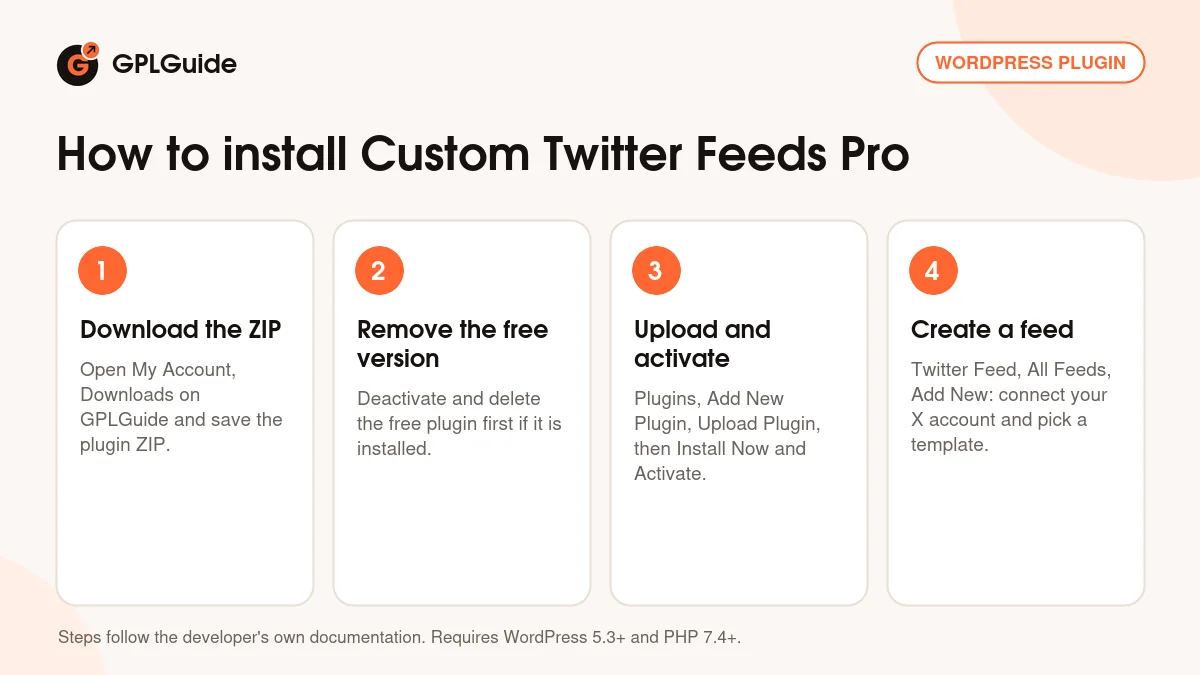
- Sign in to GPLGuide, open My Account, Downloads and save the Custom Twitter Feeds Pro ZIP.
- If the free plugin is active, tick Preserve Settings if plugin is removed under Twitter Feed, Settings, then deactivate and delete it.
- Go to Plugins, Add New Plugin, Upload Plugin, choose the ZIP without unzipping it, click Install Now and then Activate.
- Open Twitter Feed, All Feeds, click Add New, connect your X account and build your first feed.
For a good first setup, build one User Timeline feed for your own handle with the Default template and Color Scheme on Inherit from Theme. Leave the cache interval at 2 hours or more. A day later, check the API credits readout on the Settings, Feeds tab to see how many updates the feed uses. Add more feeds only after that.
Keeping it up to date
Updates from GPLGuide are manual. When a new version of Custom Twitter Feeds Pro is listed here, download it from your account and upload it under Plugins, Add New Plugin, Upload Plugin. WordPress offers to replace the installed copy, and your feeds and settings stay in place. If we haven't added a newer version yet, tell us on the Request Item/Update page.
Questions about Custom Twitter Feeds Pro
Does Custom Twitter Feeds Pro still work with X? Yes. It shows User Timeline, Hashtag and Search feeds through X's current API, with a daily update limit that the developer sets.
How often will my feed pick up new posts? Up to 12, 18 or 24 times a day, depending on the plan, shared by every active feed on the site. More feeds means each one refreshes less often.
Do I need my own X developer account? No. It's optional and only helps if you want more updates than the standard limit, and it needs a paid X API tier.
Do I have to enter a license key? No. Your Custom Twitter Feeds Pro download comes with the license key already activated, so you can go straight to All Feeds and click Add New.
Can I show my home timeline or my mentions? No. The developer lists home timelines, mentions timelines and list feeds as not supported at this time because of X's API changes.
Does Custom Twitter Feeds Pro work with Elementor? Yes. Version 2.6.0 added an Elementor widget and a newer block, and the shortcode and classic widget still work.
Can I mix accounts and hashtags in one feed? Yes. Tick more than one feed type when you create the feed, or add up to 10 handles to one User Timeline feed.
Running feeds from more than one network? There is also Custom Facebook Feed Pro for Facebook. Browse more WordPress plugins on GPLGuide, or see what a GPLGuide membership includes if you use several premium plugins.
Features & capabilities
- User Timeline, Hashtag and Search feeds, mixed in one feed if you like
- Up to 10 X accounts merged into a single feed
- Seven templates with List, Masonry and Carousel layouts
- Allowed Words, Blocked Words and Hide Specific Tweets filters
- Popup lightbox, link cards, threads, videos and live broadcasts
- Infinite Scroll or a Load More button
- GDPR mode that works with popular consent plugins
- Block, Elementor widget, classic widget and shortcode embeds