Envira Gallery Pro WordPress Plugin

100% Original fileUnmodified copy of the developer's release
DeveloperEnvira Gallery
Up to dateOriginal released Oct 7, 2026 · File last updated Oct 23, 2026
About this product
Envira Gallery Pro is the paid edition of Envira Gallery, a WordPress gallery plugin that turns your Media Library images into responsive galleries with a lightbox, 16 layouts and AI help for alt text. It's made for people who want galleries that look right on a phone without writing CSS. This page is for Envira Gallery Pro 1.17.2, released on October 7, 2026. On GPLGuide you download the original plugin file to install on your own websites. That file is the main plugin; the add-ons are separate, as explained below.
Good for: photographers and wedding studios, portfolio and agency sites, travel and food blogs, holiday rental pages, and anyone moving up from the free Lite plugin or the default WordPress Gallery block.
Requirements: The developer's free version listing asks for WordPress 6.3 or newer and PHP 7.0 or newer, tested up to WordPress 7.1.3. The developer doesn't publish separate numbers for the paid plugin, so treat those as the minimum. The main file needs no other plugin.
What Envira Gallery Pro does
Each gallery is its own item under Envira Gallery, Add New. You give it a title, drop images into the File Upload box or pick them with Select Files from Other Sources, then set the look in a row of tabs. A gallery isn't tied to one page, so you can embed it in several posts with the block or the shortcode, and every change shows up everywhere.
The free Lite plugin has one layout. Envira Gallery Pro adds 15 more, lightbox effects and Supersize, a Mobile tab, Standalone gallery pages, import and export, an image compression tool and the AI Image Assistant. It can also turn a default Gallery block into an Envira gallery with one button.
Here's the honest part. The developer splits most plan extras into add-ons, 39 of them by its own count, installed from Envira Gallery, Addons. Albums, Videos, Watermarking, WooCommerce, Proofing, Gallery Themes and Google Photos are all add-ons. Our download is the main Envira Gallery Pro file, version 1.17.2, and none of those add-ons are inside the ZIP.
Layouts and gallery settings in Envira Gallery Pro
Layouts live in a gallery's Configuration tab under Gallery Layout, with a small preview of each. Lite only has Automatic, a justified grid with rows of equal height. Envira Gallery Pro adds Mason, Grid, Square, Blogroll, BnB, Vertical Focus, Spread Harmony, Highlight Grid, Bento Grid, Creative, Polaroid, Vertical Line Grid, Grid Fixed Title, Horizontal Carousel and Horizontal Slideshow.
Automatic has its own controls. Automatic Layout: Row Height starts at 150px and Margins at 1px, and the paid plugin adds a Last Row option for a final row that isn't full. Column layouts use Number of Gallery Columns, from one to six or Automatic. Pick Square and Crop Images? switches on at 300 by 300. That crop stays on if you change layouts later, so check it when a Mason gallery suddenly looks boxy.
Some layouts don't behave like a grid at all. BnB shows one large image beside four thumbnails, with a Click for more button that opens the rest in an overlay. Highlight Grid makes the first image and every third one after it full width, so reordering changes which shots get the space. Horizontal Carousel has no arrows or dots by default. Your first few images do the selling.
On the Gallery tab, the Sorting dropdown includes Random and No Sorting. Anything other than No Sorting turns off drag and drop ordering, which catches people out the first time.
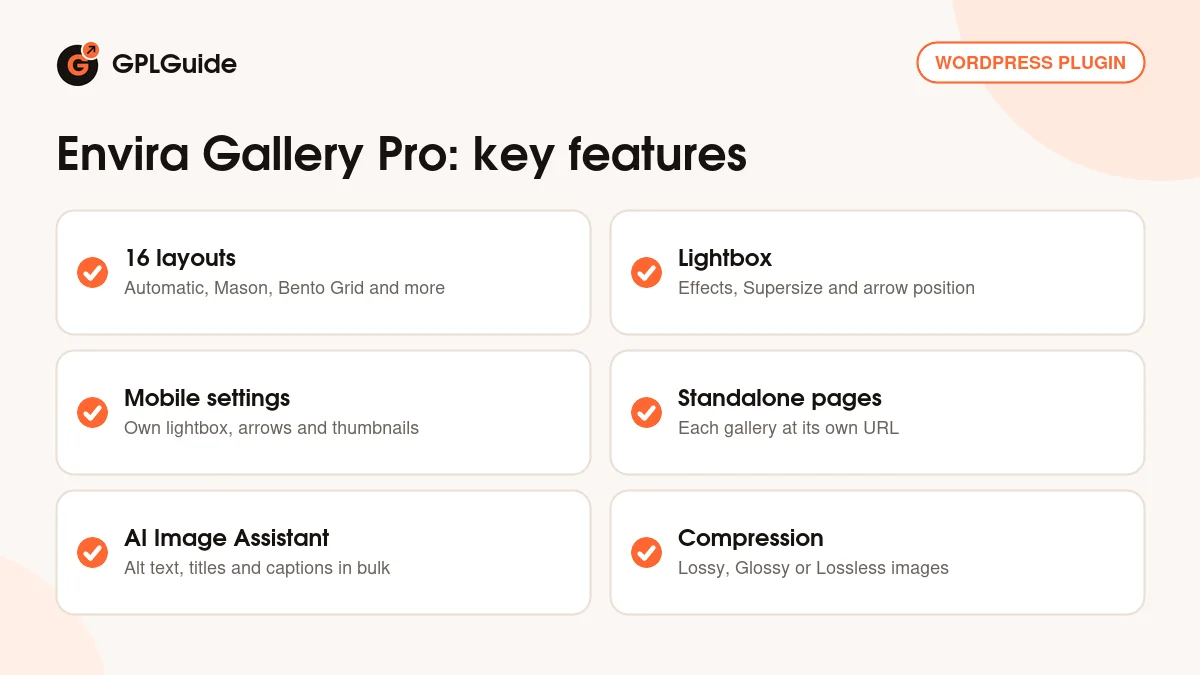
The lightbox, mobile and Standalone settings
The Lightbox tab controls what happens after a click. Lightbox Open/Close Effect and Lightbox Transition Effect set the animations. Enable Lightbox Supersize? lets images grow past their usual size; it used to be an add-on and has been in the main plugin since version 1.5.8. Gallery Arrow Position puts the arrows Inside or Outside the image.
One catch. Base (Dark) and Base (Light) are the standard lightbox themes in Envira Gallery Pro. To pick Captioned, Polaroid, Showcase, Sleek or Subtle, the developer's docs say the Gallery Themes add-on must be active, and Gallery Arrow Position isn't offered on the Base themes.
The Mobile tab has its own Enable Lightbox switch (turning it off also removes image links on phones), Close Lightbox on Swipe Up, Enable Gallery Arrows and Enable Gallery Thumbnails with width and height fields. Create Mobile Gallery Images? makes smaller files for phones.
Standalone gives each gallery its own URL. Turn it on under Envira Gallery, Settings, Standalone, set your slugs, and pick a page Template per gallery if your theme has extra templates. It's also what makes the Preview Changes button work, and the Albums add-on needs it. A 404 on a new gallery page usually goes away after you click Save once under Settings, Permalinks.
AI tools, compression and maintenance in Envira Gallery Pro
The AI Image Assistant writes alt text, cleans up titles from messy file names and drafts captions. Set it up under Envira Gallery, Settings, Image Assistant Settings: Automatically generate on upload, Skip images that already have metadata, and a tone (SEO is the recommended one of six). In the Images tab, the sparkle icon works on one image and Bulk Image Assistant handles a whole gallery. Each image costs 1 AI credit.
AI image generation has its own tab in the gallery editor. Click Create Images with AI, describe the picture, choose an Image Type such as Photographic, Digital Art or 3D, and you get 9 images. Tick the ones you like and click Add selected images.
Compression is built into Envira Gallery Pro. Its settings tab sits next to General and Standalone, and you can compress Envira Gallery Images only or All Media Library Images, at Lossy, Glossy or Lossless. Lossy gives the smallest files and Lossless keeps the most quality.
Envira Gallery, Tools is where you go when something looks off. Fix Broken Migration repairs image links after a domain or SSL change, and there are buttons to flush the plugin's cache and Clear ALL Transients. A gallery's Misc tab has Export Gallery and Import Gallery for moving it as a .json file. To convert old galleries, select a core Gallery block and click Convert to Envira Gallery, or run wp envira convert-galleries in WP-CLI.
Setups you can copy with Envira Gallery Pro
Each of these uses settings from the main plugin file only.
- Photography portfolio: Automatic layout, Row Height raised to about 220px, Margins at 4px and Lazy Loading on.
- Wedding story: Horizontal Slideshow with captions shown and Enable Lightbox Supersize? checked, so every photo gets the full frame.
- Product or menu grid: Square layout (the crop sets itself to 300 by 300), four columns and titles under each tile.
- Holiday rental page: BnB layout for one hero shot and four thumbnails, with Click for more opening the full set.
- Blog teaser: [envira-gallery id="131" limit="4"] shows four images from a large gallery.
- Old blog clean-up: convert core Gallery blocks, then run Bulk Image Assistant with Skip images that already have metadata turned on.
What's new in Envira Gallery Pro 1.17.2
Version 1.17.2 came out on October 7, 2026, and most of it is about AI images. Generation works again after the image provider retired the model the plugin used. Sizes are now chosen by shape (Square, Portrait or a wide format) instead of pixel sizes. Generated images get proper titles instead of 0, 1 and 2, a failed import no longer leaves stray images, and errors say whether the cause was quota, permission or the provider.
The rest are fixes. The block's gallery picker lists every gallery, not only the ten most recent. Inserting a gallery block keeps its saved title. Galleries no longer render at half size in themes that don't set an image width. There's general security hardening too.
Before it, 1.17.1 (October 1, 2026) fixed WooCommerce Add to Cart buttons in Firefox and made the Turn Gallery Cache Off button work. 1.16.0 (August 12, 2026) added Bento Grid, Horizontal Slideshow and Horizontal Carousel, and 1.14.0 (July 14, 2026) brought the AI Image Assistant. At the time of writing, 1.17.2 is the newest version in the developer's changelog.
Good to know before you buy
This listing is the main plugin. Galleries, all 16 layouts, the lightbox, Standalone, compression, the AI tools and import and export are in it. Albums, Videos, Audio, Watermarking, Proofing, WooCommerce, Downloads, Social, Gallery Themes, Google Photos, Lightroom and the page builder add-ons are separate plugins and aren't part of this ZIP. Need one? Ask for it on the Request Item/Update page.
The AI tools are a service on the developer's servers. They spend AI credits from an account with the developer, tracked in a Credit Usage widget, and the developer's Pro plan includes 1,500 of them. The plugin file carries the AI code, not the credits.
Coming from Lite? The two are separate plugins. The developer's own upgrade switches Lite off and promises no loss of galleries or settings, so deactivate Lite before you activate Envira Gallery Pro.
Envira Gallery Pro from GPLGuide vs the official subscription
From GPLGuide you get the original Envira Gallery Pro 1.17.2 plugin ZIP, the same main file the developer ships, with the license key already activated. Everything in that file is there, from the layouts to the AI code. The developer states that Envira Gallery is licensed under the GNU GPL.
Buying from the developer gets you what a file can't: priority support, the 14-day refund, AI credits, the add-ons and updates from their account. The developer lists the Pro plan at $99.50 per year for 5 sites (normally $199.00), with 1,500 AI credits, and says renewals are at full price.
How to install Envira Gallery Pro
- Sign in to GPLGuide, open My Account, Downloads and save the Envira Gallery Pro ZIP.
- If the free Lite plugin is active, deactivate it. Then go to Plugins, Add New Plugin, Upload Plugin and choose the ZIP.
- Click Install Now, then Activate Plugin.
- Open Envira Gallery, Add New, type a title and upload a few images.

For a good first setup, open Envira Gallery, Settings before you upload much. Turn on Standalone and switch on compression for Envira Gallery Images. Build a test gallery with about a dozen images, try Automatic and Mason, and check the Mobile tab on a real phone. Then paste the gallery's code into a draft page and use Preview Changes before anything goes live.
Keeping it up to date
Updates from GPLGuide are manual. When a new version of Envira Gallery Pro is listed here, download it from your account and upload it under Plugins, Add New Plugin, Upload Plugin. WordPress offers to replace the installed copy, and your galleries are saved in WordPress rather than in the plugin folder. If a gallery looks odd afterwards, flush the cache under Envira Gallery, Tools. Seen a newer version we haven't added? Tell us on the Request Item/Update page.
Questions about Envira Gallery Pro
Does the download include the add-ons? No. It's the main Envira Gallery Pro file, version 1.17.2. Albums, Videos, Watermarking and the other add-ons are separate plugins.
Do I have to enter a license key? No. The file comes with the license key already activated, so you can build galleries right after activation.
Will my Lite galleries carry over? Yes. The developer says moving from Lite to the paid plugin means no loss of galleries or settings.
Does AI alt text work straight away? Only with AI credits. They come from an account with the developer, at 1 credit per image.
How many layouts does Envira Gallery Pro have? Sixteen. Automatic is the one Lite also has, and the other 15 come with the paid plugin.
Can I move a gallery to another site? Yes. Use Export Gallery on the Misc tab, then Import Gallery on the other site.
Can I show only part of a big gallery? Yes. Add a limit to the shortcode, for example [envira-gallery id="131" limit="4"]. The lightbox shows those same four images.
Can I convert my old WordPress galleries? Yes. Select a Gallery block and click Convert to Envira Gallery. It can't be reversed, so back up first.
Building a portfolio or client site? Browse more WordPress plugins on GPLGuide, or see what a GPLGuide membership includes if you use several premium plugins. Gallery pages are heavy, so a cache plugin such as WP Rocket pairs well with Envira Gallery Pro.
Features & capabilities
- 16 gallery layouts, from Automatic and Mason to Bento Grid and Horizontal Carousel
- Lightbox with open, close and transition effects, Supersize and arrow position
- Mobile tab with its own lightbox, swipe to close, arrows and thumbnail sizes
- Standalone gallery pages with custom slugs and Preview Changes
- Envira Gallery Pro AI Image Assistant for alt text, titles and captions
- AI image generation with 9 images per prompt
- Image compression at Lossy, Glossy or Lossless for galleries or the Media Library
- Gallery export and import as .json, WordPress gallery conversion and repair Tools