Nutrey – Organic Food Shop WordPress Theme

100% Original fileUnmodified copy of the developer's release
DeveloperwpOcean
Up to dateOriginal released Feb 19, 2026 · File last updated Oct 21, 2026
About this product
The Nutrey theme is a WordPress theme for organic food shops, farm stores and health food stores that want to sell online with WooCommerce. It comes with three home styles, a shop with weight-based products, inner pages for services, pricing, team and blog, and Elementor pages you load with a one click demo importer. This page is for Nutrey 1.0.3, released on February 19, 2026. On GPLGuide you download the original theme file to install on your own websites.
Good for: organic grocers, farm shops selling vegetable and fruit boxes, dairy and produce co-ops, health food stores and small food brands that want a WooCommerce shop plus a blog for recipes.
Requirements: WordPress, tested up to 6.9 according to the theme's own files, and PHP 7.4 or higher, with PHP 8.1 and 8.2 support added in 1.0.2. Three free plugins are required: Elementor, WooCommerce (8.x and 9.x listed as compatible) and Contact Form 7. The theme's core plugin, Nutrey Core, and the Codestar Framework ship inside the theme and install from its plugin prompt.
What the Nutrey theme does
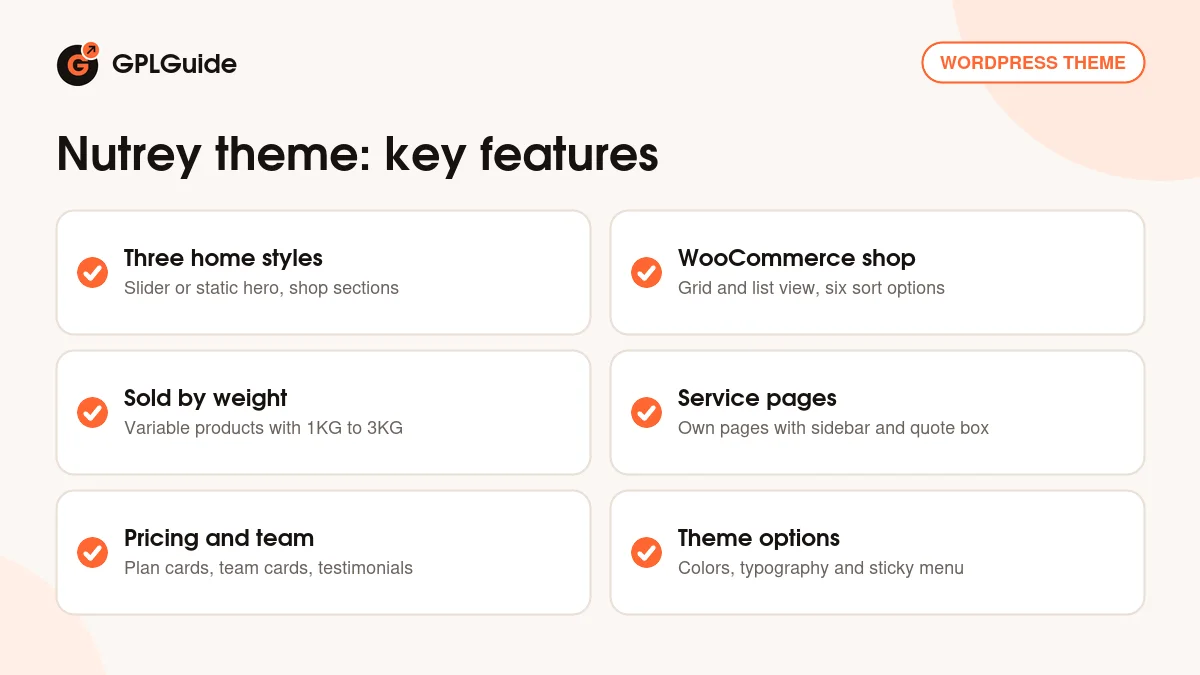
Nutrey is a shop theme with a narrow focus: fresh food. The demo sells limes, radishes, cauliflower and mushrooms as variable products with 1KG, 2KG and 3KG weight options, which is how most produce shops price things. Around the shop, the Nutrey theme adds the pages a food business tends to need: about, services, pricing plans, team, testimonials, contact with a map, and a blog.
Pages are built with Elementor, and the demo importer brings in the demo content, so you start by editing. Design settings sit in the theme options, which run on the Codestar Option Framework. The item page lists unlimited colors, advanced typography and a sticky menu on scroll. The default fonts are Outfit and Itim from Google Fonts, with icons from Themify Icons and Flaticon.
Under the surface the Nutrey theme uses Bootstrap 5.x. It's marked Gutenberg optimized and widget ready, so posts can be written in the block editor and the blog sidebar takes widgets.
Three home styles in the Nutrey theme
Open the Home menu in the demo and you'll find Home Style 1, 2 and 3. They share most of their sections, and the clearest difference is the hero. Home Style 1 opens with a two-slide hero, "Nourish Your Body, Go Organic" with a "25% off all products" tag, then "Organic Food And Vegetables." Home Style 2 swaps the slider for one static banner labelled "100% Pure Vegetables". Home Style 3 goes back to two slides, with social icons in the top bar as on Home Style 2.
Under the slider on Home Style 1 and 3 sits a strip with three promises, Free Delivery, 24/7 Support and Secure Payment, then the "Welcome to Nutrey Organic Shop" block with an award badge. Four counters follow: Trusted By Customers, Product Sale Per Day, Years Of Foundation and Monthly Product Order. In the demo they all read "00+". Put in real numbers or delete the row. A counter stuck at zero hurts more than no counter.
The shop part of the home page is where the Nutrey theme earns its name. "Our Latest Food" shows four category cards: Agriculture Products, Dairy Products, Organic Fruits and Fresh Vegetables. An "80% OFF" banner pushes a sale, and "Popular Products" shows eight products under filter tabs, one per category. Client logos, testimonials and the three latest blog posts close the page.
Shop pages, product pages and the cart drawer
The demo shop page is full width, with no sidebar. A switch above the products flips between grid and list view, and the sort menu has the standard WooCommerce choices, from popularity and average rating to price low to high. Each product card in the Nutrey theme shows a Sale badge, the price range, an Add to Cart link, a wishlist link and a Quick View icon. List view adds the short description, handy for a few lines about origin.
On the single product page, the demo's Fresh Key Lime is a variable product with a weight attribute. You pick 1KG, 2KG or 3KG from "Choose an option". There's a main image with four gallery thumbnails, a quantity field, the SKU, categories and tags, and three tabs: Description, Additional information and Reviews with a star rating form.
The cart sits in the header as an icon with a count. Click it and a Shopping Cart panel slides out, with a Start Shopping button when it's empty. The demo header has no product search, so once your range passes a few dozen items, put a search box somewhere visible.
Services, pricing, team and blog pages
Services in the Nutrey theme get their own single pages. The demo lists six, including Product Delivery, Natural Dairy Milk and Agricultural Services. A service page has a right sidebar with an "Our Services" list and a "Contact Us Today For Your Organic Food" box with a Get A Quote button, and the content ends in a short FAQ. For a farm shop that's a natural home for box deliveries, catering or farm visits.
The pricing page has three plan cards, Basic Pack, Standard Pack and Extended Pack, each with a monthly price and a Choose Plan button. They suit a weekly veg box. The buttons don't go anywhere in the demo, so point each one at a product or your contact form. The team page shows four member cards with photo, role and social links.
The blog has three layouts: Blog Default with a sidebar, Blog Left Sidebar and Blog Full Width. The sidebar holds Search, Categories, Recent Posts and Tags, and single posts end with tags, share links for Facebook, Twitter, LinkedIn and Pinterest and a comment form. The contact page has boxes for address, email and phone, a Contact Form 7 form and an embedded Google map.
Store setups to copy with the Nutrey theme
Before you run the import, write down your product categories, the weights or pack sizes you sell and your delivery area. The demo content of the Nutrey theme is built around exactly those pieces.
- Farm shop with weekly boxes: Home Style 1, the three pricing cards as small, family and large boxes, and each box set up as a product so Choose Plan goes straight to the cart.
- Organic greengrocer: the Popular Products tabs set to your four biggest categories, weight variations on every loose item and the 80% OFF banner as this week's special.
- Dairy and cheese producer: Home Style 2's single banner with one strong photo, Dairy Products as the lead category card and a delivery service page.
- Health food store: list view in the shop so the short description shows ingredients and allergens, plus a recipe blog.
- Farmers market stall: a small shop, the team page for the growers and the contact page map showing pickup points.
- Fish and meat counter: a service page for preorders, with Get A Quote opening your Contact Form 7 form.
Shoot every product on the same background in the same light. Popular Products puts eight cards together, and mixed photos make a good shop look thrown together.
What's new in the Nutrey theme 1.0.3
Nutrey 1.0.3 came out on February 19, 2026. It's a maintenance release with three changelog entries: WordPress 6.9.x compatibility, a fix for a WooCommerce deprecation issue and resolved PHP deprecation notices. No new demos or sections are listed for 1.0.3.
The release before it, 1.0.2 from May 15, 2024, added PHP 8.1 and 8.2 and WordPress 6.5.2 compatibility, fixed another WooCommerce deprecation issue, updated Nutrey Core and fixed a post type select error. Version 1.0.0 is dated November 2, 2023, and there's no 1.0.1 entry. Since launch, the Nutrey theme has had fixes and compatibility work, not new designs.
Good to know before you buy
Nutrey is a young, small theme with three releases since late 2023. The item page promises "More Features Coming Soon", but buy the Nutrey theme for what the demo shows today. It also says the theme is well documented, yet there's no public documentation online, so expect to learn the setup on a test install.
The plugin list is short. Elementor, WooCommerce and Contact Form 7 are the only outside plugins required, and Nutrey Core and the Codestar Framework come inside the theme. The item page doesn't say what drives the wishlist link, the Quick View icon or the footer newsletter form, so try them on a test install. Nothing points to a service on the developer's servers.
The demo also has placeholder content to replace: counters at "00+", filter tabs called "Category", social icons that link nowhere and different addresses in the header and footer. RTL, WPML and a child theme aren't mentioned. If WordPress reports a missing style sheet on upload, the developer's support tab says the wrong ZIP went in; the theme isn't broken.
Nutrey theme from GPLGuide vs the official subscription
The Nutrey theme is sold on ThemeForest. The Regular licence costs $49 and includes future updates and six months of item support from the developer; extending support to 12 months was listed at $13.88. The Extended licence costs $2,600. Under Envato's licence for this item, its PHP code is licensed under the GPL.
From GPLGuide you get the original Nutrey 1.0.3 theme file, with Nutrey Core and the Codestar Framework inside it, the three home styles and the theme options. The file comes with the license key already activated, so there's no purchase code to look up.
Only a ThemeForest purchase gives you the developer's item support, refunds under Envato's rules and updates through your Envato account. That support answers within two business days and doesn't cover customization or installation.
How to install the Nutrey theme
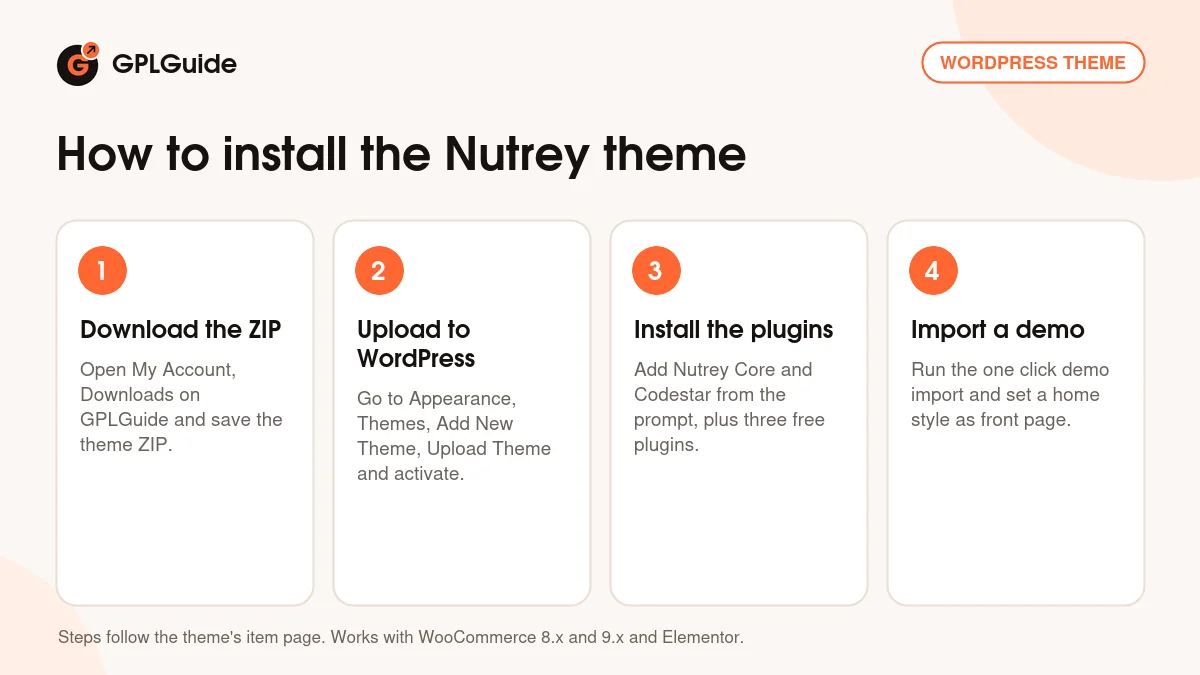
- Sign in to GPLGuide, open My Account, Downloads and save the Nutrey ZIP.
- Go to Appearance, Themes, Add New Theme, Upload Theme, choose the ZIP and activate it.
- Use the theme's plugin prompt to install Nutrey Core and Codestar Framework, plus the free Elementor, WooCommerce and Contact Form 7.
- Run the one click demo import, then set Home Style 1, 2 or 3 as your front page.
A good first setup starts in WooCommerce, not Elementor. Set your currency, a shipping zone for your delivery area and local pickup. Then create a Weight attribute under Products, Attributes with the steps you sell, and rebuild one demo product as your own before touching the rest. Pick colors and fonts in the theme options, then replace the counters, category cards and testimonials. Last, place a test order on a phone, from the cart drawer to checkout.
Keeping it up to date
Updates from GPLGuide are manual. When a new version of the Nutrey theme is listed here, download it from your account and upload it under Appearance, Themes, Add New Theme, Upload Theme. WordPress offers to replace the installed copy, and your Elementor pages, products and orders stay in the database. If you change theme files, use a child theme so an update doesn't overwrite your work. Spotted a newer release we haven't added? Tell us on the Request Item/Update page.
Questions about the Nutrey theme
Which page builder does the Nutrey theme use? Elementor. The demo pages are built with it, and Elementor Pro is listed as compatible but not required.
Which plugins do I need? Three free ones: Elementor, WooCommerce and Contact Form 7. Nutrey Core and the Codestar Framework ship inside the theme.
How many home pages are there? Three. Home Style 1 and 3 open with a two-slide hero, while Home Style 2 uses one static banner.
Can I sell products by weight? Yes. The demo products have 1KG, 2KG and 3KG options, and you set your own steps in a WooCommerce attribute.
Is there a demo importer? There is. The Nutrey theme uses a one click demo importer, so you edit the demo instead of starting blank.
Which PHP version does Nutrey 1.0.3 need? PHP 7.4 or higher. PHP 8.1 and 8.2 compatibility arrived in 1.0.2, and 1.0.3 cleared more deprecation notices.
Is it RTL or translation ready? The item page doesn't say. Test a second language on a staging site first.
Which blog layouts come with it? Three: default with a sidebar, left sidebar and full width.
Do I need a purchase code? No. The license key is already activated in the GPLGuide file.
Want more shop and food designs? Browse the WordPress themes on GPLGuide, or see what a GPLGuide membership includes. For extra widgets on the Nutrey theme's Elementor pages, Elementor Pro is listed as compatible.
Features & capabilities
- Organic food shop design with three home styles
- Elementor pages and a one click demo importer
- WooCommerce shop with grid and list view and weight variations
- Cart drawer, sale badges, wishlist and Quick View links
- Service pages with sidebar, quote box and FAQ
- Pricing, team, testimonials, about and contact pages with a map
- Three blog layouts: default sidebar, left sidebar and full width
- Theme options for colors and typography, sticky menu, Bootstrap 5.x