
PowerPack Elements for Elementor
100% Original fileUnmodified copy of the developer's release
DeveloperElementor Pro
Up to dateOriginal released Oct 30, 2026 · File last updated Nov 27, 2026
About this product
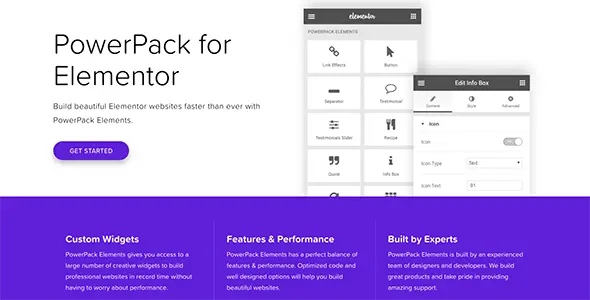
PowerPack Addons for Elementor 3.2.2 is a premium addon pack that adds 70+ Elementor widgets, as the developer counts them, along with page and section templates and a few site-wide extensions. It suits freelancers and agencies who build client sites, local business pages and WooCommerce shops and want one plugin to cover what would otherwise take several small addons. The developer says it works with both the free Elementor plugin and Elementor Pro, so Elementor Pro is optional, and its pages count 150+ ready section and page templates. After activation the widgets show up in the Elementor panel, and you decide which ones load on the Elements tab of the plugin's settings page, found under the Elementor menu in the WordPress sidebar.
How to install PowerPack Addons for Elementor
- Install and activate the free Elementor plugin under Plugins, Add New Plugin if your site doesn't have it yet. The developer says Elementor Pro is not needed.
- Log in to GPLGuide, open this product and click Download under Your downloads.
- Go to Plugins, Add New Plugin, Upload Plugin, choose the ZIP, click Install Now, then Activate.
- Open the Elementor menu in the WordPress sidebar, choose the plugin's settings page and use the Elements tab to switch off widgets you don't need, then click Save.
- Edit any page with Elementor and drag the new widgets from the panel onto the page.
Features & capabilities
- Header Footer Builder for site-wide headers and footers designed in Elementor.
- Cross-Domain Copy Paste moves sections from one site to another without exporting templates.
- Display Conditions show or hide sections and widgets by login status, user role, browser, date range or day.
- WooCommerce widgets for products, categories, cart, mini cart and checkout pages.
- Form styler widgets for WPForms, Gravity Forms, Ninja Forms, Formidable Forms, Contact Form 7 and Fluent Forms.
- Schema-ready FAQ and How To widgets plus a Review Box with pros, cons and its own heading tags.
- Login and sign-up form widgets that let visitors register with Facebook or Google.
- Business Reviews widget for Google reviews that accepts keys from projects using Places API (New).
- Animated backgrounds such as particles, snow, bubbles, fog and waves, plus Wrapper Link and Custom Cursor.
- White label settings for client sites and Version Control that lists the last 10 releases for rollback.
Frequently asked questions
Is this the original file?
Yes. Every product on GPLGuide is the developer’s own release, unchanged. The license key comes already activated. If a product does ask for a key, the activation steps appear on its page once you have it.
Is it legal to use a GPL plugin or theme from GPLGuide?
Yes. WordPress plugins and themes are released under the GPL, which lets anyone use, share and change the code. The developer’s support desk and the developer’s own update service are not part of the file; those stay with the developer.
How do I install it?
Log in, open the product page and click Download under Your downloads. For a plugin go to Plugins, Add New Plugin, Upload Plugin, choose the ZIP, then Install Now and Activate. For a theme go to Appearance, Themes, Add New Theme, Upload Theme.
How do updates work?
When a newer version is listed on GPLGuide, download it from the product page and upload it over the installed copy; WordPress offers to replace the old version. Updates are manual.
Can I use it on more than one site?
Yes. The GPL lets you use it on as many of your own sites as you like.
What if the file does not work or a newer version is out?
Tell us on the Request Item page or through Support. We check the file and add the newer version when we have it.


