Proshop WooCommerce Theme
100% Original fileUnmodified copy of the developer's release
DeveloperAutomattic
Up to dateOriginal released May 24, 2019 · File last updated Oct 29, 2026
About this product
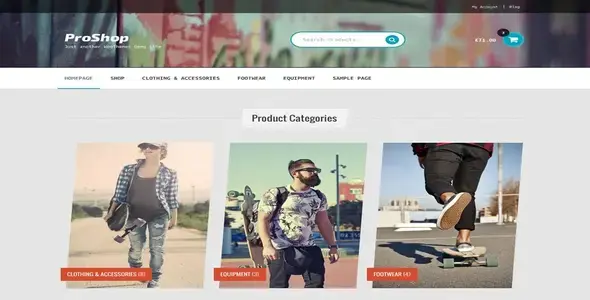
ProShop Theme 2.0.16 is a child theme for Storefront, the official WooCommerce theme, made for online shops that sell sports clothing, sports equipment or urban fashion. It suits store owners who already run WooCommerce and want a bolder look than plain Storefront without designing one from scratch: an edgy, texture-rich style that pairs with a header image you choose. Because it is a child theme, Storefront does the shop work underneath and ProShop changes the styling on top, so the two stay installed together. The developer ships the child theme on its own with setup documentation; Storefront and WooCommerce are installed separately, and the photos seen in the demo store are not part of the package.
How to install ProShop Theme
- Install and activate WooCommerce under Plugins, Add New Plugin, because ProShop styles a WooCommerce shop running on Storefront.
- Go to Appearance, Themes, Add New Theme, search for Storefront and click Install. ProShop needs Storefront as its parent theme, so it must be installed first.
- Log in to GPLGuide, open this product and click Download under Your downloads.
- Go to Appearance, Themes, Add New Theme, Upload Theme, choose the ProShop ZIP, click Install Now, then Activate.
- Open Appearance, Customize, WooCommerce, Product Images to set image sizes; the developer's demo used 500 x 700 pixel catalog images and 600 x 850 pixel single product images.
- Set your header image and colors under Appearance, Customize. Use the Storefront Homepage template for the front page, and keep custom code out of the theme's functions.php, since an update replaces that file.
Features & capabilities
- Urban, texture-rich design made for sports and street fashion stores.
- Custom header image support, so the header carries your own photo.
- Built-in styling options in the Customizer on top of Storefront's own settings.
- Works with the Storefront Homepage template for a shop front page.
- Sticky navigation when you add the Storefront Powerpack extension.
- Compatible with the Storefront Blog, Checkout and WooCommerce Customizer extensions.
- Product sharing buttons and a footer content bar through the Storefront Product Sharing and Footer Bar plugins.
- Larger product thumbnails, 390 pixels wide, and a clickable search icon in the header.
Frequently asked questions
Is this the original file?
Yes. Every product on GPLGuide is the developer’s own release, unchanged. The license key comes already activated. If a product does ask for a key, the activation steps appear on its page once you have it.
Is it legal to use a GPL plugin or theme from GPLGuide?
Yes. WordPress plugins and themes are released under the GPL, which lets anyone use, share and change the code. The developer’s support desk and the developer’s own update service are not part of the file; those stay with the developer.
How do I install it?
Log in, open the product page and click Download under Your downloads. For a plugin go to Plugins, Add New Plugin, Upload Plugin, choose the ZIP, then Install Now and Activate. For a theme go to Appearance, Themes, Add New Theme, Upload Theme.
How do updates work?
When a newer version is listed on GPLGuide, download it from the product page and upload it over the installed copy; WordPress offers to replace the old version. Updates are manual.
Can I use it on more than one site?
Yes. The GPL lets you use it on as many of your own sites as you like.
What if the file does not work or a newer version is out?
Tell us on the Request Item page or through Support. We check the file and add the newer version when we have it.