
YITH WooCommerce Save for Later Premium
100% Original fileUnmodified copy of the developer's release
DeveloperYITH
Up to dateOriginal released Feb 22, 2024 · File last updated Oct 25, 2026
About this product
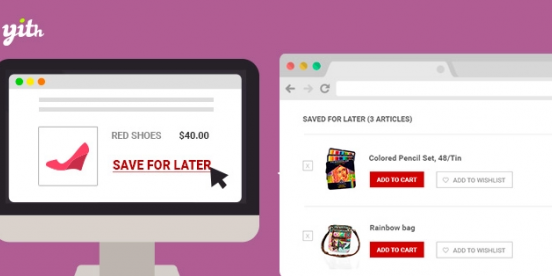
YITH WooCommerce Save for Later Premium 1.32.0 adds a Save for later link to the items in your WooCommerce cart. It suits shops where buyers often take items out of the cart to look again later, or use the cart like a loose wishlist, and then lose track of what they wanted. A shopper clicks the link, the item moves to its own list on the same cart page, and one click puts it back in the cart. You change the link text and the list page from the plugin's own menu in the WordPress sidebar.
How to install YITH WooCommerce Save for Later Premium
- Install and activate WooCommerce first if your site doesn't run it: Plugins, Add New Plugin, search for WooCommerce, Install Now, Activate.
- Log in to GPLGuide, open this product and click Download under Your downloads.
- In WordPress go to Plugins, Add New Plugin, Upload Plugin, choose the ZIP you downloaded, click Install Now, then Activate.
- The plugin creates a Save for later page when you activate it. Add that page to a menu under Appearance, Menus so customers can reach their list.
- Know the limits before you promote it: saved items don't reserve stock, and only simple and variable products can be saved, not composite, add-on or bookable products.
- Open the plugin's settings from its entry in the developer's menu in the WordPress sidebar. General settings holds the link text and the list page; Product settings holds the single product page button.
Features & capabilities
- A Save for later link beside each cart item moves it to a list on the cart page, and one click adds it back to the cart.
- Works with simple products and with variable products, including the chosen variation.
- Supports the WooCommerce Cart block as well as the classic cart.
- Optional Save for later button on the single product page, with your own text for the add and remove buttons.
- A shortcode puts the button or the list on any page, including custom product templates.
- The list lives on its own page, and you can reword the link and labels.
- Lists of logged-in shoppers are stored in the database; guest lists stay in a cookie for 30 days.
- An optional Add to wishlist link appears beside saved items when the developer's separate wishlist plugin is active.
- Translation ready, with a WPML localization guide.
Frequently asked questions
Is this the original file?
Yes. Every product on GPLGuide is the developer’s own release, unchanged. The license key comes already activated. If a product does ask for a key, the activation steps appear on its page once you have it.
Is it legal to use a GPL plugin or theme from GPLGuide?
Yes. WordPress plugins and themes are released under the GPL, which lets anyone use, share and change the code. The developer’s support desk and the developer’s own update service are not part of the file; those stay with the developer.
How do I install it?
Log in, open the product page and click Download under Your downloads. For a plugin go to Plugins, Add New Plugin, Upload Plugin, choose the ZIP, then Install Now and Activate. For a theme go to Appearance, Themes, Add New Theme, Upload Theme.
How do updates work?
When a newer version is listed on GPLGuide, download it from the product page and upload it over the installed copy; WordPress offers to replace the old version. Updates are manual.
Can I use it on more than one site?
Yes. The GPL lets you use it on as many of your own sites as you like.
What if the file does not work or a newer version is out?
Tell us on the Request Item page or through Support. We check the file and add the newer version when we have it.


